Auto Application Log Upload
Android - Phone App
The objective is to automatically capture problems, reduce manual log collection, and improve application reliability, while protecting sensitive user information.
BOnePhone Auto Log Upload is a background feature that securely uploads application logs, errors, crashes, and diagnostic information from BOnePhone to Azure blob storage without requiring manual user action.
-
For the user
- Enable - Upload existing Logs to Azure.
- Open BOnePhone.
- Navigate to Settings → Application Log.
- Tap Copy device enrollment.
- Send the copied enrollment JSON to +1-347-855-4340 (WhatsApp). It contains the device ID and public key, not a password or private key.
Download BOne Phone App
Android - Phone App
BOne Phone App Setup
Important Setup Information
- Setting up BOne Phone is similar to setting up most mobile apps.
- Because this version is installed outside the App Store, your phone may require a few extra installation and security steps.
- Follow the instructions shown during setup and allow the required permissions.
- BOne Phone may ask to become your default Phone, SMS, and Caller ID/Spam app. Android controls these system permissions and default-app settings.
- After an update or reinstall, BOne Phone may find saved settings and display Use preserved BOne settings & app data?.
- Select Use preserved to restore supported settings such as Top Contacts, groups, SMS replies, call settings, themes, blocked numbers, Lines & Services, and ringtone settings.
- Select Keep current if you do not want to restore the saved settings.
- After reinstalling, Android permissions and default-app selections may need to be approved again.
- SIP passwords are not restored and may need to be entered again.
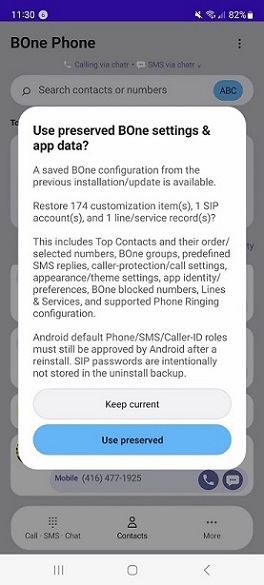
Permissions, Setup and Agreement
After BOne Phone is installed, open the app and complete the initial setup. Review the setup choices and the BOne Phone End User Agreement before continuing.
- Use BOne Phone for calls.
- Use BOne Phone for SMS.
- Enable Caller ID & Spam protection.
- Allow Contacts.
- Enable SIP calling accounts when required.
- Review the BOne Phone End User Agreement.
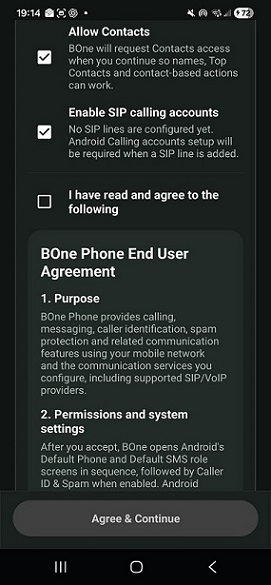
Accept the End User Agreement
After reviewing the agreement, select the agreement checkbox to enable the Agree & Continue button.
- Select "I have read and agree to the following".
- Tap "Agree & Continue".
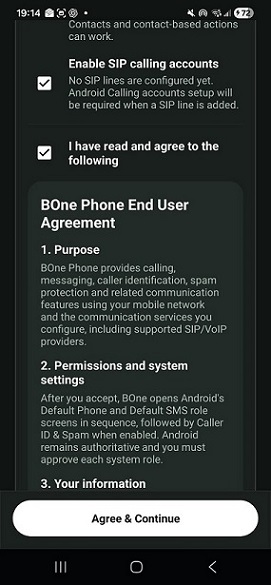
The Agree & Continue button is enabled only after the agreement checkbox is selected.
Allow Contacts Access
BOne Phone will request access to your contacts so contact names, Top Contacts, contact searching, calling, messaging, and other contact-based features can work.
- When Android asks "Allow BOne Phone to access your contacts?", tap "Allow".
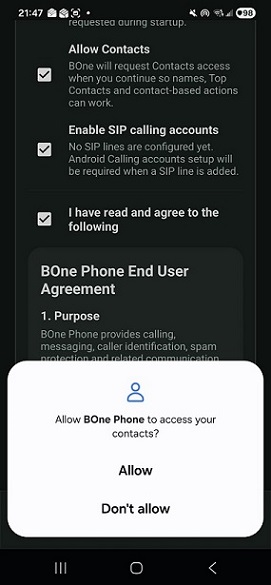
If Contacts access is not allowed, contact names, Top Contacts, and other contact-based functions may not be available.
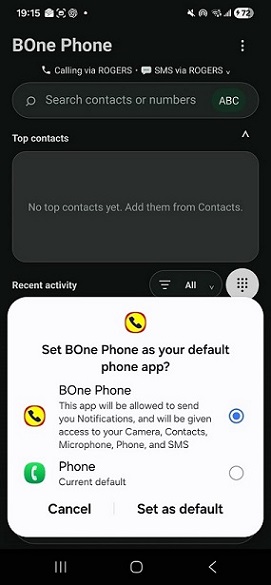
Set BOne Phone as the Default Phone App
Android will display the default phone application selection screen.
- Select BOne Phone.
- Tap "Set as default".
- BOne Phone will become the Android phone and dialer application.
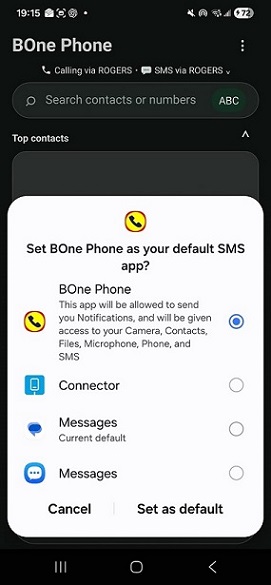
Set BOne Phone as the Default SMS App
Android will next display the default SMS application selection screen.
- Select BOne Phone.
- Tap "Set as default".
- BOne Phone will become the Android SMS application for supported cellular text messaging.
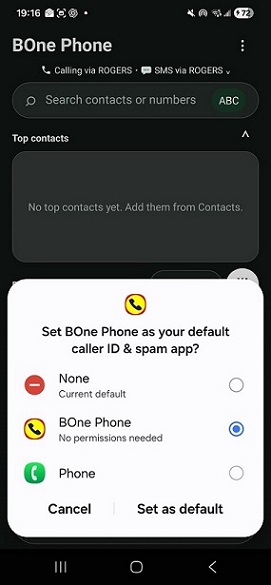
Enable Caller ID and Spam Protection
Android will display the caller ID and spam application selection screen when Caller ID & Spam protection is enabled.
- Select BOne Phone.
- Tap "Set as default".
- This enables BOne Phone to provide its supported caller identification, spam protection, and call-screening functions.
The Android system screens may look slightly different depending on the device manufacturer and Android version.
Setup Complete
After the Android setup screens are completed, BOne Phone opens to the main phone screen. The currently selected calling and SMS services are shown near the top of the screen.
- BOne Phone is configured as the default Phone app when selected.
- BOne Phone is configured as the default SMS app when selected.
- Caller ID & Spam protection is enabled when selected.
- Contacts can be used for contact names, Top Contacts, searching, calling, and messaging.
- Additional SIP/VoIP calling services can be configured in BOne Phone.
BOne Phone Unique Features
What Makes BOne Phone Unique
BOne Phone gives you more control over how calls and messages are handled across cellular and VoIP services.
- Enable or disable blocking of unwanted calls before they reach voicemail.
- Receive cellular calls and one or multiple VoIP calls within BOne Phone.
- Choose the desired service provider for each outgoing call or SMS message.
About BOne Phone in Nutshell
Features
BOne Phone brings calling, messaging, contacts, recent activity, caller protection, and communication services together in one simple phone app.
- Enable user to launch the phone with Keypad or Recent Activity.
- Cellular and SIP/VoIP calling.
- SMS messaging and quick replies.
- Contacts, groups, and Top Contacts.
- Recent call and message activity.
- Caller ID, spam protection, and call blocking.
- Call waiting, hold, transfer, voicemail, and group calls.
- Photos, videos, files, and message attachments.
- Custom MP3, MP4, and Android ringtones.
- Multiple calling lines and services.
- Customize the look and feel: Themes, Dark mode, wallpapers, text zoom, and accessibility.
- Customize BOne Phone and Top Contacts to your preference—for example: My Phone, Favorite Contacts
- Customize your Top Contacts—for example: Mom, Dad, Wife, Son, or Daughter.
- All screens can be zoomed in or out using the + / − controls.
- Call Barring and Exceptions
- Backup and restore of BOne Phone settings and data.
How to report issues/bugs
Periodically
- Periodically export the application log and attach it to the WhatsApp group.
- Build Version (Preferences -> About ->Build Version)
I will use the log to proactively investigate the application, identify hidden or emerging issues, and resolve problems that may not be immediately visible during normal use.
Issuess / Bugs
- Export the application logs (Preferences -> Application Log)
- Build Version (Preferences -> About ->Build Version)
- Attach to the BOne Phone WhatsApp Group
- Write a detailed description of the issue
- or voice message
⚠️ Important privacy protection
BOne is not recording everything literally. The current rules specifically prohibit logging SMS/message bodies, DTMF digits, SIP passwords, authentication credentials, tokens, secrets and private keys.
Quick User Guide
Top Contacts can be rearranged by drag-and-drop
Press and hold the avatar/photo.
Drag it left or right onto another Top Contact.
Dragging right places it after the target contact.
Dragging left places it before the target contact.
The new order is saved and appears consistently in Call · SMS · Chat and Contacts.
If the same person has multiple Top Contact entries for different phone numbers, each entry can be rearranged independently.
Dragging the avatar outside the Top Contacts area still removes only that Top Contact shortcut.
Horizontal scrolling remains protected so a scroll does not accidentally call or reorder a contact
Remove Contacts from Top Contacts
Press and hold the contact’s avatar/photo, drag it out of the Top contacts area, then release it.
One important distinction: long-pressing the contact name/text is for renaming the Top Contact alias, so use the avatar/photo as the drag handle for removal.