Refrence
Primary INRAT References
TP 691E - Study and Reference Guide for Instrument Rating Written Examinations.
Canadian Aviation Regulations (CARs).
Transport Canada Aeronautical Information Manual (TC AIM).
Canada Air Pilot (CAP) - CAP General section.
Canada Flight Supplement (CFS).
Enroute Low/High/Terminal Charts.
Human Factors for Aviation - Basic Handbook.
Air Command Weather Manual.
When in Doubt... Aircraft Critical Surface Contamination Training.
Start:STAR - Standard Terminal Arrival Route.
1. Air Law and Procedures
1.1 Canadian Aviation Regulations - Part I General Provisions
Interpretation and definitions.
1.2 Personnel Licensing and Training
Recency Requirment to act as PLC/SIC (Co-pilot):
- Have flown as PIC/SIC in the last 5 years or, Completed a flight review + written exam.
-
For IFR use, within:
- 6 months: 6 approaches
- 24 months:
- IPC - Instrument Proficiency Check by a Pilot Examiner / authorized IFR examiner.
- or IFR flight test
- or PPC with IFR component - Pilot Proficiency Check that includes the required instrument/IFR sequences.
| IFR Rating Group | Privileges |
| Group 1 | Fly all multi-engine and single-engine aircraft |
| Group 2 | Fly Multi-engine centreline-thrust aeroplanes and single-engine aeroplanes |
| Group 3 | Fly single-engine aircraft only. |
| Group 4 | Fly helicopters only |
1.3 Airspace Structure, Classification, and Use
-
CDA -> Canadian Domestic Airspace - controlled/uncontrolled airspace system.
- Controlled A - E
- Uncontrolled airspace - G as no control authority, but flight information and alerting may still exist.
- Special-use airspace: advisory or restricted - F which can be controlled, uncontrolled or mixed.
- advisory - CYA - Caution - activity nearby area
- restricted - CYR - Restricted - activity in area, permission required to enter.
- Low-level airspace -> below 18,000 ft ASL.
- High-level airspace -> 18,000 ft ASL and above.
- SDA -> Southern Domestic Airspace. Uses magnetic track for cruising altitude rules
- NDA -> Northern Domestic Airspace. uses true track for cruising altitude rules.
- Other divisions include altimeter setting region, standard pressure region, and mountainous regions.
1.4 Operating and Flight Rules
Portable electronic devices
- PEDs need permission and must not interfere.
- Phone/tablet allowed only if the operator permits it.
- If it could affect aircraft systems, equipment, or safe operation, do not use it.
Compliance with air traffic control instructions and clearances
- ATC says it, you acknowledge it, then you comply.
- Clearance/instruction must be followed unless amended, unsafe, or an emergency requires otherwise.
- If you cannot comply, say unable early.
- After avoiding an immediate conflict, return to the last accepted clearance or acknowledged instruction when safe.
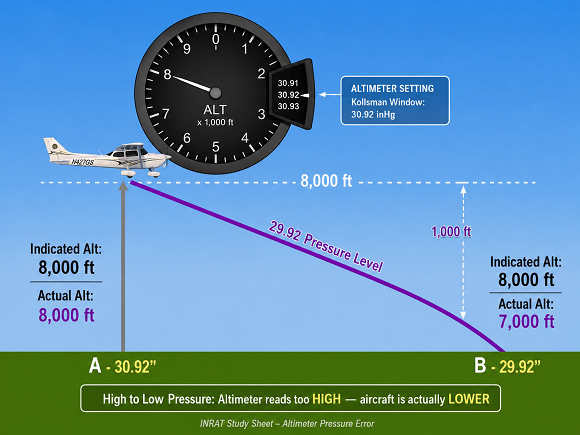
Altimeter-setting
- Altimeter Setting Region: use the current/local altimeter setting.
- Standard Pressure Region: use 29.92 inHg.
- At or above 18,000 ft: use 29.92 and report flight level.
- Low: Rapid pressure drops possible → risk of altimeter under-reading
- High: More stable pressure → altimeter readings more predictable
Cruising altitudes and cruising flight levels.
- Southern Domestic Airspace: use magnetic track.
- Northern Domestic Airspace: use true track.
- 000°–179° = odd IFR cruising altitudes or flight levels.
- 180°–359° = even IFR cruising altitudes or flight levels.
- Track decides — east-ish odd, west-ish even, unless ATC assigns different.
- ATC-assigned altitude or flight level overrides the normal odd/even rule.
1.5 Operational and Emergency Equipment Requirements
Requirements for power-driven aircraft:
- Charts
- Checklist
- Flashlight
- Timepiece
- First aid kit
- Fire extinguisher.
Oxygen requirements for flight crew and passengers.
- Cabin-pressure-altitude above 10,000 ft ASL but not above 13,000 ft ASL for more than 30 minutes: oxygen supply must be available for all crew members and 10% of passengers, minimum one passenger.
- At those altitudes, each crew member must use oxygen for the part of flight that is more than 30 minutes.
- Cabin-pressure-altitude above 13,000 ft ASL: oxygen supply must be available for all persons on board, everyone on board must use oxygen for the entire time at those altitudes.
1.6 Flight Preparation, Flight Plans, and Flight Itineraries
Pre-flight information, Weather, flight plan, Arrival Airport, Fuel
- Before flight, the PIC must check the information needed for that flight.
- Think: weather, NOTAMs, route, fuel, alternates, airport/runway info, and aircraft limits.
Operations at or in the Vicinity of an Aerodrome
General operating rules, VFR and IFR aircraft operations at uncontrolled aerodromes within an MF area.
Reporting procedures for IFR aircraft approaching or landing at an uncontrolled aerodrome.
1.8 Instrument Flight Rules
General IFR requirements.
- If you are in instrument weather, you must follow IFR rules.
- IFR requires the proper flight rules, equipment, rating, and clearances where required.
Alternate aerodrome requirement.
- IFR needs a backup airports.
- IFR flight plan/itinerary must list an alternate aerodrome.
- The alternate must have a landing area suitable for your aircraft.
Minimum altitudes to ensure obstacle clearance.
- Use the published IFR chart altitude when one exists.
- If no published minimum exists: stay 1,000 ft above the highest obstacle within 5 NM.
- In designated mountainous areas: stay 2,000 ft above the highest obstacle within 5 NM.
What is Take-off Minima?
Take-off minima are the minimum reported take-off visibility or RVR required before an aircraft may legally take off.
They are based on visibility/RVR, not ceiling.
For Canadian IFR, the applicable minimum usually comes from the CAP unless the operator has an AOC or 604 special authorization.
CAP = default. AOC/604 = special permission.
RVR 2600 = common standard.
Lower than standard = runway support + authorization.
Ceiling does not control take-off minima.
What is Enroute IFR Position Report?
An enroute IFR position report is a radio report that tells ATC or FSS your location and progress while flying IFR enroute.
It is mainly used when radar/ATS surveillance is not available, when required by the route, or when ATC asks for it.
| Part | Example |
| Who you are |
|
| Where you are |
|
| When you were there |
|
| Your altitude |
|
| Where you are going next |
|
| When you expect the next fix |
|
Exam trap: In radar/surveillance coverage, ATC may not need routine position reports unless requested.
Position Reports – IFR Controlled Airspace. Must report when:
- Entering / leaving holds
- Reaching/Leaving clearance limit
- Missed approach
- VOR changeover point (when required)
Instrument Approach Procedures
- Approach flow: ATIS → STAR/vector → initial → final → minima → land or missed.
- DA = decide now. MDA = do not descend below until visual.
- Missed approach = planned escape route, not failure.
Landing Minima
- Landing minima = lowest point you may continue from unless you have the required visual reference.
- DA = Decide at altitude: land if visual, miss if not.
- MDA = Minimum floor: do not descend below until visual and safe.
- Required visual reference must be seen and maintained to continue landing.
- If visual reference is lost below minima, go missed/go around.
- Memory hook: Minima are the gate — visual and stable means continue; no visual means missed.
Approach ban - general
- Approach ban = gate before final; DA/MDA = landing decision.
- Approach ban is checked before continuing past the FAF.
- Approach ban is based on reported visibility/RVR, not ceiling.
- ATC approach clearance does not cancel the approach ban.
- Runway Visual Range(RVR) - the distance a pilot can see along the runway.
- RVR 2600 is commonly treated as about 1/2 SM.
- You may continue if RVR improves above minimums before reaching the FAF.
- If RVR drops after passing the FAF, continue only if legally allowed and required visual reference exists at DA/MDA.
- Circling approach requires maintaining required visual reference with the airport/runway environment.
- DA/MDA is the landing decision point after the approach-ban gate has been satisfied.
1.9 Radio communications
Two-way radiocommunication failure in IFR flight.
- If two-way radio communications fail in IFR, squawk 7600.
- Route to fly is determined by AVEF priority.
- AVEF = Assigned, Vectored, Expected, Filed.
- Maintain the appropriate altitude/route and continue according to the applicable IFR communications-failure procedure.
-
AVEF route-order priority: Assigned, Vectored, Expected, Filed.
- Assigned - last ATC-assigned route.
- Vectored - route to fix/vector ATC was giving before failure.
- Expected - route you were told to expect in a clearance.
- Filed - route originally filed in your flight plan.
1.10 Aircraft Requirements
Power-driven aircraft - IFR. De-icing or anti-icing equipment.
| IFR Equipment – Power-driven Aircraft To fly IFR,aircraft must have: |
|
| De-Icing/Anti-Icing Equipment |
|
| Instrument Rating |
|
| Instrument Rating – Validity |
|
1.11 Air Traffic Services
Air Traffic Control (ATC) and advisory services.
- Clearance = permission with a stop point.
- Clearance limit = farthest point you may go.
- Published hold? Hold as published.
- No published hold, then use Standard hold on inbound track.
- Do not pass the clearance limit without more clearance.
- Unable or unsafe? Tell ATC early.
- Emergency or amended clearance can change the plan.
- No landing clearance = do not land.
- Lost comms in VMC = stay VMC, land as soon as practicable.
- Lost comms in IMC = follow IFR lost-comms procedure.
- Expected Further Clearance(EFC) given = hold until EFC, then continue.
- No EFC + limit is approach fix = approach near ETA.
- No EFC + limit not approach fix = go to an approach fix, then approach near ETA.
Flight Service Stations (FSS).
- FSS advises at uncontrolled aerodromes and MF areas.
- FSS is not ATC: it gives information, not control or separation.
- FSS may relay a clearance, but ATC owns the clearance.
- FSS gives the field picture: runway, wind, traffic, vehicles, wake, weather, and conditions.
- FSS/FIC can help with alerting and emergencies.
- FIC = briefing, weather, NOTAMs, flight plans, and enroute information.
- RAAS = remote FSS-style advisory with no direct eyes on the airport.
Flight Information Centres (FIC).
- FIC = preflight briefing + enroute information.
- FIC gives weather, NOTAMs, flight planning help, and FISE.
- FISE = enroute updates: SIGMET, AIRMET, PIREP, METAR, TAF, altimeter, radar, lightning, RSC/CRFI.
- FIC can accept flight plan information and flight updates.
- FIC may relay IFR/SVFR clearances, but ATC issues them.
- FIC receives PIREPs, position reports, arrival/departure times, and flight plan revisions.
- FIC gives information only; it does not control or separate aircraft.
Clearances and instructions.
- Clearance = permission.
- Instruction = direction issued by ATC that the pilot must acknowledge and comply with.
- Advisory = information only.
- ATC clears; pilot reads back and complies.
- If unclear, ask: Say again / confirm.
- If unable or unsafe, say unable early.
- Emergency can override, but advise ATC ASAP.
- FSS/FIC may pass the clearance; ATC owns it.
- ATC clearance does not cancel weather minima, obstacle clearance, aircraft limits, or PIC responsibility.
Communication procedures for departure, enroute, and arrival.
- Departure: get ATIS/AWOS/advisory, get IFR clearance, read it back, then switch to departure/centre when told.
- Enroute: listen on the assigned frequency, follow frequency changes, and make required position reports.
- Arrival: get ATIS/AWOS/advisory early, contact approach/tower/FSS/MF, and report intentions as required.
- Read back the big safety items: route, altitude, squawk, runway, hold short, heading, approach clearance, and frequency.
- Report important IFR events: clearance limit, entering/leaving a hold, missed approach, altitude changes, and unable-to-comply.
- At uncontrolled or MF aerodromes, make position and intention reports so everyone has the traffic picture.
- Approach clearance is not landing clearance.
- If unclear, ask ATC/FSS to say again or clarify.
Radar services for departure, enroute, and arrival.
- Radar service = ATS surveillance service.
- ATC must identify you before radar service begins.
- ATC tells you when you are identified or identification is lost.
- Radar identified does not mean pilot responsibility disappears.
- On vectors, ATC handles obstacle clearance until you resume normal navigation.
- Vectors = ATC-assigned headings for separation, noise, pilot request, or better traffic flow.
- ATC should tell you where you are being vectored.
- 'Resume normal navigation' = stop following vectors and navigate yourself again.
- Vectors to final + approach clearance = resume normal approach navigation.
- Radar service usually continues until you leave coverage, enter uncontrolled airspace, or transfer to non-radar ATC.
- If radar service ends, ATC tells you.
- Traffic information is helpful, but ATC may not see or report every aircraft.
Wake turbulence separation.
- Wake comes from big wings: heavy aircraft make strong wingtip vortices.
- Wake is worst on takeoff and landing, but can happen enroute behind large aircraft.
- Wake sinks and drifts with the wind.
- Calm wind can be worse: wake may sit on the runway.
- 'Caution wake turbulence' means pilot must avoid it — ATC does not guarantee safety.
- Takeoff behind Heavy: lift off before its rotation point and stay above its path.
- Landing behind Heavy: stay above its glide path and land beyond its touchdown point.
- Landing behind a departing aircraft: touch down before its rotation point.
- ATC separates, but wake can still bite.
- IFR departure wake spacing is ATC’s responsibility, but avoidance is still the pilot’s job.
Transponder operation
- Transponder = ATC can see and identify you.
- Mode A = Squawk Code.
- Mode C = Squawk Code and Altitude reporting.
- Mode S = Squawk Code, Altitude reporting, and unique aircraft Address.
- Set the assigned code before leaving STANDBY.
- IFR low-level default = 1000 with Mode C, unless ATC says otherwise.
- IFR high-level default = 2000 with Mode C, unless ATC says otherwise.
- Keep your assigned discrete code until ATC tells you to change.
- IDENT only when ATS asks.
- Transponder/Mode C failure in required airspace: continue to next intended landing, then get ATC authorization for further flight if needed.
- Need transponder airspace without working transponder/Mode C? Get approval before entering.
- 7500 = unlawful interference.
- 7600 = radio failure.
- 7700 = emergency.
- 7600 tells ATC you lost comms, but you still follow IFR lost-comm procedures.
Wake turbulence separation.
- Wake sinks and drifts.
- Heavy ahead? Stay above its path.
- Landing behind Heavy = stay above glidepath, land beyond touchdown.
- Takeoff behind Heavy = rotate before Heavy’s rotation point, then stay above.
- Light wind can be worse because wake can sit on the runway.
- Crosswind can drift wake onto nearby runways.
- ATC may warn: CAUTION WAKE TURBULENCE.
- ATC separates, but pilot still avoids the wake.
- Light behind Medium = 4 NM.
- Medium behind Heavy = 5 NM.
- Light behind Heavy = 6 NM.
- Same runway behind Heavy = usually 2 minutes.
- Intersection departure behind Heavy = usually 3 minutes.
- Intersection adds time.
Reduced visibility operations.
- RVOP = Reduced Visibility Operations Plan.
- LVOP = Low Visibility Operations Plan.
- RVOP applies when aerodrome visibility is below RVR 2600 down to and including RVR 1200.
- LVOP applies when aerodrome visibility is below RVR 1200.
- RVOP/LVOP are mainly aerodrome ground-movement procedures used to protect aircraft and vehicles in poor visibility.
- Procedures can vary by airport, so check ATIS, CAP, CFS, NOTAMs, and ATC instructions.
- ATC may be unable to issue taxi, takeoff, or landing clearance when RVOP/LVOP restrictions are in effect.
- RVR is the key visibility value used for runway operations.
- RVR A = touchdown/threshold area, RVR B = midpoint, RVR C = rollout/stop-end area.
- Low-visibility procedures are associated with CAT III operations and restrict aircraft/vehicle movement on the airport movement area.
1.12 Canadian Airspace
- A to E = Controlled
-
Canadian Domestic Airspace Structure:
- SDA uses magnetic tracks.
- NDA uses true tracks.
| Class | Description |
| Class A |
|
| Class B |
|
| Class C |
|
| Class D |
|
| Class E |
|
| Class F |
|
| Class G |
|
1.13 Route and Flight Planning
| Topic | Description |
| Publications/charts |
|
| Preferred routing |
|
| Navigation plan/log |
|
| Altitude selection |
|
| Mountainous IFR |
|
| Fuel |
|
| Weather |
|
| NOTAM |
|
| Flight computer |
|
| CAP/CAP GEN |
|
1.14 Departure Procedures
| Topic | Description |
| ATIS / AWOS / FSS |
|
| IFR clearance |
|
| SID |
|
| ODP |
|
| Radar departure |
|
| Non-radar departure |
|
| CAP departure box |
|
| Takeoff minima |
|
| Obstacle clearance |
|
| Higher climb gradient |
|
| Uncontrolled aerodrome |
|
| Uncontrolled + controlled airspace |
|
| Uncontrolled + uncontrolled airspace |
|
| SPEC VIS |
|
1.15 Enroute Procedures
- Position reports when required.
- Clearance limit = farthest point authorized by ATC.
- Advise ATC of flight plan changes.
- Report TAS change if 5% or more from filed TAS.
- Altitude limits: MEA, MOCA, MRA, AMA/GASA.
- Fixes and waypoints identify route position.
- 1,000-ft-on-top IFR = IFR clearance to remain at least 1,000 ft above cloud.
- Controlled to uncontrolled airspace: ATC may clear you out of controlled airspace.
- Uncontrolled to controlled airspace: get ATC clearance before entering controlled airspace under IFR.
1.16 Holding Procedures
- Holding clearance.
- Entry.
- Standard holding pattern.
- Non-standard holding pattern.
- Timing: outbound 1 min at/below 14,000 ft; 1.5 min above 14,000 ft.
- Speed limits: 200 KIAS at/below 6,000; 230 KIAS above 6,000 to 14,000; 265 KIAS above 14,000.
- DME hold: use distances instead of time.
- Shuttle = climb/descent in a hold-like pattern, usually mountainous/procedure chart.
1.17 Approach Procedures
ATIS.
- ATIS = Automatic Terminal Information Service.
- ATIS gives routine airport information for arriving and departing aircraft.
- ATIS may include weather, approach in use, landing runway, departure runway, NOTAMs, NAVAID status, and field conditions.
- On initial contact, tell ATC/FSS you have the current ATIS letter e.g. ALFA, BRAVO, CHARLIE.
- Current RVR is not normally included in ATIS; it is issued separately when required.
- If weather or airport conditions are changing quickly, ATIS may tell pilots to contact ATC/FSS for current information.
STAR - Standard Terminal Arrival Route.
- A STAR is an IFR arrival procedure published in the CAP.
- STARs connect the enroute structure to the terminal/approach environment.
- If cleared for a STAR, fly the charted lateral route.
- Do not descend on the STAR vertical profile until ATC gives descent clearance.
- Charted altitude and speed restrictions remain mandatory unless ATC cancels or changes them.
- ATC speed assignments override charted STAR speeds until cancelled or no longer legal.
- Open STARs usually expect vectors and do not automatically join final.
- Approach clearance is required before linking the STAR to the approach.
Radar vectors.
- Radar vectors are ATC-assigned headings used to guide the aircraft.
- ATC must identify the aircraft before providing ATS surveillance service.
- When identified, pilots may hear 'IDENTIFIED' or 'RADAR IDENTIFIED'.
- Vectors may be used for separation, sequencing, noise abatement, pilot request, or operational advantage.
- When being vectored, fly the assigned heading until ATC gives a new instruction or clears you to resume navigation.
- ATC assumes terrain/obstacle clearance responsibility while vectoring IFR aircraft for arrival until normal navigation resumes.
- When vectors end, ATC normally says 'RESUME NORMAL NAVIGATION'.
- If vectored to final approach course, the approach clearance indicates normal navigation should resume.
- Approach clearance is not landing clearance.
- Radar service does not guarantee all traffic or weather will be seen.
Speed adjustment.
- ATC may assign speeds to help with sequencing, spacing, and vectors.
- Speed adjustments are normally given in 10-KIAS increments.
- Maintain the assigned speed within 10 KIAS.
- You may be told to maintain present speed, increase speed, reduce speed, or change speed by a specified amount.
- ATC-assigned speed may override a STAR speed restriction, unless the speed is no longer legal or safe.
- Pilot must not fly an unsafe speed just because ATC assigned it.
- If unable to comply, tell ATC immediately.
- Legal speed limits still apply: 250 KIAS below 10,000 ft ASL; 200 KIAS below 3,000 ft AGL within 10 NM of a controlled airport, unless minimum safe speed is higher.
Transition to approach.
- Transition to approach = moving from STAR/vector/arrival routing onto the actual instrument approach.
- A STAR does not automatically clear you for the approach.
- ATC must issue approach clearance before you start the approach.
- After approach clearance, comply with remaining STAR altitude and speed restrictions unless ATC cancels them.
- Use the assigned transition, published interface waypoint, or ATC vectors to intercept final.
- Open STARs usually expect vectors or a published transition to final.
- If approach clearance is not received, continue the STAR as charted and wait for ATC instructions.
- Approach clearance is not landing clearance.
Initial approach and procedure turn.
- Initial approach = the segment that positions the aircraft for the intermediate/final approach.
- Procedure turn = course reversal used to get established inbound.
- Straight-in approach = no procedure turn.
- NoPT means no procedure turn is required from that route or sector.
- If cleared straight-in, do not fly a procedure turn.
- If arriving from a sector where HILPT/procedure turn is required, fly it unless ATC clears otherwise.
- If the approach says ATS SURVEILLANCE REQUIRED, ATC vectors provide the initial approach segment.
- Do not invent your own procedure turn; follow the chart or ATC clearance.
Straight-in approach with no procedure turn.
- Straight-in approach = join final without flying a procedure turn.
- NoPT means no procedure turn is required from that route, fix, or sector.
- If cleared straight-in, do not fly a procedure turn.
- Vectors to final usually set you up for a straight-in approach.
- A published transition to an IF may allow a straight-in approach.
- Still follow published altitudes, step-down fixes, and approach minima.
- Straight-in approach clearance is not landing clearance.
Straight-in minima
- Straight-in approach = no procedure turn.
- Straight-in minima = landing minima for that runway.
- Straight-in approach clearance ≠ straight-in minima guaranteed.
- Use the published minima for your aircraft category.
- If straight-in minima are not published, use circling minima.
- Circling minima only does not ban a straight-in landing if visual reference allows a normal landing.
- Need wind, runway condition, and runway clear before landing.
- At uncontrolled airports, verify runway condition/obstructions before landing.
Final approach.
- Final approach = last IFR segment before decision.
- Non-precision final starts at FAF/FAWP/FAP.
- Precision final starts near glidepath intercept.
- FAF = final descent begins on many non-precision approaches.
- Stay on the published course and vertical path/profile.
- Step-down fixes still count.
- DA = decide now.
- MDA = maintain until MAP.
- MAP = missed approach point.
- No required visual reference by DA/MDA/MAP = missed approach.
- Approach clearance ≠ landing clearance.
Precision Approach: ILS and PAR
- Precision approach = lateral + vertical guidance.
- ILS = LOC + glide path.
- LOC = runway centreline guidance.
- Glide path = descent guidance.
- ILS uses DA/DH, not MDA.
- PAR = controller talks you down using radar.
- PAR gives controller azimuth, altitude, and range.
- PAR is mostly military, but may be available to civilians where published.
- No required visual reference at DA/DH = missed approach.
- Approach clearance ≠ landing clearance.
Non-precision approach: NDB, VOR, DME, LOC, RNAV/GNSS.
- Non-precision = lateral guidance only.
- No glidepath = use MDA, not DA.
- MDA = Maintain Descent Altitude until MAP.
- MAP = missed approach point.
- No visual by MAP = missed approach.
- NDB = bearing guidance.
- VOR = radial/course guidance.
- DME = distance fixes/step-downs.
- LOC-only = localizer lateral guidance only.
- RNAV/GNSS LNAV or LP = non-precision style, usually MDA.
- LNAV/VNAV or LPV = vertical guidance/APV, not basic NPA.
- Step-down fixes still count.
- Approach clearance ≠ landing clearance.
Stabilized Constant Descent Angle approach.
- SCDA = Stabilized Constant Descent Angle.
- SCDA is used mainly on non-precision approaches.
- Instead of dive-and-drive, fly a smooth constant descent.
- Aim to arrive near MDA at the MAP or visual descent point.
- MDA still applies — do not descend below it early.
- Advisory vertical guidance is advisory only.
- Barometric altimeter is the primary altitude reference.
- Step-down fixes and altitude restrictions still count.
- No required visual reference at MDA/MAP = missed approach.
- SCDA makes NPA look cleaner, but it does not turn it into precision.
Visual Approach and Contact Approach
- Visual approach = IFR flight, but proceed visually to the airport.
- Visual approach needs VMC, ATC authorization, and airport in sight.
- Contact approach = IFR flight, but you may not see the airport yet.
- Contact approach needs clear of cloud, at least 1 SM flight visibility, and visual reference to the surface.
- Contact approach must be requested by the pilot.
- Contact approach also needs ATC authorization and a functioning/published IAP or GNSS approach at the airport.
Circling approach.
- Circling = IFR approach, visual manoeuvre.
- Used when runway is not suitable for straight-in landing.
- Descend to circling MDA, then visually manoeuvre.
- Keep the runway in sight after initial visual contact.
- Stay at circling MDA until normal landing is assured.
- Protected area depends on aircraft approach category.
- If circling faster than your category, use the higher category minima.
- Do not circle into a restricted sector.
- ATC may suggest direction/area, but pilot is responsible for safe manoeuvring.
- If visual reference is lost or landing is doubtful, go missed.
Missed approach.
- Missed approach = climb, navigate, communicate.
- No visual at DA = go missed immediately.
- No visual by MAP on MDA approach = go missed.
- Follow the published missed approach unless ATC gives specific missed instructions.
- Continue along the final approach course to the MAP, then fly the missed procedure.
- You may climb immediately to the missed approach altitude.
- If no further clearance at the missed approach hold, hold as published or standard as required.
- ATC instructions do not automatically guarantee obstacle clearance.
- Pilot must ensure terrain and obstacle clearance.
- Check missed approach climb gradient before the approach.
- Faster groundspeed = higher required climb rate.
- Approach clearance ≠ missed approach clearance change.
Uncontrolled aerodromes and VFR/IFR traffic mix.
- Uncontrolled airport = no tower separation.
- IFR clearance ≠ traffic priority.
- IFR aircraft do not have priority over VFR traffic.
- Fit into the active runway/circuit when VFR circuit traffic is operating.
- Broadcast clearly on MF/ATF.
- In uncontrolled airspace, monitor 126.7 before descent or approach when practical.
- Broadcast intentions before changing altitude or commencing approach.
- Once on MF, make required IFR position reports.
- Report before approach, outbound/final, FAF, final, circling, and missed as required.
- Straight-in landing may be unsafe without wind/runway condition information.
- If runway condition is unknown, visually inspect or circle using circling MDA.
- Pilot is responsible for traffic avoidance and safe sequencing.
Obstacle Clearance: Minimum Safe Altitude and Minimum Sector Altitude (MSA)
- MSA (Minimum Sector Altitude) gives at least 1,000 ft obstacle clearance.
- Safe Altitude 100 NM = obstacle clearance within 100 NM of the aerodrome reference point.
- MSA normally covers at least 25 NM from a NAVAID or waypoint near the aerodrome.
- MSA may be split into pie-shaped sectors.
- Pick the sector by your track/bearing to the reference NAVAID or waypoint.
- Conventional NAVAID-based MSA may not guarantee signal coverage.
- In mountains, required obstacle clearance may be 1,500 ft or 2,000 ft.
- MSA/Safe Altitude may let you descend before approach, but position must be known.
- Low temperature can reduce true altitude, so cold-temperature correction may be needed.
Temperature compensation.
- Cold = true altitude lower than indicated.
- High to low, look out below; warm to cold, you are lower than told.
- Temperature correction protects obstacle clearance.
- Correct published minimum IFR altitudes when cold enough.
- Correct MSA/TAA, initial, intermediate, final, missed approach, MDA, and DA.
- General trigger: 0°C or colder.
- If MDA/DA is 1,000 ft HAA or higher, correction begins at 10°C.
- Add correction to the published altitude; never subtract.
- Use the CAP altitude correction chart/table.
- Use temperature from the nearest reporting station, normally the aerodrome.
- Do not correct an ATC-assigned altitude you accepted, like 'maintain 3000'.
- ATC vectoring altitudes are already temperature-corrected.
- If correcting a published mandatory altitude or missed approach holding altitude, advise ATC.
Approach Ban and Visibility Requirements
- Approach ban = gate before final.
- Check before passing the FAF inbound.
- If no FAF, check before intercepting final approach course.
- For general aviation, approach ban is mainly RVR-based.
- Aeroplane GA minimum: RVR A only = 1200.
- Aeroplane GA minimum: RVR A and B = 1200/600.
- Aeroplane GA minimum: RVR B only = 1200.
- If RVR drops below minima after passing FAF, you may continue to DA/MDA.
- If RVR is varying above and below minimum, approach may be authorized.
- If RVR is below minimum but ground visibility is at least 1/4 SM, approach may be authorized.
- If RVR is unavailable or not reported, there may be no RVR-based approach-ban criterion.
- Approach ban decides if you may continue inbound; DA/MDA decides if you may land.
- ATC approach clearance does not cancel the approach ban.
- Low-visibility procedures in effect can prohibit NPA, APV, CAT I, or CAT II approaches.
1.18 Canada Air Pilot (CAP)
- CAP GEN - How to understand the symbols, abbreviations, aircraft categories, minima rules, RVR, DA, MDA, NoPT, NA, notes, etc.
- CAP approach plate - It tells you the exact route, altitudes, frequencies, fixes, inbound course, minima, and missed approach for that specific airport/runway/approach.
Altitude corrections.
| Correction Type | When Used |
| Cold temperature |
|
| Remote altimeter setting |
|
| Falling pressure |
|
| ATC assigned altitude |
|
| ATC vectoring altitude |
|
Operating Minima
Operating minima are the legal limits that control whether you may take off, continue an approach, descend below minima, or use an alternate for IFR planning.
| Operating minima | Legal weather/altitude limits published in the CAP and explained by CAP GEN. |
| CAP minima |
|
| Depends on |
|
| Takeoff minima |
|
| Approach ban |
|
| Landing minima |
|
| DA / DH |
|
| MDA |
|
| Required visual reference |
|
| Visibility / RVR |
|
| Aircraft category |
|
| Lighting |
|
| Alternate minima |
|
| Two precision approaches |
|
| One precision approach |
|
| Non-precision only |
|
| CAT II / CAT III |
|
| ATC vs CAP |
|
Aircraft Categories
| Category | Speed Range |
| A |
|
| B |
|
| C |
|
| D |
|
| E |
|
1.19 Emergencies
Declaration of an emergency.
| Call | Meaning | |
| MAYDAY | Distress: serious/imminent danger requiring immediate assistance | Need help now |
| PAN PAN | Urgency: safety issue but not immediate assistance yet | Problem developing |
| 7700 | Emergency transponder code | Seven-seven = emergency heaven |
| 121.5 | International VHF emergency frequency | Guard frequency |
| 243.0 | International UHF emergency frequency | Military/backup emergency frequency |
Use of transponder.
| Code | Meaning |
| 7700 |
|
| 7600 |
|
| 7500 |
|
| IDENT |
|
Deviation from clearance.
| Situation | Pilot Action |
| ATC clearance is safe |
|
| Clearance would jeopardize safety |
|
| TCAS/ACAS RA |
|
| TAWS/GPWS warning |
|
| Emergency requiring priority |
|
Equipment Failure
| Failure | Pilot Action |
| Radio failure |
|
| Emergency + no contact |
|
| Navigation failure |
|
| Instrument failure |
|
| Autopilot failure |
|
| Transponder failure |
|
2. Meteorology
2.1 Fundamentals of Weather
Meteorological services available.
| Service / Product | Use |
| FIC |
|
| CFPS |
|
| ATS / Tower / FSS |
|
| FISE |
|
| METAR / SPECI |
|
| TAF |
|
| GFA |
|
| AIRMET / SIGMET |
|
| PIREP |
|
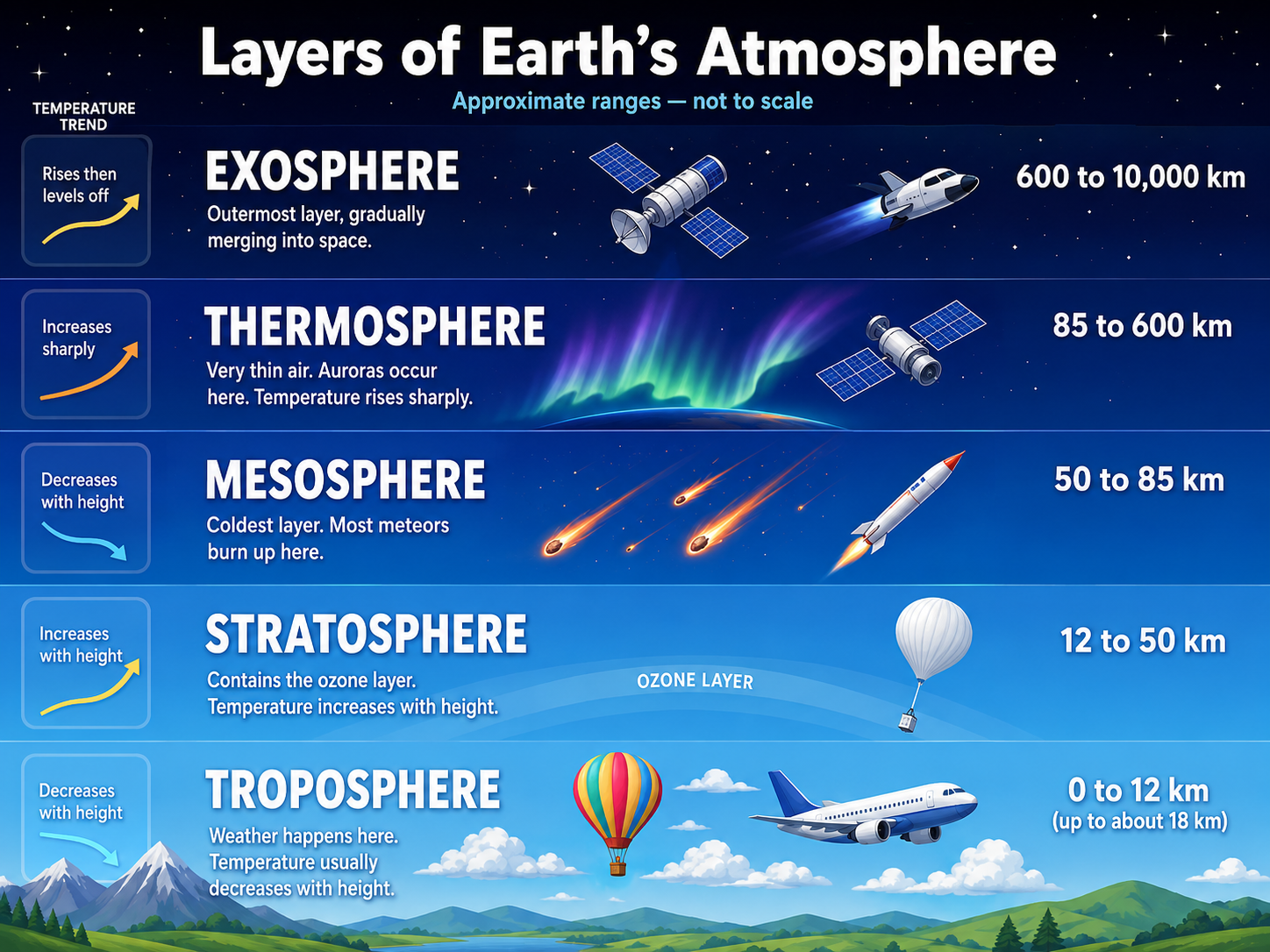
Weather is built by heat, moisture, pressure, stability, lift, wind, air masses, fronts, and terrain, which together control clouds, precipitation, icing, turbulence, visibility, and IFR conditions.
...
Factors that determine the weather
| Factor | Weather Effect | |
| Temperature | Changes density, stability, and moisture capacity | Heat changes the air |
| Moisture | Creates cloud, fog, precipitation, icing potential | Water is weather fuel |
| Pressure | Creates wind and vertical motion patterns | Pressure pushes air |
| Stability | Controls cloud type, turbulence, and vertical growth | Stable layers, unstable towers |
| Lift | Cools air toward saturation | Lift makes cloud |
| Air masses | Bring broad temperature/moisture characteristics | Air carries its birthplace |
| Fronts | Focus cloud, precipitation, wind shift, and turbulence | Front = weather boundary |
| Terrain | Forces upslope cloud/precipitation and turbulence | Mountains stir and lift |
Meteorological aspect of altimetry.
ISA - Altimeters are calibrated for ISA conditions — a standard atmosphere.
| Meteorological Condition | Altimeter / Aircraft Effect |
| Aircraft is lower than indicated if not reset |
|
| Aircraft is higher than indicated if not reset |
|
| Remote altimeter setting |
|
Temperature:
- Temperature = heat level of the air.
- Temperature controls air density.
- Warm air is less dense and tends to rise.
- Cold air is denser and tends to sink.
- Warm air can hold more water vapour than cold air.
- Cooling air toward its dew point creates cloud, fog, or precipitation.
- Temperature-dew point spread tells how close air is to saturation.
- Small spread = fog/cloud risk.
- Large spread = drier air and less immediate cloud/fog risk.
- Temperature usually decreases with altitude in the troposphere.
- Standard temperature lapse rate = about 2°C per 1,000 ft.
- Dry adiabatic lapse rate = about 3°C per 1,000 ft.
- Saturated adiabatic lapse rate = about 1.5°C per 1,000 ft, variable.
- Temperature lapse rate affects stability.
- Rapid cooling with height = unstable air.
- Little cooling or warming with height = stable air.
- Temperature inversion = temperature increases with height.
- Inversions trap fog, haze, smoke, low cloud, and poor visibility.
- Cold temperature makes true altitude lower than indicated.
- Hot temperature increases density altitude and reduces aircraft performance.
- Icing risk needs visible moisture and suitable cold temperatures.
| Temperature Concept | Meaning | |
| Warm air | Less dense, can hold more moisture, tends to rise | Warm rises |
| Cold air | Denser, holds less moisture, tends to sink | Cold sinks |
| Temperature-dew point spread | How close air is to saturation | Small spread = cloud/fog close |
| Standard lapse rate | Temperature decreases about 2°C per 1,000 ft | ISA cooling rate |
| Dry adiabatic lapse rate | Unsaturated rising/sinking air changes about 3°C per 1,000 ft | Dry changes faster |
| Saturated adiabatic lapse rate | Saturated air changes about 1.5°C per 1,000 ft, variable | Moist changes slower |
| Inversion | Temperature increases with height | Lid on the atmosphere |
| Hot day | Higher density altitude, weaker performance | Hot = high density altitude |
| Cold day | True altitude lower than indicated | Cold = look out below |
Moisture.
- Moisture = water vapour in the air.
- Moisture is the fuel for cloud, fog, precipitation, thunderstorms, and icing.
- Warm air can hold more water vapour than cold air.
- Cold air holds less water vapour, so cooling air can cause saturation.
- Saturation = air is holding as much water vapour as it can at that temperature.
- Relative humidity = how full the air is compared with its maximum capacity.
- 100% relative humidity = saturated air.
- Dew point = temperature the air must cool to for saturation.
- Temperature-dew point spread = fog/cloud warning tool.
- Small temperature-dew point spread = high chance of fog, cloud, or precipitation.
- Large temperature-dew point spread = drier air.
- Cooling air to dew point forms visible moisture: cloud, fog, dew, frost, or precipitation.
- Lifting air cools it and can bring it to saturation.
- Main lifting sources: fronts, terrain, convection, convergence, and low pressure.
- Moist unstable air = shower/thunderstorm potential.
- Moist stable air = stratus, fog, drizzle, poor visibility, and icing risk.
- Visible moisture plus freezing temperatures = icing concern.
- Dew point close to temperature at night = radiation fog risk.
- Moisture does not guarantee weather; it needs cooling/lift and the right stability.
| Moisture Term | Meaning | Memory |
| Water vapour | Invisible moisture in the air | Weather fuel |
| Relative humidity | Percent of moisture capacity being used | How full the air is |
| Saturation | Air cannot hold more water vapour at that temperature | Full air |
| Dew point | Temperature needed for saturation | Cloud/fog trigger temperature |
| Temperature-dew point spread | Difference between temperature and dew point | Small spread = fog/cloud close |
| Condensation | Water vapour changes to liquid droplets | Cloud/fog forms |
| Deposition | Water vapour changes directly to ice | Frost/ice crystals |
| Moist stable air | Layered cloud, fog, drizzle, poor visibility | Stratus soup |
| Moist unstable air | Cumulus, showers, turbulence, thunderstorms | Tower weather |
Stability and instability.
- Stability = does lifted air return or keep rising?
- Stable air resists vertical motion.
- Unstable air keeps rising once lifted.
- Stable air = layered clouds, steady precipitation, smoother air, poor visibility risk.
- Unstable air = cumulus clouds, showers, turbulence, thunderstorms.
- Stability depends on temperature lapse rate.
- Environmental lapse rate = actual temperature change with height.
- Dry adiabatic lapse rate = about 3°C per 1,000 ft.
- Saturated adiabatic lapse rate = about 1.5°C per 1,000 ft, variable.
- Standard lapse rate = about 2°C per 1,000 ft.
- Inversion = temperature increases with height; very stable air.
- Stable air often forms stratus, fog, drizzle, haze, and widespread low cloud.
- Unstable air often forms towering cumulus, CB, showers, gusts, and turbulence.
- Heating from below makes air more unstable.
- Cooling from below makes air more stable.
- Lifting moist unstable air can create heavy showers or thunderstorms.
- Subsiding air tends to warm and stabilize.
- IFR trap: stable air can be smooth but still dangerous due to low ceilings, fog, icing, and poor visibility.
| Condition | Weather Result | Memory |
| Stable air | Stratus, fog, haze, steady precipitation, smoother flight | Stable = layers |
| Unstable air | Cumulus, showers, turbulence, thunderstorms | Unstable = towers |
| Inversion | Traps fog, haze, smoke, low cloud, and pollution | Inversion = lid |
| Heating from below | Promotes rising air and instability | Surface heat bubbles up |
| Cooling from below | Promotes stable air, fog, and low stratus | Cold ground makes soup |
| Moist unstable air | Convective cloud, showers, thunderstorm potential | Moist + unstable = active weather |
| Moist stable air | Stratus, drizzle, fog, icing risk | Moist + stable = IFR blanket |
| Dry stable air | Clearer but may have haze or smoke under inversion | Stable can trap junk |
Clouds and surface-based layers.
- Clouds = visible moisture from cooled/saturated air.
- Cloud type tells you stability, lift, visibility, icing, and turbulence risk.
- Stable air usually gives layered cloud: stratus, stratocumulus, nimbostratus.
- Unstable air usually gives heap/tower cloud: cumulus, towering cumulus, cumulonimbus.
- Stratus = low layer cloud; IFR ceiling/visibility trap.
- Cumulus = vertical motion; expect bumps and showers if growing.
- Cumulonimbus = thunderstorm cloud; avoid.
- Nimbostratus = widespread steady precipitation.
- Alto = middle-level cloud prefix.
- Cirro = high-level ice-crystal cloud prefix.
- Ceiling = lowest broken or overcast layer, or vertical visibility into an obscuration.
- FEW and SCT are not ceilings.
- BKN and OVC are ceilings.
- Surface-based layer = cloud/obscuration based at the surface, like fog or low stratus.
- Fog = cloud on the ground.
- Mist, haze, smoke, blowing snow, and fog can reduce visibility without a normal cloud base.
- METAR/TAF cloud heights are AGL.
- GFA and PIREP cloud heights are normally ASL unless marked AGL.
- Small temperature-dew point spread = fog/low cloud risk.
- Surface cooling overnight favours radiation fog and low stratus.
- Moist upslope flow favours low cloud and poor visibility.
| Cloud / Layer | Meaning | Memory |
| Stratus | Low, layered cloud; stable air; low ceiling/visibility risk | Stratus = sheet |
| Stratocumulus | Lumpy low layer; usually stable to weakly unstable | Layer with bumps |
| Nimbostratus | Thick layered cloud with steady precipitation | Nimbus = rain layer |
| Cumulus | Heap cloud from rising air; unstable air | Cumulus = bubbling air |
| Towering cumulus | Strong vertical development; showers/turbulence risk | Tower = warning |
| Cumulonimbus | Thunderstorm cloud; severe turbulence/icing/hail/lightning/wind shear risk | CB = stay away |
| Altostratus / Altocumulus | Middle cloud layers | Alto = middle |
| Cirrus / Cirrostratus / Cirrocumulus | High ice-crystal cloud | Cirro = high ice |
| Fog | Surface-based cloud reducing visibility | Fog = cloud on runway |
| Surface-based obscuration | Fog, mist, haze, smoke, blowing snow, or similar visibility restriction | No base, just soup |
Wind.
- Wind = air moving from higher pressure toward lower pressure.
- Wind is named for the direction it comes from.
- A 270° wind blows from the west toward the east.
- Pressure gradient force starts the wind.
- Strong pressure gradient = strong wind.
- Widely spaced isobars = lighter wind.
- Closely spaced isobars = stronger wind.
- Coriolis force turns moving air: right in the Northern Hemisphere.
- Friction slows surface wind and makes it cross isobars more toward low pressure.
- Around lows in the Northern Hemisphere, wind flows counterclockwise and inward.
- Around highs in the Northern Hemisphere, wind flows clockwise and outward.
- Surface friction usually makes wind lighter and more backed than wind aloft.
- With height, wind often veers and increases as friction decreases.
- Gusts = rapid wind speed fluctuations.
- Wind shear = change in wind speed and/or direction over a short distance.
- LLWS = low-level wind shear; serious takeoff/approach hazard.
- Headwind reduces groundspeed but improves takeoff/landing performance.
- Tailwind increases groundspeed but increases takeoff/landing distance.
- Crosswind affects runway selection and aircraft control.
- Wind over terrain can create mechanical turbulence, mountain wave, updrafts, and downdrafts.
- METAR wind direction is true; landing/takeoff wind is normally magnetic, except true in the NDA.
| Wind Concept | Meaning | Memory |
| Pressure gradient | Pressure difference that starts air movement | Pressure pushes wind |
| Close isobars | Strong pressure gradient and stronger wind | Close lines = strong winds |
| Coriolis force | Deflects moving air right in Northern Hemisphere | North = right turn |
| Friction | Slows surface wind and turns it more toward low pressure | Surface drags wind |
| Low pressure flow | Counterclockwise and inward in Northern Hemisphere | Low pulls in |
| High pressure flow | Clockwise and outward in Northern Hemisphere | High spills out |
| Gust | Short-term increase in wind speed | G = gust |
| Wind shear | Rapid change in wind speed or direction | Shear = sudden change |
| Headwind | Reduces groundspeed; improves takeoff/landing performance | Headwind helps runway |
| Tailwind | Increases groundspeed; increases takeoff/landing distance | Tailwind hurts runway |
| Crosswind | Wind across runway or track | Control and correction |
| Mountain wave | Strong wind over terrain causing wave turbulence/downdrafts | Mountains bend wind |
Air masses.
- Air mass = huge body of air with similar temperature and moisture.
- Air masses get their traits from their source region.
- Source region = where the air mass forms.
- Continental air = dry.
- Maritime air = moist.
- Arctic air = very cold.
- Polar air = cold.
- Tropical air = warm.
- cA = continental Arctic: very cold and dry.
- cP = continental Polar: cold and dry.
- mP = maritime Polar: cool/cold and moist.
- mT = maritime Tropical: warm and moist.
- cT = continental Tropical: hot and dry.
- Air masses are modified as they move over warmer, colder, wetter, or drier surfaces.
- Warm air moving over cold ground/water becomes more stable.
- Cold air moving over warm ground/water becomes more unstable.
- Moist unstable air can produce cumulus, showers, turbulence, and thunderstorms.
- Moist stable air can produce stratus, fog, drizzle, poor visibility, and icing.
- Fronts form where different air masses meet.
- IFR trap: the same air mass can change character after travelling over a new surface.
| Air Mass | Typical Characteristics | Memory |
| cA | Continental Arctic: very cold, dry, stable in winter | Arctic freezer |
| cP | Continental Polar: cold and dry | Cold dry land air |
| mP | Maritime Polar: cool/cold and moist | Cold wet ocean air |
| mT | Maritime Tropical: warm and moist | Warm wet air |
| cT | Continental Tropical: hot and dry | Desert-style air |
| Continental | Forms over land; usually dry | Land = dry |
| Maritime | Forms over water; usually moist | Sea = wet |
| Warm over cold surface | Stabilizes lower air; fog/stratus risk | Warm over cold = stable soup |
| Cold over warm surface | Destabilizes lower air; showers/turbulence risk | Cold over warm = bubbles |
Fronts: types and associated weather.
- Front = boundary between two different air masses.
- Fronts concentrate weather because temperature, moisture, pressure, and wind change quickly there.
- Cold front = cold air advancing and lifting warm air.
- Cold fronts usually move faster than warm fronts.
- Cold front weather is often narrow, sharp, and intense.
- Cold front signs: abrupt wind shift, temperature drop, pressure rise after passage.
- Cold front hazards: showers, thunderstorms, turbulence, wind shear, icing, squalls.
- Warm front = warm air advancing over colder air.
- Warm front weather is often widespread and gradual.
- Warm front signs: falling pressure ahead, rising temperature after passage, layered cloud sequence.
- Warm front hazards: low stratus, fog, steady precipitation, poor visibility, icing, freezing rain.
- Stationary front = front with little movement.
- Stationary front weather can linger for days: cloud, precipitation, fog, and poor visibility.
- Occluded front = cold front catches up to warm front.
- Occlusion usually means a mature low-pressure system.
- Occluded fronts can bring widespread cloud, precipitation, turbulence, icing, and mixed weather.
- Trough = elongated low-pressure area; often linked with cloud, wind shifts, showers, or thunderstorms.
- Frontogenesis = front becoming stronger.
- Frontolysis = front weakening.
- IFR trap: warm fronts often create worse widespread IFR; cold fronts often create sharper convective hazards.
| Front Type | Associated Weather | Memory |
| Cold front | Narrow band of showers/TS, turbulence, gusty winds, wind shift, temperature drop | Cold front = fast slap |
| Warm front | Layered cloud, steady precipitation, fog/stratus, poor visibility, icing/freezing rain risk | Warm front = slow blanket |
| Stationary front | Persistent cloud, precipitation, fog, low ceilings, poor visibility | Stationary = stuck weather |
| Occluded front | Complex widespread cloud/precipitation around mature low | Occlusion = caught-up front |
| Cold-type occlusion | Colder air behind undercuts cooler air ahead | Colder behind wins |
| Warm-type occlusion | Cooler air behind rides over colder air ahead | Colder ahead stays |
| Trough | Wind shift, rising motion, cloud/showers, possible thunderstorms | Trough = low-pressure wrinkle |
2.2 Icing
Formation and meteorological factors.
- Icing needs visible moisture plus freezing temperature.
- Main recipe: supercooled liquid water + aircraft surface at or below 0°C.
- Supercooled droplets are liquid below 0°C and freeze on impact.
- Visible moisture includes cloud, fog, rain, drizzle, freezing rain, and freezing drizzle.
- Icing is most common from 0°C to about -20°C.
- Greatest icing threat is often near 0°C to -15°C where liquid water content can be high.
- Very cold clouds often contain more ice crystals and less liquid water, so icing risk may reduce.
- Frontal lift creates widespread icing zones.
- Warm fronts are classic icing traps because warm moist air rides over cold air.
- Freezing rain/drizzle = large-droplet icing threat.
- Freezing rain/drizzle can create rapid clear ice and severe performance loss.
- Stratiform cloud usually gives widespread rime or mixed icing.
- Cumuliform cloud can give stronger, bumpier, more intense icing due to vertical motion.
- Orographic lift can create icing over mountains and windward slopes.
- Icing is more likely near cloud tops where supercooled liquid water can be concentrated.
- Temperature inversions can support freezing rain: warm layer above, cold layer below.
- PIREPs are especially valuable because icing is local and time-sensitive.
- Icing forecast does not guarantee icing, and no forecast does not guarantee no icing.
| Meteorological Factor | Icing Effect | Memory |
| Visible moisture | Provides droplets that can freeze on the aircraft | Moisture is the ice supply |
| Temperature 0°C to -20°C | Main icing temperature range | Cold enough to freeze, warm enough for liquid |
| Supercooled liquid water | Liquid droplets below freezing that freeze on impact | Liquid until impact |
| Warm front | Widespread cloud, precipitation, freezing rain/drizzle risk | Warm front = icing blanket |
| Cold front | Narrower but more intense convective icing possible | Cold front = sharp icing band |
| Stratiform cloud | Widespread smoother icing, often rime or mixed | Layer cloud = broad icing |
| Cumuliform cloud | More intense icing, turbulence, showers | Tower cloud = rough icing |
| Freezing rain/drizzle | Large supercooled droplets; severe clear ice risk | Big drops = big danger |
| Orographic lift | Moist air lifted over terrain, cloud/icing on windward side | Mountains squeeze moisture |
| Temperature inversion | Warm layer melts snow; cold layer below supercools droplets | Warm over cold = freezing rain setup |
Types and intensities.
- Icing type = what the ice looks like and how it forms.
- Icing intensity = how fast it is accumulating and how hazardous it is.
- Main icing types: rime, clear, and mixed.
- Rime ice = rough, milky, opaque ice.
- Rime forms when small supercooled droplets freeze almost instantly on impact.
- Clear ice = glossy, clear, or translucent ice.
- Clear ice forms when large supercooled droplets freeze more slowly and spread before freezing.
- Mixed ice = rime and clear ice occurring together.
- Freezing rain/drizzle usually creates dangerous clear or mixed ice.
- Clear ice is often heavier, harder to remove, and more dangerous than rime.
- Rime is easier to recognize but still hazardous.
- Icing intensity levels: trace, light, moderate, severe.
- Trace = perceptible ice, not hazardous unless prolonged.
- Light = may become a problem if flight continues for over 1 hour.
- Moderate = short encounter can become hazardous; de-ice/anti-ice or diversion needed.
- Severe = de-ice/anti-ice equipment cannot control the hazard; immediate diversion needed.
- Report icing to ATS with type, intensity, altitude, location, time, aircraft type, and indicated airspeed.
| Icing Type / Intensity | Meaning | Memory |
| Rime ice | Rough, milky, opaque ice from small droplets freezing instantly | Rime = rough |
| Clear ice | Glossy, clear/translucent ice from large droplets freezing slowly | Clear = clear danger |
| Mixed ice | Combination of rime and clear ice | Mixed = both |
| Trace | Ice becomes perceptible; not hazardous unless prolonged | Trace = notice it |
| Light | May become a problem if flight continues over 1 hour | Light = long exposure problem |
| Moderate | Short encounter may be hazardous; equipment or diversion needed | Moderate = act now |
| Severe | Equipment cannot control accumulation; immediate diversion needed | Severe = escape now |
Effects on aircraft performance.
- Icing destroys performance before it looks dramatic.
- Ice changes the airfoil shape.
- Ice disrupts smooth airflow over wings and tail surfaces.
- Lift decreases.
- Drag increases.
- Weight increases.
- Stall speed increases.
- Stall angle of attack decreases.
- Aircraft may stall earlier and at a higher indicated airspeed.
- Climb performance decreases.
- Cruise speed decreases.
- Fuel burn increases because more power is needed.
- Propeller efficiency can decrease.
- Engine thrust can decrease if airflow is disturbed or ice is ingested.
- Jet engine ice ingestion may cause compressor stall or flameout.
- Control surfaces may become restricted or abnormal.
- Tailplane icing can cause dangerous pitch-control problems.
- Windshield or canopy ice can reduce or block forward visibility.
- Antennas and sensors can be affected by ice accumulation.
- De-icing/anti-icing equipment buys time; it does not make icing safe to ignore.
- Severe icing means equipment cannot control the hazard; escape/diversion is required.
| Icing Effect | Aircraft Performance Result | Memory |
| Airfoil shape changed | Less lift and earlier stall | Ice ruins the wing |
| Surface roughness | More drag and disturbed airflow | Rough = drag |
| Extra ice weight | Higher weight and weaker climb | Ice is unwanted payload |
| Higher stall speed | Aircraft may stall at a higher IAS than normal | Ice raises stall speed |
| Lower stall angle of attack | Wing can stall earlier than expected | Less AoA margin |
| Propeller icing | Reduced thrust and vibration risk | Prop loses bite |
| Engine/induction icing | Power loss or engine airflow problem | Ice can choke power |
| Control surface icing | Restricted or abnormal control response | Controls may lie |
| Tailplane icing | Pitch-control hazard, especially with flap changes | Tail matters too |
| Windshield icing | Reduced cockpit visibility | Can’t land what you can’t see |
Flight precautions and avoidance.
- Best icing strategy = avoid, exit, report.
- Never launch with frost, ice, or snow on critical surfaces.
- Clean aircraft concept = wings, tail, controls, rotors, propellers, and stabilizing surfaces must be clean.
- Check freezing level before departure.
- Check cloud bases, tops, and temperature profile.
- Check GFA icing, turbulence, and freezing level chart.
- Check SIGMETs, AIRMETs, METARs, TAFs, and PIREPs.
- PIREPs are gold because icing is local and time-sensitive.
- Visible moisture near/below freezing = icing threat.
- Avoid freezing rain and freezing drizzle.
- Freezing rain/drizzle can create rapid clear ice or large-droplet icing.
- Plan an escape route before entering cloud in icing conditions.
- Escape options: climb, descend, turn around, or divert depending on temperature, terrain, cloud tops, and clearance.
- If icing is encountered and hazardous, tell ATS and request a new altitude or routing.
- Use de-icing/anti-icing equipment early and according to the AFM/POH.
- De-icing equipment is not a licence to remain in icing.
- Severe icing = equipment cannot control accumulation; immediate diversion/exit required.
- Maintain extra performance margin; icing raises stall speed and reduces climb.
- Be cautious with flap changes if tailplane icing is suspected.
- Avoid prolonged flight in even light icing.
- If aircraft is not approved/equipped for known icing, avoid forecast or reported icing along the route.
| Precaution | Purpose | Memory |
| Clean aircraft before takeoff | Prevents contaminated-wing takeoff accident risk | No ice, no go |
| Check freezing level | Find altitude bands where icing may occur | Freezing level frames the threat |
| Check GFA icing chart | Shows forecast icing type, intensity, bases, and tops | GFA shows ice layers |
| Check PIREPs | Gives real pilot-observed icing | PIREP = reality check |
| Avoid freezing rain/drizzle | Large droplets can create rapid severe clear ice | FZRA/FZDZ = escape |
| Plan exit route | Avoid getting trapped with no safe climb/descent/turn option | Enter only with an out |
| Request altitude/routing change | Leave hazardous icing conditions | Ask early |
| Use de-ice/anti-ice properly | Buys time and protects critical systems | Equipment buys time |
| Divert early | Preserves performance, fuel, and options | Ice shrinks options |
| Report icing | Helps ATS and other aircraft | Share the hazard |
2.3 Turbulence
Mechanical turbulence.
- Mechanical turbulence = wind disturbed by terrain, buildings, trees, hangars, or rough surface features.
- It is caused by friction and obstruction of airflow near the surface.
- Stronger wind = stronger mechanical turbulence.
- Rougher terrain = stronger turbulence.
- Mechanical turbulence is usually worst on the leeward side of obstacles.
- Low-level flight near hills, buildings, or tree lines can be bumpy even in clear weather.
- Wind flowing over ridges can create eddies, rotors, downdrafts, and mountain wave.
- Mechanical turbulence is most important during takeoff, approach, landing, and low-level IFR.
- Gusty surface winds often signal mechanical mixing near the ground.
- Stable air can make mechanical turbulence sharper and more trapped near the surface.
- Unstable air can mix turbulence through a deeper layer.
- Wind shear may accompany mechanical turbulence near terrain or obstacles.
- Expect turbulence downwind of buildings, hills, cliffs, tree lines, and mountain ridges.
- Larger obstacles disturb airflow farther downwind.
- Terrain-induced turbulence can exist without cloud or precipitation.
- Avoid flying close behind or below ridges when strong wind crosses the terrain.
- For IFR, mechanical turbulence can make altitude, heading, and airspeed control harder.
| Mechanical Turbulence Factor | Effect | Memory |
| Strong surface wind | Greater turbulence intensity | More wind = more bumps |
| Rough terrain | More disrupted airflow | Rough ground = rough air |
| Buildings / hangars | Local eddies and gusts near aerodromes | Obstacles stir air |
| Tree lines | Low-level bumps and wind shifts | Trees make rotor-lite |
| Hills / ridges | Leeward turbulence, downdrafts, rotors, mountain wave risk | Ridge wind bites downwind |
| Stable layer | Turbulence may be trapped near surface | Stable lid traps bumps |
| Unstable layer | Turbulence can mix upward through a deeper layer | Unstable spreads bumps |
| Takeoff / landing | Control and performance workload increases | Low-level hazard |
Thermal turbulence.
- Thermal turbulence = turbulence caused by rising warm air.
- Surface heating creates convective currents.
- Warm air rises; cooler air sinks to replace it.
- Stronger surface heating = stronger thermal turbulence.
- Thermal turbulence is common on sunny afternoons over land.
- It is usually weaker in the morning, evening, and at night.
- Dark surfaces, dry soil, pavement, rocks, and cities heat quickly and create stronger thermals.
- Water, snow, forests, and moist ground usually heat more slowly and create weaker thermals.
- Thermal turbulence is linked with unstable air.
- Cumulus clouds often mark rising thermal currents.
- Bumpy air below cumulus bases is common.
- Thermal turbulence usually decreases above the convective layer.
- It can cause altitude, airspeed, and attitude fluctuations.
- It can make approaches unstable on hot afternoons.
- It can combine with mechanical turbulence near rough terrain.
- It can combine with frontal or thunderstorm turbulence when unstable moist air is present.
- IFR trap: clear skies do not guarantee smooth air if strong surface heating is active.
| Thermal Turbulence Factor | Effect | Memory |
| Surface heating | Creates rising warm air currents | Heat makes bubbles |
| Unstable air | Allows rising air to keep moving upward | Unstable = rising continues |
| Sunny afternoon | Often strongest time for thermals over land | Afternoon bumps |
| Dark land / pavement | Heats quickly and produces stronger thermals | Dark ground cooks |
| Water / snow / moist ground | Heats slowly and usually produces weaker thermals | Cool surfaces calm |
| Cumulus clouds | Often mark rising air and thermal activity | Cumulus = thermal marker |
| Convective layer | Layer where thermal mixing and bumps occur | Bumpy bubble layer |
| Hot approach path | Can cause airspeed and glidepath instability | Heat bumps final |
Frontal Turbulence
- Frontal turbulence = turbulence caused by air moving and lifting along a front.
- Front = boundary between different air masses.
- Frontal zones often have sharp changes in wind, temperature, pressure, and moisture.
- Wind shift across a front can create wind shear.
- Stronger temperature contrast = stronger frontal lift and turbulence potential.
- Faster-moving front = greater turbulence risk.
- Cold fronts usually produce the strongest frontal turbulence.
- Cold front turbulence is often narrow, sharp, gusty, and convective.
- Cold fronts can produce towering cumulus, CB, showers, squalls, and thunderstorms.
- Warm fronts usually produce broader, smoother, more widespread weather.
- Warm front turbulence is usually less violent but can occur in cloud, precipitation, and icing layers.
- Occluded fronts can produce complex turbulence because multiple air masses are involved.
- Embedded thunderstorms near fronts are a major IFR hazard.
- Frontal turbulence often comes with icing, wind shear, poor visibility, and precipitation.
- Turbulence is commonly worse near the frontal surface and inside/near convective cloud.
- Avoid embedded CBs and strong frontal bands when possible.
- IFR trap: the front itself is not just a line on the chart; it is a zone of active weather.
| Frontal Situation | Turbulence Risk | Memory |
| Cold front | Often strongest; sharp lift, gusts, showers, CB, wind shear | Cold front = sharp slap |
| Warm front | Usually broader and smoother, but turbulence possible in cloud/precip/icing | Warm front = wide blanket |
| Occluded front | Complex cloud, precipitation, icing, and turbulence near mature lows | Occlusion = messy mix |
| Fast-moving front | Greater lift, wind shift, and turbulence | Fast front = rougher ride |
| Strong temperature contrast | Stronger vertical motion and turbulence potential | Big contrast = bigger lift |
| Embedded CB near front | Severe turbulence, icing, hail, lightning, wind shear | CB = avoid |
| Frontal wind shift | Wind shear and control/workload increase | Shift = shear |
Wind shear.
- Wind shear = rapid change in wind speed and/or direction over a short distance.
- It can be horizontal, vertical, or both.
- LLWS = low-level wind shear.
- LLWS is most dangerous during takeoff, approach, and landing.
- Wind shear can cause sudden airspeed, altitude, attitude, and flight path changes.
- Headwind suddenly decreases = airspeed loss and sink risk.
- Tailwind suddenly increases = airspeed loss and sink risk.
- Tailwind changing to headwind may give temporary airspeed gain.
- Microburst sequence memory: headwind gain, downdraft, tailwind loss.
- Thunderstorms and CBs are major wind shear sources.
- Gust fronts can create strong wind shear ahead of thunderstorms.
- Frontal zones can create wind shear because wind changes across the air-mass boundary.
- Temperature inversions can create low-level wind shear by trapping different wind layers.
- Terrain and obstacles can create local wind shear and mechanical turbulence.
- Jet streams can create high-level wind shear and clear air turbulence.
- If unsafe wind shear is encountered on approach, execute missed approach/go-around as appropriate.
- Avoid known or suspected microbursts and thunderstorm outflows.
- Report wind shear with airspeed gain/loss, altitude, location, time, and aircraft effect.
| Wind Shear Source | Hazard | Memory |
| Thunderstorm / CB | Severe shear, gust front, microburst, turbulence | CB = shear machine |
| Microburst | Headwind gain, downdraft, tailwind loss | Gain, sink, loss |
| Front | Wind shift and speed change across boundary | Front = shear line |
| Temperature inversion | Different wind layers trapped near surface | Inversion = wind lid |
| Terrain / obstacles | Local shear, eddies, turbulence, downdrafts | Terrain bends wind |
| Jet stream | High-level wind shear and clear air turbulence | Jet = high shear |
| Approach / takeoff LLWS | Airspeed and flight path can change suddenly close to ground | Low level = little room |
Flight precautions.
- Best turbulence strategy = forecast, avoid, slow, secure, report.
- Check GFA turbulence areas, bases, tops, and intensity.
- Check SIGMETs, AIRMETs, PIREPs, METARs, TAFs, and upper winds.
- PIREPs matter because turbulence is local and time-sensitive.
- Avoid thunderstorms, CBs, squall lines, and embedded convective cells.
- Avoid known or suspected severe turbulence.
- Avoid strong wind over mountains if mountain wave/rotor is likely.
- Expect turbulence near fronts, jet streams, terrain, inversions, and strong wind shear.
- Slow to the AFM/POH turbulence penetration or rough-air speed before entering turbulence.
- If no specific speed is published, use an appropriate manoeuvring/rough-air speed from the aircraft guidance.
- Do not chase airspeed and altitude aggressively in turbulence.
- Maintain aircraft attitude and accept reasonable altitude/airspeed fluctuations.
- Avoid abrupt control inputs.
- Keep wings level and maintain control first.
- Secure loose objects and ensure seat belts are fastened.
- In turbulence, use autopilot only if approved and appropriate; disconnect if it is over-controlling.
- In moderate or severe turbulence, consider altitude change, course change, holding, delay, or diversion.
- LLWS or wind shear near the ground = go-around/missed approach if safety is affected.
- Report turbulence intensity, altitude, location, time, and aircraft type to ATS.
| Precaution | Purpose | Memory |
| Check GFA / SIGMET / AIRMET | Find forecast turbulence, bases, tops, and severity | Forecast first |
| Check PIREPs | Get real pilot-observed conditions | PIREP = reality check |
| Avoid CB / thunderstorms | Avoid severe turbulence, hail, icing, lightning, and wind shear | CB = no-go bubble |
| Avoid mountain wave / rotor | Avoid severe updrafts, downdrafts, and rotor turbulence | Mountains can bite |
| Slow to rough-air speed | Reduces structural/control stress risk | Slow before bumps |
| Maintain attitude | Prevents over-controlling and chasing instruments | Attitude first |
| Secure cabin | Reduces injury/object hazard | Strap and stow |
| Change altitude or route | Escape the turbulent layer or area | Move, don’t suffer |
| Report turbulence | Warns ATS and other aircraft | Share the bumps |
2.4 Thunderstorms
Conditions for development.
- Thunderstorm recipe = moisture + instability + lift.
- Moisture supplies the water vapour for cloud, rain, hail, and latent heat release.
- Instability lets lifted air keep rising.
- Lift starts the rising motion.
- Main lifting triggers: surface heating, fronts, terrain, convergence, troughs, and low pressure.
- Warm moist air near the surface increases thunderstorm potential.
- Cold air aloft over warm moist surface air increases instability.
- Strong lapse rate = air cools quickly with height = more unstable.
- Cumulus cloud growth is the early visual clue.
- Towering cumulus means stronger vertical development.
- Cumulonimbus means thunderstorm stage.
- Latent heat release helps the storm grow once condensation begins.
- Wind shear is not required for every thunderstorm, but it helps storms organize and become severe.
- Frontal thunderstorms often form along cold fronts, warm fronts, occlusions, or troughs.
- Air-mass thunderstorms often form from daytime heating in moist unstable air.
- Orographic thunderstorms form when terrain forces moist unstable air upward.
- Embedded thunderstorms are dangerous because cloud can hide CB visually.
- IFR trap: no lightning yet does not mean no thunderstorm threat if towering cumulus is building.
| Development Condition | Role | Memory |
| Moisture | Fuel for cloud, precipitation, and latent heat release | Moisture = fuel |
| Instability | Allows rising air to keep rising | Instability = engine |
| Lift | Starts vertical motion | Lift = spark |
| Surface heating | Creates thermals and convective lift | Sun cooks bubbles |
| Front | Forces warm air upward along an air-mass boundary | Front = forced lift |
| Terrain | Forces air upslope | Mountains lift air |
| Convergence | Air flows together and is forced upward | Air piles up, then rises |
| Cold air aloft | Increases instability over warm moist lower air | Cold top, warm bottom |
| Wind shear | Helps storm organization and severity | Shear organizes storms |
Structure.
- Thunderstorm structure = vertical engine plus hazard zones.
- Main stages: cumulus, mature, dissipating.
- Cumulus stage = building stage with mainly updrafts.
- Mature stage = updrafts and downdrafts together; maximum hazard.
- Dissipating stage = mainly downdrafts; storm weakens but remains hazardous.
- Updraft = rising warm moist air feeding storm growth.
- Downdraft = sinking air, precipitation drag, and cold outflow.
- Cloud base is where rising air first becomes saturated.
- Towering cumulus shows strong vertical development.
- Cumulonimbus means thunderstorm cloud.
- Anvil forms near the top when rising air spreads outward at upper levels.
- Precipitation core contains heavy rain, hail risk, severe turbulence, and possible water ingestion risk.
- Gust front = leading edge of thunderstorm outflow near the surface.
- Outflow can produce sudden wind shift, low-level turbulence, and wind shear.
- Microbursts come from intense downdrafts spreading outward near the surface.
- Lightning, hail, icing, turbulence, and wind shear can exist outside the most visible part of the cloud.
- Embedded CB is dangerous because cloud can hide the storm structure visually.
- IFR trap: the visible CB is only part of the hazardous system.
| Thunderstorm Part / Stage | Meaning | Memory |
| Cumulus stage | Building stage dominated by updrafts | Growing tower |
| Mature stage | Updrafts plus downdrafts, precipitation, lightning, hail, severe turbulence | Maximum hazard |
| Dissipating stage | Downdrafts dominate; storm weakens but remains hazardous | Dying but dangerous |
| Updraft | Rising warm moist air feeding storm growth | Storm elevator up |
| Downdraft | Sinking air and precipitation-driven outflow | Storm elevator down |
| Anvil | Upper-level spreading cloud near storm top | Top spreads out |
| Precipitation core | Heavy rain/hail area with strong turbulence and water-loading risk | Core = don’t enter |
| Gust front | Leading edge of cool outflow near surface | Outflow front |
| Microburst | Intense downdraft spreading outward at the surface | Downburst danger |
| Embedded CB | Thunderstorm hidden inside cloud layers | Hidden storm |
Classification.
- Thunderstorms can be classified by how they form, how they are organized, and how visible they are to pilots.
- Air-mass thunderstorms form inside a warm, moist, unstable air mass.
- Air-mass thunderstorms are often caused by daytime surface heating.
- Air-mass thunderstorms are usually scattered, local, and short-lived.
- Air-mass thunderstorms often develop in the afternoon and weaken after sunset.
- Frontal thunderstorms form along or near fronts.
- Cold fronts often produce stronger, sharper, more organized thunderstorms.
- Warm fronts can produce widespread cloud with embedded thunderstorms.
- Squall lines are organized lines of thunderstorms.
- Squall lines often form ahead of or along cold fronts.
- Squall lines can move fast and produce severe turbulence, hail, heavy rain, lightning, and wind shear.
- Embedded thunderstorms are hidden inside other cloud layers.
- Embedded thunderstorms are especially dangerous in IFR because visual avoidance may be impossible.
- Orographic thunderstorms form when terrain lifts moist unstable air.
- Severe thunderstorms are operationally important because hazards extend outside the visible cloud.
- Thunderstorm appearance does not reliably tell you how bad turbulence or hail is inside.
- IFR trap: a thunderstorm can be dangerous whether it is air-mass, frontal, embedded, or squall-line.
| Thunderstorm Class | Main Features | Memory |
| Air-mass | Local heating in moist unstable air; often scattered and short-lived | Afternoon pop-up |
| Frontal | Forms along fronts; often stronger with cold fronts | Front forces storms |
| Squall line | Organized line of thunderstorms, often ahead of a cold front | Line of violence |
| Embedded | Hidden inside cloud or precipitation layers | Invisible CB trap |
| Orographic | Terrain forces moist unstable air upward | Mountain-lift storm |
| Severe | Very hazardous storm; tops 35,000 ft or higher are considered severe in TC AIM guidance | High tops = severe |
Hazards: macrobursts and microbursts.
- Downburst = strong downdraft that hits the surface and spreads outward.
- Microburst = small, intense downburst.
- Macroburst = larger downburst affecting a wider area.
- Both create dangerous low-level wind shear.
- Greatest danger is during takeoff, approach, and landing.
- Microburst sequence: headwind gain, downdraft, tailwind loss.
- Initial headwind gain can make performance look better for a moment.
- Downdraft then forces the aircraft downward.
- Tailwind loss reduces airspeed and climb performance.
- The aircraft may sink rapidly even with high power.
- Microbursts are short-lived but extremely intense.
- Macrobursts last longer and cover a larger area than microbursts.
- Wet microburst = heavy rain reaches the surface.
- Dry microburst = precipitation evaporates before reaching the ground; virga may be the clue.
- Gust fronts and outflow boundaries can arrive before the thunderstorm itself.
- Avoid takeoff or landing when thunderstorms or wind shear are near the airport.
- Heed LLWS alerts, PIREPs, wind shear warnings, and thunderstorm outflow signs.
- IFR trap: an airspeed increase on final may be the first part of a microburst, not a good sign.
| Hazard | Meaning | Memory |
| Downburst | Strong downdraft spreading outward after hitting the surface | Down then out |
| Microburst | Small, intense downburst with severe localized wind shear | Tiny but violent |
| Macroburst | Larger downburst affecting a wider area and lasting longer | Bigger blast |
| Headwind gain | Temporary airspeed/performance increase | False gift |
| Downdraft | Aircraft forced downward | Sink hit |
| Tailwind loss | Airspeed and climb performance decrease | Performance stolen |
| Wet microburst | Heavy rain reaches surface with strong outflow | Rain shaft warning |
| Dry microburst | Rain evaporates before ground; virga may be visible | Virga warning |
| Gust front | Leading edge of storm outflow | Wind shift wall |
Squall lines.
- Squall line = organized line of thunderstorms.
- Usually forms ahead of or along a cold front.
- Can also form along troughs or convergence zones.
- Squall lines can extend over very long distances.
- They often move quickly and can arrive earlier than expected.
- Hazards include severe turbulence, hail, lightning, heavy rain, icing, wind shear, and low visibility.
- Gust fronts can occur ahead of the visible storm line.
- Gust front = leading edge of thunderstorm outflow.
- Gust fronts can cause sudden wind shifts and low-level wind shear.
- Squall lines may contain embedded CBs hidden by cloud or precipitation.
- Radar often shows a narrow band of strong precipitation returns.
- Strong radar returns usually mean greater convective hazard.
- Do not try to pick through small gaps in an active squall line.
- Gaps can close quickly and may still contain severe turbulence.
- Best options: delay, divert, land before the line arrives, or route well around it.
- IFR trap: a squall line is not just bad visibility; it is an organized wall of convective hazards.
| Squall Line Feature | Aviation Meaning | Memory |
| Organized thunderstorm line | Long band of convective weather | Storms in formation |
| Ahead of cold front | Common location for fast-moving severe storms | Cold front's attack line |
| Gust front | Sudden wind shift, turbulence, and LLWS ahead of storms | Outflow wall |
| Embedded CB | Thunderstorms hidden inside cloud or precipitation | Hidden towers |
| Heavy precipitation core | Poor visibility, hail, turbulence, and water-loading risk | Core = avoid |
| Small radar gap | May close quickly or still contain severe turbulence | Gap trap |
| Fast movement | Weather may reach airport or route sooner than expected | Fast line, fast decision |
Flight precautions.
- Best thunderstorm precaution = avoid, don’t penetrate.
- Never treat a thunderstorm as light just because radar returns look light.
- Thunderstorms can contain turbulence, hail, icing, lightning, heavy rain, wind shear, microbursts, low ceilings, and poor visibility.
- Do not take off or land when a thunderstorm is approaching.
- Gust fronts can arrive before the visible storm or rain.
- Do not fly under a thunderstorm, even if you can see through to the other side.
- Avoid severe thunderstorms and intense radar returns by at least 20 NM.
- Include the anvil of large CBs in the avoidance area.
- Do not try to pick through embedded thunderstorms in IMC.
- Avoid areas where thunderstorms cover 5/8 or more of the area.
- If topping a storm, clear the top by at least 1,000 ft for each 10 kt of wind at cloud top.
- Use weather radar carefully; radar mainly shows precipitation, not all turbulence or wind shear.
- Check SIGMETs, AIRMETs, GFA, radar, satellite, lightning, METARs, TAFs, and PIREPs.
- Delay, divert, land early, or route well around convective weather.
- If unavoidable, tighten belts, secure loose items, set turbulence penetration speed, and fly instruments.
- In thunderstorm penetration, maintain attitude and avoid chasing altitude aggressively.
- Do not make abrupt control inputs.
- If wind shear or microburst is encountered on approach, go around or execute missed approach if safety is affected.
- Report thunderstorms, turbulence, icing, wind shear, and severe weather to ATS.
| Precaution | Purpose | Memory |
| Avoid thunderstorms | Prevents exposure to severe turbulence, hail, lightning, icing, and wind shear | Best policy = avoid |
| Do not take off/land near approaching storm | Avoid gust front, LLWS, microburst, and sudden wind shift | Storm near runway = wait |
| Do not fly underneath | Outflow and turbulence below CB can be severe | Under is not safe |
| 20 NM from severe/intense cells | Keeps clear of hazards extending outside visible cloud | Give CB room |
| Avoid embedded CB | Visual avoidance may be impossible in IMC | Hidden CB trap |
| Avoid squall lines | Organized line may contain widespread severe convective hazards | Wall of weather |
| Use radar cautiously | Shows precipitation, not every hazard | Radar is not x-ray vision |
| Turbulence penetration speed | Reduces structural stress risk | Slow before bumps |
| Maintain attitude | Prevents over-controlling in severe turbulence | Ride the waves |
| PIREPs | Warn other pilots and improve real-time decisions | Share the hazard |
2.5 Aviation Weather Reports
Types and times: METAR, SPECI, METAR AUTO, SPECI AUTO.
- Best thunderstorm precaution = avoid, don’t penetrate.
- Never treat a thunderstorm as light just because radar returns look light.
- Thunderstorms can contain turbulence, hail, icing, lightning, heavy rain, wind shear, microbursts, low ceilings, and poor visibility.
- Do not take off or land when a thunderstorm is approaching.
- Gust fronts can arrive before the visible storm or rain.
- Do not fly under a thunderstorm, even if you can see through to the other side.
- Avoid severe thunderstorms and intense radar returns by at least 20 NM.
- Include the anvil of large CBs in the avoidance area.
- Do not try to pick through embedded thunderstorms in IMC.
- Avoid areas where thunderstorms cover 5/8 or more of the area.
- If topping a storm, clear the top by at least 1,000 ft for each 10 kt of wind at cloud top.
- Use weather radar carefully; radar mainly shows precipitation, not all turbulence or wind shear.
- Check SIGMETs, AIRMETs, GFA, radar, satellite, lightning, METARs, TAFs, and PIREPs.
- Delay, divert, land early, or route well around convective weather.
- If unavoidable, tighten belts, secure loose items, set turbulence penetration speed, and fly instruments.
- In thunderstorm penetration, maintain attitude and avoid chasing altitude aggressively.
- Do not make abrupt control inputs.
- If wind shear or microburst is encountered on approach, go around or execute missed approach if safety is affected.
- Report thunderstorms, turbulence, icing, wind shear, and severe weather to ATS.
| Precaution | Purpose | Memory |
| Avoid thunderstorms | Prevents exposure to severe turbulence, hail, lightning, icing, and wind shear | Best policy = avoid |
| Do not take off/land near approaching storm | Avoid gust front, LLWS, microburst, and sudden wind shift | Storm near runway = wait |
| Do not fly underneath | Outflow and turbulence below CB can be severe | Under is not safe |
| 20 NM from severe/intense cells | Keeps clear of hazards extending outside visible cloud | Give CB room |
| Avoid embedded CB | Visual avoidance may be impossible in IMC | Hidden CB trap |
| Avoid squall lines | Organized line may contain widespread severe convective hazards | Wall of weather |
| Use radar cautiously | Shows precipitation, not every hazard | Radar is not x-ray vision |
| Turbulence penetration speed | Reduces structural stress risk | Slow before bumps |
| Maintain attitude | Prevents over-controlling in severe turbulence | Ride the waves |
| PIREPs | Warn other pilots and improve real-time decisions | Share the hazard |
Decoding.
- Decode METAR left to right.
- METAR/SPECI = actual observed aerodrome weather.
- First group = report type: METAR or SPECI.
- Second group = station identifier, usually four-letter ICAO code in Canada.
- Date/time group = day of month and UTC time, ending in Z.
- AUTO = automated observation.
- CCA, CCB, etc. = corrected report.
- Wind group = direction true, speed in knots, gusts if reported.
- 00000KT = calm wind.
- VRB means variable wind direction.
- Visibility in Canadian METARs is normally in statute miles.
- RVR = runway visual range, usually shown as R runway / value in feet.
- Present weather uses intensity, descriptor, precipitation/obscuration codes.
- -RA = light rain; RA = moderate rain; +RA = heavy rain.
- BR = mist; FG = fog; SN = snow; TS = thunderstorm; FZ = freezing.
- Cloud groups show amount and height in hundreds of feet AGL.
- FEW and SCT are not ceilings.
- BKN and OVC are ceilings.
- Temperature/dew point are in Celsius.
- M before temperature means minus.
- Altimeter setting in Canada is usually A followed by inches of mercury.
- RMK = remarks, often cloud types and extra visibility/weather details.
- SLP = sea level pressure in remarks.
- Read the newest METAR/SPECI first, then compare with TAF, GFA, SIGMET/AIRMET, and PIREPs.
| METAR Group | Example | Meaning / Memory |
| Report type | METAR / SPECI | Routine or special observation |
| Station | CYUL | ICAO airport/weather station identifier |
| Date/time | 261900Z | 26th day at 1900 UTC |
| Modifier | AUTO / CCA | Automated / corrected |
| Wind | 27015G25KT | Wind from 270° true at 15 kt, gusting 25 kt |
| Visibility | 3SM | Prevailing visibility 3 statute miles |
| RVR | R09/4000FT | Runway 09 visual range 4000 ft |
| Weather | -RA BR | Light rain and mist |
| Cloud | BKN008 | Broken cloud at 800 ft AGL |
| Temperature/dew point | 21/19 | Temperature 21°C, dew point 19°C |
| Altimeter | A2992 | Altimeter 29.92 inHg |
| Remarks | RMK SF5NS3 | Extra observed details |
Pilot report (PIREP).
- PIREP = pilot report of actual weather encountered in flight.
- PIREPs are real-time, local, and pilot-observed.
- PIREP designator = UA.
- Urgent PIREP designator = UUA.
- PIREPs are issued as reported, not on a fixed schedule.
- PIREPs help other pilots, ATS, and weather forecasters.
- PIREPs are especially valuable for icing, turbulence, wind shear, cloud tops, cloud bases, and thunderstorms.
- Forecasts are broad; PIREPs are actual conditions at a place, altitude, and time.
- A PIREP should include location, time, altitude, aircraft type, and the weather observed.
- Report icing with intensity, type, altitude, location, time, aircraft type, and indicated airspeed if useful.
- Report turbulence with intensity, altitude, location, time, cloud association, aircraft type, and duration if useful.
- Report wind shear with airspeed gain/loss, altitude, location, and aircraft effect.
- Report cloud tops/bases, visibility, precipitation, thunderstorms, volcanic ash, and unusual weather.
- Urgent PIREPs are for hazards that need quick distribution.
- Moderate or greater icing/turbulence, wind shear, severe weather, or volcanic ash should be reported urgently.
- PIREPs can confirm, improve, or trigger updates to forecasts and warnings.
- INRAT trap: no PIREP does not mean no hazard; it may mean nobody reported it.
| PIREP Item | Meaning | Memory |
| UA | Routine pilot weather report | UA = usual actual |
| UUA | Urgent pilot weather report | UUA = urgent actual |
| Location | Where the condition was encountered | Where |
| Time | UTC time of observation | When |
| Altitude / Flight level | Height where condition occurred | Where vertically |
| Aircraft type | Helps judge severity and relevance | Aircraft context |
| Icing | Type and intensity of ice | Ice truth |
| Turbulence | Intensity, cloud association, duration | Bump truth |
| Wind shear | Airspeed gain/loss and altitude | Shear truth |
| Cloud tops / bases | Actual layer information | Layer truth |
2.6 Aviation Forecasts
Times issued and validity.
- All aviation forecast times are UTC/Zulu.
- Always check issue time, valid time, and expiry/replacement time.
- GFA = big-picture area forecast for at or below 24,000 ft.
- GFA is issued about 30 min before the forecast period.
- GFA valid times: 0000Z, 0600Z, 1200Z, 1800Z.
- GFA issue times are approximately 2330Z, 0530Z, 1130Z, 1730Z.
- Each new GFA set replaces the previous set.
- Each GFA issue gives charts for start time, +6 hr, and +12 hr.
- Final GFA clouds/weather chart includes an IFR outlook for an additional 12 hr.
- TAF = aerodrome forecast.
- TAFs are generally issued every 6 hr.
- TAF validity may be up to 30 hr.
- TAF issue/update periods may vary; check the CFS.
- The next TAF issue time is stated at the end of each TAF.
- TAF AMD = amended forecast when the forecast is no longer representative.
- AIRMET = moderate/widespread weather advisory that amends the relevant GFA.
- AIRMET validity is normally 4 hr.
- SIGMET = significant weather warning for hazards affecting safety.
- SIGMET validity is normally 4 hr.
- Volcanic ash and tropical cyclone SIGMETs are normally valid for 6 hr.
- Upper wind/temperature forecasts use fixed issue and validity blocks; read the product header carefully.
- A forecast may be valid but still outdated if a newer amendment, SIGMET, AIRMET, METAR, SPECI, or PIREP changes the picture.
| Forecast Product | Issue / Validity | Memory |
| GFA | Issued about 30 min before period; valid 0000Z, 0600Z, 1200Z, 1800Z | GFA = 6-hour snapshots |
| GFA set | Charts at start, +6 hr, +12 hr; final chart includes extra 12-hr IFR outlook | Now, later, later-plus |
| TAF | Generally issued every 6 hr; validity up to 30 hr | TAF = airport future |
| TAF issue time | May vary by aerodrome; check CFS and next issue time in TAF | Airport-specific |
| TAF AMD | Issued when forecast is no longer representative | AMD = update the story |
| AIRMET | Normally valid 4 hr; amends current/relevant GFA | AIRMET = moderate amendment |
| SIGMET | Normally valid 4 hr | SIGMET = severe safety warning |
| Volcanic ash / tropical cyclone SIGMET | Normally valid 6 hr | Special SIGMET = longer |
| Upper winds/temps | Use listed issue/validity blocks and product header | Header tells time |
Decoding.
- Decode aviation forecasts by product first: TAF, GFA, FD/FB, SIGMET, AIRMET.
- TAF = aerodrome forecast; GFA = regional forecast map; FD/FB = upper winds and temperatures; SIGMET/AIRMET = hazard message.
- All aviation forecast times are UTC/Zulu.
- TAF decoding is similar to METAR decoding, but it predicts future conditions.
- TAF order: type, station, issue time, validity, wind, visibility, weather, cloud, change groups, remarks.
- TAF AMD = amended forecast.
- TAF validity group like 2812/2912 = valid from 28th at 1200Z to 29th at 1200Z.
- TAF wind direction is true.
- TAF visibility is in statute miles; P6SM = greater than 6 SM.
- TAF cloud heights are AGL.
- In Canadian TAFs, CAVOK is not used.
- TAF VC means 5 to 10 NM from the centre of the runway complex.
- FM = rapid permanent change; everything before FM is superseded.
- BECMG = gradual permanent change, usually over 1 to 2 hr and not more than 4 hr.
- TEMPO = temporary fluctuation; each event less than 1 hr and total time not more than half the period.
- PROB30 or PROB40 = 30% or 40% probability of aviation-significant alternate conditions.
- PROB below 30% is not used; 50% or more should be forecast with FM, BECMG, or TEMPO.
- RMK NXT FCST BY = next TAF issue time.
- GFA title box gives region, chart type, issue time, and valid time.
- GFA has two main charts: clouds/weather and icing/turbulence/freezing level.
- GFA bases/tops are normally ASL unless marked SFC or AGL.
- GFA panels are snapshots; interpolate between valid times.
- FD/FB winds aloft code: first two digits wind direction true, next two digits wind speed.
- FD/FB 9900 = light and variable.
- FD/FB temperatures are Celsius; temperatures above 24,000 ft are assumed negative.
- FD/FB winds 100-199 kt: subtract 50 from direction code and add 100 to speed.
- SIGMET = significant weather affecting safety; AIRMET = moderate/widespread hazard or GFA amendment.
- Decode SIGMET/AIRMET by FIR, phenomenon, validity, location, altitude/level, movement, intensity, and change.
| Forecast Code / Product | Decode | Memory |
| TAF | Aerodrome forecast | Airport future |
| TAF AMD | Amended TAF | Forecast update |
| 2812/2912 | Valid from 28th 1200Z to 29th 1200Z | Day-hour to day-hour |
| FM290130 | From 29th at 0130Z; rapid permanent change | FM resets forecast |
| BECMG 2906/2908 | Becoming gradually between 0600Z and 0800Z on the 29th | BECMG = gradual |
| TEMPO 2818/2901 | Temporary conditions during that period | TEMPO = temporary |
| PROB30 2820/2822 | 30% probability during that period | PROB = chance |
| P6SM | Visibility greater than 6 statute miles | Plus six |
| BKN020 | Broken cloud at 2,000 ft AGL | Hundreds AGL |
| RMK NXT FCST BY | Next forecast issue time | Next TAF clue |
| GFA | Graphic regional forecast at or below 24,000 ft | Big picture |
| GFA CLDS/WX | Clouds and weather chart | Cloud/weather map |
| GFA ICG/TURB/FZLVL | Icing, turbulence, and freezing level chart | Hazard layer map |
| FD/FB 9900 | Light and variable wind | 9900 = calm-ish |
| FD/FB 2523 | 250° true at 23 kt | Direction/speed |
| FD/FB 791159 | 290° true at 111 kt, temperature -59°C | Subtract 50, add 100 |
| SIGMET | Significant/severe weather safety warning | Severe signal |
| AIRMET | Moderate/widespread hazard or GFA amendment | Moderate amendment |
Graphical Area Forecasts (GFA).
- GFA = Graphical Area Forecast.
- GFA gives the big-picture forecast over a region, not just one aerodrome.
- GFA covers forecast weather at or below 24,000 ft.
- GFA is mainly for pre-flight planning in Canada.
- GFA is issued four times daily.
- GFA issue times are approximately 2330Z, 0530Z, 1130Z, and 1730Z.
- GFA valid times are 0000Z, 0600Z, 1200Z, and 1800Z.
- Each new GFA set replaces the previous set.
- Each GFA issue has charts valid at start time, +6 hr, and +12 hr.
- Final clouds/weather chart includes an IFR outlook for an additional 12 hr.
- GFA has two main chart types: CLDS/WX and ICG/TURB/FZLVL.
- CLDS/WX chart shows clouds, weather, visibility, precipitation, fronts, pressure systems, and comments.
- ICG/TURB/FZLVL chart shows icing, turbulence, and freezing level.
- GFA heights are normally ASL unless marked otherwise.
- GFA cloud bases/tops are usually in hundreds of feet.
- GFA visibility is in statute miles.
- GFA winds are in knots.
- GFA times are UTC/Zulu.
- GFA panels are snapshots; interpolate weather movement between valid times.
- AIRMET or SIGMET may amend the current and relevant GFA.
- Use GFA with METAR, SPECI, TAF, PIREP, radar, satellite, lightning, AIRMET, and SIGMET.
| GFA Item | Meaning | Memory |
| GFA | Regional graphical forecast at or below 24,000 ft | Big-picture map |
| Issue times | About 2330Z, 0530Z, 1130Z, 1730Z | 30 min before |
| Valid times | 0000Z, 0600Z, 1200Z, 1800Z | Six-hour anchors |
| Chart periods | Start, +6 hr, +12 hr | Now, later, later |
| IFR outlook | Extra 12-hr outlook on final clouds/weather chart | Extra IFR look-ahead |
| CLDS/WX | Clouds and weather chart | Weather picture |
| ICG/TURB/FZLVL | Icing, turbulence, freezing level chart | Hazard layers |
| Heights | Normally ASL unless otherwise noted | GFA = ASL |
| Visibility | Statute miles | SM |
| Wind | Knots | KT |
| AIRMET/SIGMET | May amend or override the GFA picture | Hazard update |
Aerodrome Forecasts (TAF).
- TAF = Terminal/Aerodrome Forecast.
- TAF gives forecast weather for a specific aerodrome.
- TAF is a forecast, not an observation.
- TAF describes the most probable weather and timing expected at the aerodrome.
- TAF is mainly for pre-flight and in-flight planning.
- TAF normally applies within about 5 NM of the runway complex.
- Significant weather such as thunderstorms may be included when 5 to 10 NM from the aerodrome.
- TAF requires a regular METAR/SPECI observation program.
- TAF issue time is UTC/Zulu.
- TAFs are issued about 20 min before the validity period.
- TAF validity may be up to 30 hr.
- TAF is valid from issue time until amended, replaced by the next scheduled TAF, or the validity period ends.
- TAF AMD = amended TAF.
- RMK NXT FCST BY gives the next forecast issue time.
- TAF wind direction is true.
- TAF visibility is in statute miles.
- P6SM = visibility greater than 6 SM.
- TAF cloud heights are AGL.
- In Canadian TAFs, CAVOK is not used.
- TAF VC means weather between 5 and 10 NM from the runway complex.
- FM = rapid permanent change; new complete forecast begins.
- BECMG = gradual permanent change.
- TEMPO = temporary fluctuation.
- PROB30/PROB40 = 30% or 40% probability of aviation-significant alternate conditions.
- Use TAF with METAR, SPECI, GFA, AIRMET, SIGMET, PIREP, radar, satellite, and lightning.
| TAF Item | Meaning | Memory |
| TAF | Aerodrome forecast | Airport future |
| AMD | Amended forecast | Updated forecast |
| Issue time | Day/time forecast was issued in UTC | When written |
| Validity | Period forecast applies, up to 30 hr | When usable |
| 2812/2912 | Valid from 28th at 1200Z to 29th at 1200Z | Day-hour to day-hour |
| Wind | Direction true, speed in knots | True wind |
| Visibility | Statute miles; P6SM means more than 6 SM | SM forecast |
| Cloud | Heights in hundreds of feet AGL | TAF = AGL |
| VC | In TAF, 5 to 10 NM from runway complex | Vicinity ring |
| FM | Rapid permanent change; previous forecast superseded | Forecast reset |
| BECMG | Gradual permanent change | Becoming |
| TEMPO | Temporary fluctuation | Temporary |
| PROB30 / PROB40 | 30% or 40% probability of specified hazardous/important conditions | Probability |
| RMK NXT FCST BY | Next TAF issue time | Next update |
Upper-level winds and temperature forecasts (FD).
- TAF = Aerodrome Forecast.
- TAF is forecast weather, not observed weather.
- TAF gives the most probable weather expected at a specific aerodrome.
- TAF is used for pre-flight and in-flight planning.
- TAF normally covers weather within about 5 NM of the runway complex.
- Significant weather such as thunderstorms may be included when 5 to 10 NM from the aerodrome.
- TAFs are generally issued every 6 hr.
- TAFs are issued about 20 min before the validity period.
- TAF validity may be up to 30 hr.
- TAF times are UTC/Zulu.
- TAF wind direction is true.
- TAF visibility is in statute miles.
- TAF cloud heights are AGL.
- TAF AMD = amended forecast.
- TAF is valid from issue time until amended, replaced by the next TAF, or expired.
- RMK NXT FCST BY gives the next forecast issue time.
- FM = rapid permanent change and starts a new complete forecast period.
- BECMG = gradual permanent change.
- TEMPO = temporary fluctuation.
- PROB30/PROB40 = 30% or 40% probability of aviation-significant alternate conditions.
- CAVOK is not used in Canadian TAFs.
- Use TAF with METAR, SPECI, GFA, PIREP, AIRMET, SIGMET, radar, satellite, and lightning.
| TAF Element | Meaning | Memory |
| TAF | Aerodrome forecast | Airport future |
| AMD | Amended forecast | Forecast update |
| Issue time | When the TAF was issued, in UTC | When written |
| Validity group | Forecast start and end time | When usable |
| 2812/2912 | Valid from 28th at 1200Z to 29th at 1200Z | Day-hour to day-hour |
| Wind | Direction true, speed in knots | True wind |
| Visibility | Forecast prevailing visibility in statute miles | SM |
| P6SM | Visibility greater than 6 statute miles | Plus six |
| Cloud | Cloud amount and height in hundreds of feet AGL | TAF = AGL |
| FM | Rapid permanent change; full new forecast begins | FM resets |
| BECMG | Gradual permanent change | Becoming |
| TEMPO | Temporary fluctuation | Temporary |
| PROB30 / PROB40 | 30% or 40% chance of specified conditions | Probability |
| RMK NXT FCST BY | Next forecast issue time | Next update |
Significant In-Flight Weather Warning Messages (SIGMET).
- SIGMET = Significant Meteorological Information.
- SIGMET warns of weather that may affect aircraft safety.
- SIGMET is for significant or severe in-flight weather hazards.
- SIGMET may describe weather that is occurring or expected to occur.
- SIGMET is not a routine forecast like a TAF.
- SIGMET is a warning/advisory message for hazardous weather in a FIR.
- SIGMET gives the hazard, location, altitude or flight levels, movement, intensity/change, and validity period.
- Normal SIGMET validity is 4 hr.
- Volcanic ash and tropical cyclone SIGMETs are normally valid for 6 hr.
- SIGMET can be issued before the phenomenon begins.
- SIGMETs may amend the current and relevant GFA.
- WSCN = normal Canadian SIGMET header.
- WVCN = volcanic ash SIGMET header.
- WCCN = tropical cyclone SIGMET header.
- SIGMET hazards include severe turbulence, severe icing, thunderstorms, squall lines, volcanic ash, tropical cyclones, and other significant weather.
- Decode SIGMET by reading: FIR, sequence, validity, phenomenon, location, level, movement, and intensity trend.
- SIGMET always outranks a calm-looking forecast picture.
- IFR trap: a valid TAF or GFA does not cancel a SIGMET.
| SIGMET Item | Meaning | Memory |
| SIGMET | Significant in-flight weather warning | Severe signal |
| WSCN | Normal Canadian SIGMET header | Weather SIGMET Canada |
| WVCN | Volcanic ash SIGMET header | Volcanic SIGMET |
| WCCN | Tropical cyclone SIGMET header | Cyclone SIGMET |
| Validity | Usually 4 hr | Four-hour warning |
| Volcanic ash / tropical cyclone validity | Usually 6 hr | Special six |
| FIR | Flight Information Region affected | Where broad area starts |
| Phenomenon | Weather hazard being warned about | The threat |
| Location | Area of the hazard, often by coordinates or reference points | Where exactly |
| Level | Altitude, layer, or flight levels affected | Vertical hazard |
| Movement | Direction and speed of the hazard | Where it is going |
| Intensity trend | Intensifying, weakening, or no change | Threat trend |
| Cancellation | Message may cancel a previous SIGMET | Hazard ended |
2.7 Weather Maps and Prognostic Charts
Surface weather chart.
- Surface weather chart = analyzed current weather map, not a forecast.
- It shows the pressure pattern at mean sea level.
- It shows surface highs, lows, fronts, troughs, precipitation, and obstructions to visibility.
- Observation times are 0000Z, 0600Z, 1200Z, and 1800Z.
- It is usually issued 2 to 3 hr after observation time.
- Always check the chart time before using it.
- Weather moves; the chart is only a snapshot.
- Use the surface chart with METAR, SPECI, TAF, GFA, SIGMET, AIRMET, radar, satellite, and PIREPs.
- Isobars connect equal pressure.
- Tight isobars = strong pressure gradient = stronger winds.
- Wide isobars = weaker pressure gradient = lighter winds.
- Low pressure usually means rising air, cloud, precipitation, and unsettled weather.
- High pressure usually means sinking air and more stable weather, but may also trap fog, haze, or low stratus.
- Cold fronts often bring sharper weather changes and convective weather.
- Warm fronts often bring widespread cloud, precipitation, and lower ceilings ahead of the front.
- Occluded fronts combine warm-front and cold-front weather features.
- Stationary fronts can keep poor weather stuck over an area.
- Surface pressure patterns can be treated as representative up to about 3,000 ft.
- IFR use: identify route-wide systems, frontal crossings, pressure gradients, and likely ceiling/visibility trouble.
| Chart Feature | Meaning | Memory |
| Surface weather chart | Analysis of observed surface weather | Current big picture |
| Observation times | 0000Z, 0600Z, 1200Z, 1800Z | Six-hour analysis |
| Issue delay | Usually 2 to 3 hr after observation | Check the time |
| Isobars | Lines of equal pressure | Pressure contour lines |
| Tight isobars | Strong pressure gradient and stronger wind | Tight = windy |
| High pressure | Usually sinking/stable air | High sinks |
| Low pressure | Usually rising/unsettled air | Low lifts |
| Cold front | Advancing colder air; sharper changes possible | Cold front slap |
| Warm front | Advancing warmer air; widespread cloud/precip often ahead | Warm front blanket |
| Occluded front | Cold front catches warm front | Caught-up front |
| Stationary front | Little movement; weather may linger | Stuck front |
| Trough | Elongated area of lower pressure | Low-pressure valley |
| Ridge | Elongated area of higher pressure | High-pressure ridge |
Upper-level analysis charts to 700 MB.
- ANAL = analysis, not forecast.
- Upper-level analysis charts show observed/analyzed atmospheric conditions aloft.
- In aviation weather charts, hPa is used; 1 hPa = 1 mb.
- To 700 mb usually means low/mid-level upper-air charts such as 850 hPa and 700 hPa.
- 850 hPa is approximately 5,000 ft.
- 700 hPa is approximately 10,000 ft.
- Upper-level analysis charts are normally based on 0000Z and 1200Z observations.
- They are usually issued more than 3 hr after observation time.
- They show wind speed, wind direction, temperature, and moisture at pressure levels.
- Pressure-level charts are not constant-altitude charts; they are constant-pressure surfaces.
- Height contours show the altitude of that pressure surface.
- Tight height contours usually mean stronger winds aloft.
- Winds aloft generally flow roughly parallel to height contours, especially away from surface friction.
- Troughs aloft often support rising air, cloud, precipitation, turbulence, and unsettled weather.
- Ridges aloft often support sinking air and more stable weather.
- 850 hPa is useful for low-level wind, temperature advection, frontal structure, and low-level moisture.
- 700 hPa is useful for mid-level moisture, lift, cloud development, and icing clues.
- Use upper-level analysis with surface charts, GFA, TAF, METAR/SPECI, PIREPs, SIGMETs, and AIRMETs.
- IFR trap: upper-level analysis helps explain the weather system, but it is not a stand-alone go/no-go product.
| Chart / Feature | Meaning | Memory |
| ANAL | Analysis of observed conditions | Actual aloft picture |
| hPa / mb | Pressure unit; 1 hPa = 1 mb | Same number |
| 850 hPa | Approx. 5,000 ft pressure level | Low-level aloft |
| 700 hPa | Approx. 10,000 ft pressure level | Mid-level clue |
| Observation times | Usually 0000Z and 1200Z | Twice daily |
| Issue time | Over 3 hr after observation | Time lag |
| Height contours | Altitude of the pressure surface | Pressure-surface height |
| Tight contours | Stronger winds aloft | Tight = fast |
| Temperature | Thermal pattern and advection | Warm/cold movement |
| Moisture | Cloud/precipitation potential | Cloud fuel |
| Upper trough | Lift and unsettled weather support | Trouble trough |
| Upper ridge | Sinking/stable pattern | Ridge resists |
Prognostic surface chart.
- Prognostic surface chart = forecast surface weather map.
- PROG means prognosis or prognostic.
- It is a forecast, not an observation or analysis.
- It predicts future positions of surface highs, lows, fronts, troughs, ridges, and precipitation areas.
- Use it to see where the weather systems are expected to move.
- Always check the valid time, not just the issue time.
- Compare the PROG chart with the latest surface analysis chart to see how systems are moving.
- High pressure usually suggests sinking/stable air, but fog, haze, inversions, or low stratus can still occur.
- Low pressure usually suggests rising/unsettled air, cloud, precipitation, and lower ceilings/visibility.
- Tight isobars or close pressure patterns suggest stronger surface winds.
- Cold fronts often mean sharper weather changes, wind shifts, showers, turbulence, and possible thunderstorms.
- Warm fronts often mean widespread layered cloud, precipitation, reduced visibility, and lower ceilings ahead of the front.
- Occluded fronts can combine cold-front and warm-front weather features.
- Stationary fronts can keep poor weather over the same area for a long time.
- Troughs can focus cloud, precipitation, wind shifts, and instability.
- Ridges usually point to more stable weather behind systems.
- IFR use: plan route timing around forecast frontal passages, lows, precipitation shields, and pressure gradients.
- A PROG chart is broad-scale; it does not replace METAR, SPECI, TAF, GFA, SIGMET, AIRMET, radar, satellite, or PIREPs.
| PROG Surface Feature | Meaning | Memory |
| PROG | Forecast / prognostic chart | Future picture |
| Valid time | Time the forecast chart applies | Use this time |
| Issue time | Time the chart was produced | Not the weather time |
| High pressure | Forecast area of higher pressure | High sinks |
| Low pressure | Forecast area of lower pressure | Low lifts |
| Isobars | Lines of equal pressure | Pressure lines |
| Tight isobars | Stronger pressure gradient and stronger winds | Tight = windy |
| Cold front | Forecast boundary of advancing colder air | Fast slap |
| Warm front | Forecast boundary of advancing warmer air | Slow blanket |
| Occluded front | Cold front catches warm front | Caught-up front |
| Stationary front | Slow or non-moving boundary | Stuck front |
| Trough | Elongated lower-pressure area | Low-pressure valley |
| Ridge | Elongated higher-pressure area | High-pressure ridge |
| Precipitation area | Forecast rain/snow/showers area | Route weather |
Significant weather prognostic chart from 700 to 400 MB.
- Significant weather prognostic chart = forecast hazard chart.
- PROG = forecast, not analysis.
- 700 to 400 mb/hPa = mid-level SIGWX chart.
- 700 to 400 hPa is roughly FL100 to FL240.
- It shows weather hazards that matter to aircraft enroute.
- It is not an airport-specific ceiling/visibility forecast.
- Main hazards: CB/thunderstorms, turbulence, mountain waves, icing, significant cloud layers, and freezing level.
- Moderate to severe icing is depicted; light icing is not.
- Significant cloud layers may show bases and tops.
- Freezing level line = 0°C height, usually at 5,000-ft intervals.
- Freezing level labels are in hundreds of feet.
- Surface highs, lows, fronts, and troughs may be shown with movement direction and speed in knots.
- CB implies hail, moderate or greater turbulence, and icing.
- ISOL = isolated; OCNL = occasional; FRQ = frequent.
- CAT = clear air turbulence.
- LEE WV = lee wave or mountain wave.
- FZLVL = freezing level.
- Always check chart valid time, level band, and latest SIGMET/AIRMET updates.
| Item | Meaning | Memory |
| SIGWX PROG | Significant weather prognostic chart | Forecast hazards |
| 700-400 hPa | Mid-level pressure band | Mid-level SIGWX |
| FL100-FL240 | Approximate altitude band | 10 to 24 thousand |
| CB | Cumulonimbus / thunderstorm | CB = big danger |
| ISOL | Isolated coverage | Few |
| OCNL | Occasional coverage | Some |
| FRQ | Frequent coverage | Many |
| CAT | Clear air turbulence | Invisible bumps |
| LEE WV | Lee or mountain wave | Mountain turbulence |
| MOD / SEV ICE | Moderate or severe icing | Ice hazard |
| FZLVL | Freezing level | 0°C height |
| Front / trough / low / high | Forecast surface system affecting the mid-level weather | Weather driver |
Times issued and validity.
- All chart times are UTC/Zulu.
- Always check whether the chart is ANAL or PROG.
- ANAL = analysis of observed weather.
- PROG = forecast chart for a future valid time.
- Surface weather chart observation times are 0000Z, 0600Z, 1200Z, and 1800Z.
- Surface weather chart is usually issued 2 to 3 hr after observation.
- Surface weather chart is an analysis, not a forecast.
- Upper-level analysis charts are based on 0000Z and 1200Z observations.
- Upper-level analysis charts are usually issued more than 3 hr after observation.
- Upper-level analysis charts include standard levels such as 850 hPa, 700 hPa, 500 hPa, and 250 hPa.
- Upper-level forecast chart PROG is prepared about 12 hr before valid time.
- Upper-level forecast chart valid times are 0000Z, 0600Z, 1200Z, and 1800Z.
- Upper-level forecast chart levels include FL240, FL340, FL390, and FL450.
- Significant weather forecast/prognostic chart PROG is prepared about 12 hr before valid time.
- Significant weather forecast/prognostic chart valid times are 0000Z, 0600Z, 1200Z, and 1800Z.
- Significant weather forecast/prognostic chart level bands include FL100-FL240 and FL250-FL630.
- A chart can be valid but not the newest available product.
- Use charts with METAR, SPECI, TAF, GFA, PIREP, AIRMET, SIGMET, radar, and satellite.
| Chart | Time / Validity | Memory |
| Surface Weather Chart | Observed 0000Z, 0600Z, 1200Z, 1800Z; issued 2-3 hr later | Observed surface picture |
| Upper-Level Chart - ANAL | Observed 0000Z and 1200Z; issued over 3 hr later | Observed air aloft |
| Upper-Level Forecast Chart - PROG | Prepared about 12 hr before valid time; valid 0000Z, 0600Z, 1200Z, 1800Z | Forecast winds/temps aloft |
| Upper-Level Forecast Levels | FL240, FL340, FL390, FL450 | Upper forecast levels |
| Significant Weather Forecast Chart - PROG | Prepared about 12 hr before valid time; valid 0000Z, 0600Z, 1200Z, 1800Z | Forecast hazard chart |
| Mid-Level SIGWX | FL100-FL240 | Mid-level hazards |
| High-Level SIGWX | FL250-FL630 | High-level hazards |
| ANAL | Analysis based on observed conditions | Past/current snapshot |
| PROG | Forecast for a future valid time | Future snapshot |
Symbols and decoding.
- Start decoding by identifying the chart type: surface, upper ANAL, upper PROG, or SIGWX PROG.
- Check the valid time before reading the weather picture.
- Check the level band: surface, 850 hPa, 700 hPa, 700-400 hPa, FL100-FL240, or FL250-FL630.
- ANAL means analysis of observed weather.
- PROG means forecast weather.
- H means high pressure; L means low pressure.
- Isobars are lines of equal mean sea-level pressure.
- Tight isobars mean stronger pressure gradient and stronger winds.
- Front symbols show air-mass boundaries and likely weather change zones.
- Cold fronts often bring sharper weather changes, wind shift, showers, turbulence, and possible CB.
- Warm fronts often bring layered cloud, precipitation, lower ceilings, and reduced visibility ahead of the front.
- Occluded fronts combine cold-front and warm-front weather features.
- Stationary fronts can keep poor weather over one area.
- Trough lines mark elongated lower-pressure areas and can focus cloud, precipitation, and instability.
- Ridge lines mark elongated higher-pressure areas and often suggest more stable air.
- Movement arrows show direction of motion; speed is usually in knots.
- STNR means stationary or moving less than 5 kt.
- Cloud bases and tops are usually decoded in hundreds of feet.
- On GFA, heights are ASL unless marked AGL.
- CIG and AGL identify ceiling or height above ground level.
- P6SM means visibility greater than 6 statute miles.
- Weather is usually written after visibility, such as 2-4SM -RA BR.
- Dashed or bounded areas show where the written weather applies.
- Scalloped borders enclose organized cloud or significant weather areas.
- CB means cumulonimbus and should trigger thunderstorm hazard thinking.
- CB implies hail, moderate or greater turbulence, and icing.
- ISOL, OCNL, and FRQ describe coverage or frequency, not intensity.
- CAT means clear air turbulence.
- LEE WV or MTW means lee/mountain wave.
- FZLVL means freezing level.
- MX means mixed icing; CLR means clear icing.
- XXX beside a cloud base/top means the layer extends beyond the chart limit.
- Jet stream arrows show direction, speed, and flight level; strong jets can imply turbulence risk.
- Wind barbs show wind direction and speed; read direction as where the wind is from.
- Always cross-check chart symbols with GFA, TAF, METAR/SPECI, SIGMET, AIRMET, PIREP, radar, and satellite.
| Symbol / Code | Meaning | Memory |
| ANAL | Analysis of observed weather | Observed snapshot |
| PROG | Forecast chart | Future snapshot |
| H | High pressure | High sinks |
| L | Low pressure | Low lifts |
| Isobars | Lines of equal pressure | Tight = windy |
| Cold front | Advancing colder air | Fast slap |
| Warm front | Advancing warmer air | Slow blanket |
| Occlusion | Cold front catches warm front | Caught-up front |
| Stationary front | Little movement | Stuck front |
| Trough | Elongated low-pressure area | Weather focus |
| Ridge | Elongated high-pressure area | Stable ridge |
| STNR | Stationary | Not moving much |
| P6SM | Visibility greater than 6 statute miles | Plus six |
| CIG AGL | Ceiling above ground level | Low ceiling clue |
| CB | Cumulonimbus | Thunderstorm danger |
| ISOL | Isolated coverage | Few |
| OCNL | Occasional coverage | Some |
| FRQ | Frequent coverage | Many |
| CAT | Clear air turbulence | Invisible bumps |
| LEE WV / MTW | Lee or mountain wave | Mountain-wave hazard |
| FZLVL | Freezing level | 0°C height |
| MX | Mixed icing | Mixed ice |
| CLR | Clear icing | Clear ice |
| XXX | Cloud base/top outside chart limit | Beyond chart |
2.8 Weather Interpretation
Weather systems affecting preferred routes and altitudes.
- Pick the route and altitude that avoid the worst combination of cloud, icing, turbulence, thunderstorms, terrain, and headwind.
- Weather interpretation is not just reading one product; compare surface chart, upper charts, GFA, TAF, METAR/SPECI, PIREP, AIRMET, SIGMET, radar, satellite, and winds aloft.
- Start with the big picture: lows, highs, fronts, troughs, ridges, pressure gradient, freezing level, and upper winds.
- Low pressure usually means rising air, cloud, precipitation, turbulence, and lower ceilings/visibility.
- High pressure usually means sinking/stable air, but can still trap fog, haze, smoke, or low stratus.
- Cold fronts often mean sharper weather changes, wind shift, turbulence, showers, CB, and possible squall lines.
- Warm fronts often mean widespread layered cloud, precipitation, icing risk, lower ceilings, and reduced visibility ahead of the front.
- Occluded fronts can combine cold-front and warm-front hazards.
- Stationary fronts can keep poor weather stuck along a route.
- Troughs focus lift, cloud, precipitation, turbulence, and instability.
- Ridges usually favour more stable weather, but watch for trapped low cloud or fog underneath.
- Tight isobars mean stronger winds; plan for drift, groundspeed, fuel, turbulence, and alternate needs.
- Thunderstorms and CB should be avoided laterally and vertically; do not plan to thread gaps without reliable airborne weather radar.
- Icing route choice depends on freezing level, cloud layers, precipitation type, and escape altitude.
- If icing is forecast in cloud, prefer a route or altitude that stays clear of visible moisture or exits the freezing layer quickly.
- Mountain routes need special attention to wind direction, mountain waves, lee-side turbulence, cloud on ridges, and downdrafts.
- Upper winds can make one altitude faster but rougher; best altitude is not always the strongest tailwind.
- Turbulence may push the preferred altitude lower or higher depending on mountain wave, jet stream, frontal, convective, or mechanical turbulence.
- Low ceilings and visibility may make a lower route unsafe near terrain, even if it looks shorter.
- Route timing matters: a delayed departure may let a front pass, fog lift, or convective activity build.
- A longer route around weather is often safer than a shorter route through hazards.
- Preferred altitude must still meet IFR minimum altitude, terrain clearance, oxygen, aircraft performance, icing equipment, and ATC requirements.
- Always update the plan if reports show the system moving faster, slower, stronger, or weaker than forecast.
| Weather System | Route / Altitude Effect | Preferred Action |
| Low pressure | Cloud, precipitation, turbulence, lower ceilings | Avoid worst sectors; keep alternates and fuel margins |
| High pressure | Stable air, but possible fog, haze, or low stratus | Check surface visibility and ceiling carefully |
| Cold front | Wind shift, turbulence, showers, CB, rapid changes | Cross away from worst weather or wait for passage |
| Warm front | Layered cloud, steady precipitation, icing, low ceilings | Watch freezing level and cloud depth |
| Occlusion | Mixed frontal hazards | Treat as broad poor-weather zone |
| Stationary front | Persistent low cloud, precipitation, poor visibility | Avoid lingering weather band |
| Trough | Lift, instability, cloud, precipitation | Expect active weather near trough axis |
| Ridge | More stable pattern | Good route candidate, but check fog/stratus |
| Tight isobars | Strong winds, drift, turbulence, fuel impact | Plan headings, fuel, and turbulence avoidance |
| CB / thunderstorms | Severe turbulence, hail, icing, lightning, wind shear | Avoid laterally; do not penetrate |
| Icing layer | Performance loss and escape-altitude problem | Avoid visible moisture or choose safe above/below layer |
| Mountain wave | Severe turbulence, downdrafts, altitude-control issues | Avoid lee side or choose route/altitude with margin |
| Jet / strong upper wind | Tailwind benefit or turbulence/headwind penalty | Balance speed, fuel, and ride quality |
3. Instrumentation, Navigation and Radio Aids
3.1 Pitot Static System
Pitot.
- Pitot system supplies ram air pressure to the airspeed indicator.
- Pitot pressure is total pressure: ram pressure plus static pressure.
- The airspeed indicator compares pitot pressure with static pressure.
- More forward speed creates more ram pressure, so indicated airspeed increases.
- The pitot tube normally faces into the relative airflow.
- Pitot heat helps prevent ice blockage in visible moisture or cold conditions.
- Pitot heat should be checked before flight according to aircraft procedures.
- A blocked pitot tube can cause unreliable or false airspeed indications.
- If the pitot opening is blocked but the drain hole remains open, the airspeed indicator usually reads zero.
- If both the pitot opening and drain hole are blocked, trapped pressure makes the airspeed indicator act like an altimeter.
- With pitot and drain blocked, climbing makes indicated airspeed increase falsely.
- With pitot and drain blocked, descending makes indicated airspeed decrease falsely.
- Pitot blockage affects the airspeed indicator only.
- Pitot blockage does not directly affect the altimeter or vertical speed indicator.
- Compare airspeed with pitch, power, attitude, GPS groundspeed, and aircraft performance to identify a suspected pitot problem.
- In icing or heavy precipitation, suspect pitot/static errors early if indications do not match aircraft attitude and power.
| Condition | Airspeed Indication | Memory |
| Normal pitot system | ASI compares pitot pressure to static pressure | Speed from pressure difference |
| Pitot clear, static clear | Airspeed reads normally | Normal system |
| Pitot blocked, drain open | ASI tends toward zero | No ram pressure |
| Pitot and drain blocked, static clear | ASI acts like an altimeter | Trapped pitot pressure |
| Pitot and drain blocked during climb | ASI increases falsely | Climb = false fast |
| Pitot and drain blocked during descent | ASI decreases falsely | Descent = false slow |
| Pitot blocked | Altimeter unaffected | Altimeter uses static |
| Pitot blocked | VSI unaffected | VSI uses static |
| Pitot heat | Prevents or removes pitot ice | Heat the ram-air source |
Static.
- Static system supplies ambient air pressure to the airspeed indicator, altimeter, and vertical speed indicator.
- Static pressure is outside atmospheric pressure around the aircraft.
- Static ports are usually mounted where airflow disturbance is minimized.
- The altimeter uses static pressure to indicate altitude.
- The vertical speed indicator uses changes in static pressure to show rate of climb or descent.
- The airspeed indicator compares pitot pressure against static pressure.
- If the static source is blocked, all three pitot-static instruments can be affected.
- With static blocked, the altimeter freezes at the altitude where the blockage occurred.
- With static blocked, the VSI usually goes to zero after any trapped pressure stabilizes.
- With static blocked, the ASI reads incorrectly because it is comparing pitot pressure to trapped static pressure.
- With static blocked during a climb, ASI reads lower than actual.
- With static blocked during a descent, ASI reads higher than actual.
- Static blockage can be caused by ice, water, dirt, tape, insects, or port damage.
- Alternate static source supplies static pressure from another location, often inside the cabin.
- Using alternate static can introduce small instrument errors depending on aircraft design.
- In many aircraft, alternate static may make the altimeter read slightly high and the ASI read slightly high.
- Always follow the aircraft POH/AFM for alternate static source use and corrections.
| Condition | Instrument Effect | Memory |
| Static clear | Altimeter, VSI, and ASI work normally | Normal static source |
| Static blocked | Altimeter freezes | Altitude stuck |
| Static blocked | VSI goes to zero after stabilizing | No pressure change sensed |
| Static blocked in climb | ASI reads lower than actual | Climb = false slow |
| Static blocked in descent | ASI reads higher than actual | Descent = false fast |
| Alternate static selected | Uses backup static pressure source | Backup air source |
| Alternate static from cabin | May cause altimeter and ASI errors | Check POH corrections |
| Pitot blocked only | Altimeter and VSI unaffected | Pitot affects ASI |
| Static blocked | All pitot-static instruments affected | Static feeds all three |
Anti-icing.
- Pitot-static anti-icing prevents ice from blocking pressure sources.
- Pitot heat electrically heats the pitot tube to prevent or remove ice.
- Pitot heat protects the ram-air source for the airspeed indicator.
- Some aircraft also have heated static ports.
- Some aircraft have alternate static sources if the normal static ports become blocked.
- Pitot heat should be used according to the POH/AFM, especially in visible moisture near freezing temperatures.
- Pitot heat should normally be checked during preflight or before takeoff as required by aircraft procedures.
- Do not wait for airspeed errors before thinking about pitot heat in icing conditions.
- Pitot ice can cause unreliable airspeed indications.
- Static port ice can affect the altimeter, VSI, and airspeed indicator.
- If the pitot opening is blocked and the drain hole is open, the ASI usually reads zero.
- If the pitot opening and drain hole are both blocked, the ASI acts like an altimeter.
- If the static system is blocked, the altimeter freezes, the VSI goes to zero, and the ASI gives false readings.
- Pitot heat does not fix a blocked static port unless the aircraft has heated static ports too.
- Alternate static may restore usable static pressure but can introduce instrument errors.
- Always follow POH/AFM procedures for pitot heat, static heat, alternate static, and instrument-failure checks.
| Anti-Icing Item | Protects | Memory |
| Pitot heat | Pitot tube / ram-air source | Protects ASI ram air |
| Static port heat | Static pressure source | Protects all three instruments |
| Alternate static | Backup static source | Backup pressure path |
| Pitot ice | Airspeed indicator affected | ASI unreliable |
| Static ice | Altimeter, VSI, and ASI affected | All three affected |
| Pitot blocked, drain open | ASI reads zero | No ram pressure |
| Pitot and drain blocked | ASI acts like altimeter | Trapped pitot pressure |
| Static blocked | Altimeter freezes, VSI zero, ASI false | Static feeds all three |
| POH/AFM | Aircraft-specific procedure | Procedure beats memory |
Alternate static.
- Alternate static provides a backup source of static pressure if the normal static ports are blocked.
- Static pressure is used by the altimeter, vertical speed indicator, and airspeed indicator.
- Selecting alternate static may restore usable indications after a static-source blockage.
- Alternate static often uses cabin pressure as the backup static source.
- Cabin pressure is usually slightly lower than outside static pressure because of airflow around the aircraft.
- Because alternate static pressure may differ from outside static pressure, instrument readings may have errors.
- In many aircraft, alternate static causes the altimeter to read slightly high.
- In many aircraft, alternate static causes the airspeed indicator to read slightly high.
- The VSI may briefly show a climb when alternate static is selected.
- Exact errors depend on the aircraft and must be taken from the POH/AFM.
- Alternate static helps static-system failures only.
- Alternate static does not fix a blocked pitot tube.
- If the pitot tube is blocked, the airspeed problem remains even with alternate static selected.
- If the normal static source is blocked and no alternate static source exists, some aircraft procedures may allow breaking the VSI glass as an emergency static source.
- Breaking VSI glass is not a normal procedure; use it only if the POH/AFM permits it.
- After selecting alternate static, cross-check pitch, power, GPS groundspeed, and aircraft performance.
| Situation | Instrument Effect | Memory |
| Normal static blocked | Altimeter, VSI, and ASI affected | Static feeds all three |
| Alternate static selected | Backup static source used | Backup pressure |
| Cabin alternate static | May create pressure errors | Cabin pressure differs |
| Altimeter on alternate static | Often reads slightly high | Alt high |
| ASI on alternate static | Often reads slightly high | Speed high |
| VSI on alternate static | May momentarily show climb | Brief climb kick |
| Pitot blocked | Alternate static does not fix ASI ram-air loss | Wrong source |
| POH/AFM | Aircraft-specific correction source | Procedure wins |
Sources and errors.
- Pitot-static instruments depend on two pressure sources: pitot pressure and static pressure.
- Pitot pressure is total pressure: ram pressure plus static pressure.
- Static pressure is ambient outside air pressure.
- The airspeed indicator uses both pitot and static pressure.
- The altimeter uses static pressure only.
- The vertical speed indicator uses static pressure only.
- Pitot source errors mainly affect the airspeed indicator.
- Static source errors affect the airspeed indicator, altimeter, and vertical speed indicator.
- Pitot blockage with drain hole open usually makes the ASI read zero.
- Pitot and drain both blocked makes the ASI act like an altimeter.
- With pitot and drain blocked, ASI falsely increases in a climb.
- With pitot and drain blocked, ASI falsely decreases in a descent.
- Static blockage freezes the altimeter at the altitude where the blockage occurred.
- Static blockage makes the VSI go to zero after pressure stabilizes.
- Static blockage makes ASI read lower than actual in a climb.
- Static blockage makes ASI read higher than actual in a descent.
- Alternate static may restore usable indications after static blockage.
- Alternate static may introduce errors; in many aircraft altitude and airspeed read slightly high.
- Pitot heat protects the pitot source from ice.
- Static heat, if installed, protects static ports from ice.
- Position error occurs when pressure sensed at the pitot or static source is affected by aircraft attitude, configuration, or airflow distortion.
- Instrument error comes from imperfections in the instrument itself.
- Density error explains why indicated airspeed differs from true airspeed as altitude and temperature change.
- Compressibility error becomes more important at higher speeds and higher altitudes.
- Always cross-check pitot-static instruments with pitch, power, attitude, GPS groundspeed, and expected aircraft performance.
| Source / Error | Instrument Effect | Memory |
| Pitot pressure | Used by ASI | Ram-air source |
| Static pressure | Used by ASI, altimeter, and VSI | Feeds all three |
| Pitot blocked, drain open | ASI reads zero | No ram pressure |
| Pitot and drain blocked | ASI acts like altimeter | Trapped pitot pressure |
| Pitot and drain blocked in climb | ASI increases falsely | False fast |
| Pitot and drain blocked in descent | ASI decreases falsely | False slow |
| Static blocked | Altimeter freezes | Altitude stuck |
| Static blocked | VSI goes to zero | No static change |
| Static blocked in climb | ASI reads low | Climb false slow |
| Static blocked in descent | ASI reads high | Descent false fast |
| Alternate static | Restores backup static pressure but may create errors | Backup, not perfect |
| Position error | Pressure source affected by airflow | Airflow distortion |
| Instrument error | Instrument mechanism error | Gauge imperfection |
| Density error | IAS differs from TAS | Thin air changes TAS |
| Compressibility error | High-speed pressure error | Fast-air correction |
3.2 Pitot Static Instruments
Principles.
- Pitot-static instruments use air pressure to indicate speed, altitude, and vertical movement.
- The three main pitot-static instruments are the airspeed indicator, altimeter, and vertical speed indicator.
- The airspeed indicator uses both pitot pressure and static pressure.
- The altimeter uses static pressure only.
- The vertical speed indicator uses static pressure only.
- Pitot pressure is total pressure: ram pressure plus static pressure.
- Static pressure is ambient outside air pressure.
- The airspeed indicator measures the difference between pitot pressure and static pressure.
- As dynamic pressure increases, indicated airspeed increases.
- The altimeter measures static pressure and converts it into altitude.
- As aircraft climbs, static pressure decreases and the altimeter indicates higher altitude.
- As aircraft descends, static pressure increases and the altimeter indicates lower altitude.
- The vertical speed indicator measures the rate of change of static pressure.
- A rapid decrease in static pressure indicates a climb.
- A rapid increase in static pressure indicates a descent.
- Pitot blockage mainly affects the airspeed indicator.
- Static blockage affects the airspeed indicator, altimeter, and vertical speed indicator.
- Pitot-static instruments can be misleading if pressure sources are blocked, iced, leaking, or affected by position error.
- Always cross-check pitot-static indications with attitude, power, GPS groundspeed, and expected aircraft performance.
| Instrument | Pressure Source | Principle |
| Airspeed Indicator | Pitot and static | Measures pressure difference |
| Altimeter | Static only | Measures atmospheric pressure as altitude |
| Vertical Speed Indicator | Static only | Measures rate of static-pressure change |
| Pitot Pressure | Pitot tube | Total pressure: ram plus static |
| Static Pressure | Static port | Ambient outside air pressure |
| Dynamic Pressure | Pitot minus static | Airspeed pressure |
| Climb | Static pressure decreases | Altimeter up; VSI climb |
| Descent | Static pressure increases | Altimeter down; VSI descent |
Errors.
- Pitot-static instrument errors come from blocked pressure sources, leaks, position error, instrument error, density change, temperature change, and lag.
- The airspeed indicator is affected by pitot errors and static errors.
- The altimeter and vertical speed indicator are affected by static errors only.
- Pitot blockage mainly affects the airspeed indicator.
- Static blockage affects the airspeed indicator, altimeter, and vertical speed indicator.
- If the pitot tube is blocked and the drain hole is open, the ASI usually reads zero.
- If the pitot tube and drain hole are blocked, the ASI acts like an altimeter.
- With pitot and drain blocked, ASI falsely increases in a climb.
- With pitot and drain blocked, ASI falsely decreases in a descent.
- With static blocked, the altimeter freezes at the altitude where the blockage occurred.
- With static blocked, the VSI usually goes to zero after trapped pressure stabilizes.
- With static blocked in a climb, ASI reads lower than actual.
- With static blocked in a descent, ASI reads higher than actual.
- Position error happens when airflow around the aircraft causes the pitot or static source to sense incorrect pressure.
- Instrument error is caused by imperfections in the instrument mechanism.
- Density error explains why indicated airspeed and true airspeed differ as altitude and temperature change.
- Compressibility error becomes more important at higher speeds and higher altitudes.
- Altimeter setting error causes the altimeter to indicate an incorrect altitude.
- Temperature error affects true altitude; cold air makes the aircraft lower than the altimeter indicates.
- VSI lag means the VSI takes time to catch up to the actual rate of climb or descent.
- A static leak or alternate static source can cause altitude and airspeed errors.
- Always cross-check pitot-static instruments with attitude, power, GPS groundspeed, vertical trend, and expected aircraft performance.
| Error / Failure | Instrument Effect | Memory |
| Pitot blocked, drain open | ASI reads zero | No ram pressure |
| Pitot and drain blocked | ASI acts like altimeter | Trapped pitot pressure |
| Pitot and drain blocked in climb | ASI increases falsely | False fast |
| Pitot and drain blocked in descent | ASI decreases falsely | False slow |
| Static blocked | Altimeter freezes | Altitude stuck |
| Static blocked | VSI goes to zero | No pressure change |
| Static blocked in climb | ASI reads low | Climb false slow |
| Static blocked in descent | ASI reads high | Descent false fast |
| Position error | Incorrect sensed pressure due airflow disturbance | Bad pressure source |
| Instrument error | Mechanical or calibration error | Gauge error |
| Density error | IAS differs from TAS | Thin air effect |
| Compressibility error | High-speed pressure error | Fast-air error |
| Altimeter setting error | Incorrect indicated altitude | Bad setting, bad altitude |
| Cold temperature error | Aircraft is lower than indicated | Cold = look out below |
| VSI lag | Delayed climb/descent indication | VSI is slow |
3.3 Gyroscopic Systems and Instruments
Principles.
- Gyroscopic instruments use a rapidly spinning rotor to create a stable reference.
- The two key gyroscopic principles are rigidity in space and precession.
- Rigidity in space means a spinning gyro tends to keep its axis pointed in the same direction.
- Precession means an applied force is felt about 90 degrees later in the direction of rotation.
- Gyro instruments need a power source, usually vacuum, pressure, or electricity.
- The attitude indicator uses gyro rigidity to show pitch and bank.
- The heading indicator uses gyro rigidity to provide a stable directional reference.
- The turn coordinator and turn-and-slip indicator use gyro precession to show rate of turn.
- A free gyro is mounted in gimbals so it can remain stable while the aircraft moves around it.
- An attitude gyro is usually mounted with its spin axis vertical.
- A heading gyro is usually mounted with its spin axis horizontal.
- Gyros can drift because of friction, bearing errors, earth rotation, and transport across the earth.
- The heading indicator must be periodically aligned with the magnetic compass.
- The attitude indicator may have limits and can tumble if pitch or bank limits are exceeded in older systems.
- Vacuum-driven gyros can fail if suction is too low or too high.
- Electric gyros can fail with electrical power loss.
- Many aircraft use different power sources for different instruments to reduce common-mode failure.
- Modern glass systems may use AHRS instead of spinning mechanical gyros, but the displayed attitude/heading concepts remain similar.
- Gyro failure is recognized by indications that disagree with other instruments, aircraft attitude, or expected performance.
| Principle / Item | Meaning | Memory |
| Rigidity in space | Spinning gyro resists movement of its axis | Gyro stays put |
| Precession | Force appears about 90 degrees later in rotation | Force shows later |
| Gimbals | Allow aircraft to move around the gyro | Free mounting |
| Attitude Indicator | Shows pitch and bank | Uses rigidity |
| Heading Indicator | Shows stable heading reference | Uses rigidity |
| Turn Coordinator | Shows rate of turn and roll tendency | Uses precession |
| Turn-and-Slip Indicator | Shows rate of turn and slip/skid | Rate gyro plus ball |
| Vacuum system | Powers many mechanical gyros | Suction source |
| Electric system | Powers electric gyros or AHRS | Electrical source |
| Drift | Gyro slowly departs from correct reference | Needs correction |
| Erection system | Keeps attitude gyro upright | Self-correcting gyro |
3.3 Gyroscopic Systems and Instruments - Power sources.
- Gyroscopic instruments need a power source to spin the gyro rotor.
- Common gyro power sources are vacuum, pressure, electric, and electronic AHRS systems.
- Vacuum systems use engine-driven suction to spin air-driven gyro instruments.
- Pressure systems use pressure air instead of suction to drive some gyro instruments.
- Electric gyros use electrical power to spin the gyro.
- Many traditional light aircraft use vacuum power for the attitude indicator and heading indicator.
- Many traditional light aircraft use electric power for the turn coordinator or turn-and-bank indicator.
- Using different power sources reduces the chance that one failure removes all gyro information.
- A vacuum failure commonly affects vacuum-driven attitude and heading instruments.
- An electrical failure can affect electric gyros, turn coordinator, avionics, and glass cockpit displays.
- A suction gauge or annunciator helps monitor vacuum-system health.
- Low suction may cause slow gyro spin, lazy indications, drift, or instrument failure.
- High suction can damage gyro bearings or create abnormal instrument operation.
- A gyro may continue to spin briefly after power loss, so failure may not be instant.
- Vacuum-driven attitude and heading indicators can slowly become unreliable after suction loss.
- The magnetic compass becomes an important backup if the heading indicator becomes unreliable.
- The turn coordinator can be a key backup for partial-panel flying if it is powered separately.
- Modern glass cockpits often use electrically powered AHRS instead of mechanical spinning gyros.
- AHRS requires electrical power and valid sensor inputs; it may display red Xs, flags, or comparator warnings if unreliable.
- Always identify which instruments share the same power source in the specific aircraft.
| Power Source | Usually Powers | Failure Concern |
| Vacuum / suction | Often attitude indicator and heading indicator | AI and HI may fail together |
| Pressure system | Some air-driven gyro instruments | Pressure loss affects connected gyros |
| Electric system | Often turn coordinator; may power electric AI/HI | Electrical failure affects electric gyros |
| Standby electric gyro | Backup attitude or heading reference | Depends on battery / standby power |
| AHRS | Glass-cockpit attitude and heading data | Electrical or sensor failure affects displays |
| Suction gauge | Vacuum-system monitoring | Low or high suction warning |
| Separate power sources | Redundancy | One failure should not remove every gyro |
| Magnetic compass | Non-gyro heading backup | Useful if HI fails |
Errors.
- Gyroscopic instrument errors come from drift, precession, friction, power-source problems, gimbal limits, acceleration, turns, and instrument wear.
- Rigidity in space makes gyros useful, but it also means the aircraft and earth move around the gyro reference.
- Precession is the tendency of an applied force to show about 90 degrees later in the direction of gyro rotation.
- Real drift is caused by friction, bearing wear, imbalance, or other mechanical imperfections.
- Apparent drift is caused by earth rotation and aircraft movement over the earth.
- The heading indicator is not north-seeking and must be checked against the magnetic compass.
- The heading indicator can drift over time and should be realigned regularly in straight-and-level, unaccelerated flight.
- Attitude indicators may show small errors during acceleration, deceleration, turns, or skids.
- Older attitude indicators may tumble if pitch or bank limits are exceeded.
- A vacuum failure can make vacuum-driven attitude and heading indicators slowly become unreliable.
- Low suction can make gyros spin too slowly, causing lazy or incorrect indications.
- High suction can damage gyro bearings or create abnormal gyro operation.
- Electric failure can affect electric gyros, AHRS, turn coordinator, and glass cockpit displays.
- A gyro may not fail instantly after power loss; it may spin down gradually and become misleading.
- Turn coordinators show rate of turn and roll tendency, not exact bank angle.
- The inclinometer ball shows slip or skid and is not gyroscopic.
- A slipping or skidding turn can make gyro indications harder to interpret.
- Gyro errors should be caught by cross-checking attitude, heading, turn rate, compass, power, pitot-static instruments, and aircraft performance.
- If one gyro disagrees with the rest of the panel, suspect instrument or power-source failure before trusting it.
- Partial-panel flying depends on knowing which instruments share the failed power source.
| Error / Failure | Main Effect | Memory |
| Real drift | Gyro slowly moves because of friction or mechanical error | Mechanical drift |
| Apparent drift | Gyro appears to move because earth/aircraft moves | Earth movement |
| Precession | Force shows about 90 degrees later | Force appears later |
| Heading indicator drift | Heading becomes inaccurate over time | Reset to compass |
| Attitude indicator acceleration error | Temporary false pitch/bank indication | Acceleration can fool AI |
| Attitude indicator tumble | Instrument may become unusable after limits exceeded | Old gyro limit |
| Low suction | Slow gyro spin and unreliable indications | Lazy gyro |
| High suction | Possible bearing damage or abnormal operation | Too much is bad |
| Vacuum failure | Often affects attitude and heading indicators | AI/HI together |
| Electrical failure | Can affect turn coordinator, electric gyros, AHRS, or displays | Electric instruments lost |
| Spin-down after failure | Instrument may look normal briefly but become wrong | Subtle failure |
| Turn coordinator limitation | Shows rate, not bank angle | Rate, not bank |
| Inclinometer ball | Shows slip/skid only | Ball is not gyro |
3.4 Magnetic Compass
Principles.
- The magnetic compass is the basic magnetic heading reference in the aircraft.
- Use the magnetic compass to set and periodically check the heading indicator.
- Read the compass against the lubber line after the card has settled.
- The compass is most reliable in straight-and-level, unaccelerated flight.
- Avoid relying on the compass during turns, acceleration, deceleration, turbulence, or steep bank.
- The compass indicates magnetic heading, not true heading.
- Apply variation to convert true heading to magnetic heading.
- Apply deviation using the aircraft compass correction card to get compass heading.
- A common memory chain is true, variation, magnetic, deviation, compass.
- Compass corrections must use the aircraft’s own compass correction card.
- Electrical equipment, avionics, metal objects, and aircraft magnetism can affect the compass.
- The heading indicator is easier to fly by, but it can drift and must be checked against the compass.
- In partial-panel flying, the compass may become the main heading reference if the heading indicator fails.
- Compass turns should be made using a known turn rate and careful rollout correction.
- In the Northern Hemisphere, use UNOS for turning errors: undershoot north, overshoot south.
- When rolling out on a northerly heading, start rollout before the compass reaches the target heading.
- When rolling out on a southerly heading, start rollout after the compass passes the target heading.
- In the Northern Hemisphere, use ANDS for acceleration errors: accelerate north, decelerate south.
- On east or west headings, acceleration makes the compass indicate a turn toward north.
- On east or west headings, deceleration makes the compass indicate a turn toward south.
- Compass errors are greatest on north and south headings for turns, and on east and west headings for acceleration.
- Use smooth control inputs and let the compass stabilize before using it for accurate navigation.
| Use / Situation | Compass Behaviour | Memory |
| Straight-and-level, unaccelerated flight | Most reliable compass reading | Best time to read |
| Setting heading indicator | Use compass as magnetic reference | Compass checks gyro |
| True to magnetic | Correct for variation | Earth correction |
| Magnetic to compass | Correct for deviation | Aircraft correction |
| Compass correction card | Shows aircraft-specific deviation | Use the card |
| Turning to north | Roll out early | Undershoot north |
| Turning to south | Roll out late | Overshoot south |
| Accelerating east/west | Compass indicates toward north | Accelerate north |
| Decelerating east/west | Compass indicates toward south | Decelerate south |
| Partial panel | Compass may replace failed HI as heading reference | Backup heading |
| Turbulence or bank | Compass swings and becomes unreliable | Let it settle |
3.4 Magnetic Compass - Use of the magnetic compass.
- The magnetic compass is the basic magnetic heading reference in the aircraft.
- Use the magnetic compass to set and periodically check the heading indicator.
- Read the compass against the lubber line after the card has settled.
- The compass is most reliable in straight-and-level, unaccelerated flight.
- Avoid relying on the compass during turns, acceleration, deceleration, turbulence, or steep bank.
- The compass indicates magnetic heading, not true heading.
- Apply variation to convert true heading to magnetic heading.
- Apply deviation using the aircraft compass correction card to get compass heading.
- A common memory chain is true, variation, magnetic, deviation, compass.
- Compass corrections must use the aircraft’s own compass correction card.
- Electrical equipment, avionics, metal objects, and aircraft magnetism can affect the compass.
- The heading indicator is easier to fly by, but it can drift and must be checked against the compass.
- In partial-panel flying, the compass may become the main heading reference if the heading indicator fails.
- Compass turns should be made using a known turn rate and careful rollout correction.
- In the Northern Hemisphere, use UNOS for turning errors: undershoot north, overshoot south.
- When rolling out on a northerly heading, start rollout before the compass reaches the target heading.
- When rolling out on a southerly heading, start rollout after the compass passes the target heading.
- In the Northern Hemisphere, use ANDS for acceleration errors: accelerate north, decelerate south.
- On east or west headings, acceleration makes the compass indicate a turn toward north.
- On east or west headings, deceleration makes the compass indicate a turn toward south.
- Compass errors are greatest on north and south headings for turns, and on east and west headings for acceleration.
- Use smooth control inputs and let the compass stabilize before using it for accurate navigation.
| Use / Situation | Compass Behaviour | Memory |
| Straight-and-level, unaccelerated flight | Most reliable compass reading | Best time to read |
| Setting heading indicator | Use compass as magnetic reference | Compass checks gyro |
| True to magnetic | Correct for variation | Earth correction |
| Magnetic to compass | Correct for deviation | Aircraft correction |
| Compass correction card | Shows aircraft-specific deviation | Use the card |
| Turning to north | Roll out early | Undershoot north |
| Turning to south | Roll out late | Overshoot south |
| Accelerating east/west | Compass indicates toward north | Accelerate north |
| Decelerating east/west | Compass indicates toward south | Decelerate south |
| Partial panel | Compass may replace failed HI as heading reference | Backup heading |
| Turbulence or bank | Compass swings and becomes unreliable | Let it settle |
Errors.
- Magnetic compass errors come from variation, deviation, magnetic dip, turning, acceleration, deceleration, oscillation, and magnetic interference.
- The magnetic compass indicates magnetic direction, not true direction.
- Variation is the angle between true north and magnetic north.
- East variation is subtracted when converting true heading to magnetic heading.
- West variation is added when converting true heading to magnetic heading.
- Deviation is compass error caused by magnetic fields in the aircraft.
- Deviation is corrected using the aircraft compass correction card.
- Magnetic dip is caused by the vertical component of the earth’s magnetic field pulling the compass magnet downward.
- Magnetic dip causes turning errors and acceleration/deceleration errors.
- In the Northern Hemisphere, use UNOS for turning errors: undershoot north, overshoot south.
- When rolling out on a northerly heading, start rollout before the compass reaches the desired heading.
- When rolling out on a southerly heading, start rollout after the compass passes the desired heading.
- Turning errors are greatest on north and south headings.
- Turning errors are least on east and west headings.
- In the Northern Hemisphere, use ANDS for acceleration errors: accelerate north, decelerate south.
- On east or west headings, acceleration causes the compass to indicate a turn toward north.
- On east or west headings, deceleration causes the compass to indicate a turn toward south.
- Acceleration/deceleration errors are greatest on east and west headings.
- Acceleration/deceleration errors are least on north and south headings.
- Oscillation error is compass swinging caused by turbulence, rough control input, or aircraft movement.
- Magnetic interference can come from electrical equipment, avionics, metal objects, headsets, phones, or aircraft wiring.
- The compass is most reliable in straight-and-level, unaccelerated flight.
- Let the compass settle before using it for accurate heading checks.
- Do not chase the compass card during turns; use a controlled turn rate and rollout correction.
| Error | Cause / Effect | Memory |
| Variation | Difference between true north and magnetic north | Earth error |
| Deviation | Aircraft magnetic interference | Aircraft error |
| Magnetic dip | Compass magnet pulled downward by earth’s field | Source of motion errors |
| Northerly turning error | Roll out early on north headings | Undershoot north |
| Southerly turning error | Roll out late on south headings | Overshoot south |
| Acceleration error | Acceleration on east/west heading indicates north | Accelerate north |
| Deceleration error | Deceleration on east/west heading indicates south | Decelerate south |
| Oscillation | Compass swings and lags | Let it settle |
| Magnetic interference | Nearby magnetic/electrical sources affect reading | Keep magnets away |
| Compass correction card | Corrects deviation | Use the card |
3.5 VOR
Serviceability checks.
- A VOR serviceability check confirms that the VOR receiver and selected facility are suitable for navigation.
- Before using a VOR, check NOTAMs for outages, maintenance, calibration, or unmonitored status.
- Tune the correct VOR frequency.
- Aurally identify the VOR using the Morse code identifier.
- Do not use a NAVAID if the identifier is missing when it should be present.
- Confirm the cockpit display gives the expected indications.
- Check that the CDI, TO/FROM flag, and navigation flag behave normally.
- A VOR with a navigation warning flag or unreliable identification must not be trusted.
- Dual VOR receivers may be checked by tuning both receivers to the same VOR facility.
- For a dual VOR check, compare the indicated bearings to the same station.
- If the two VOR receivers differ by more than 4 degrees, one receiver may be outside acceptable tolerance.
- If a dual VOR check is outside tolerance, investigate and correct the error before using the equipment for IFR flight.
- An airborne VOR check may be done by flying over a landmark located on a published radial.
- During an airborne VOR check, compare the indicated radial with the published radial.
- If airborne VOR equipment varies by more than plus or minus 6 degrees from the published radial, it should not be used for IFR navigation.
- Published VOR radials are flight-checked and have defined accuracy standards.
- Unpublished radials are not required to meet the same standard and may be affected by siting problems.
- Any significant published-radial anomalies associated with an aerodrome VOR may be published in the CFS.
- If abnormal VOR operation is suspected, report it to the appropriate ATS facility.
- A VOR check does not replace good navigation cross-checking.
- Cross-check VOR position with chart, heading, DME if available, GPS/RNAV if approved, and overall situational awareness.
- For INRAT purposes, remember the key tolerances: dual VOR 4 degrees, airborne check 6 degrees.
| Check / Item | Tolerance / Action | Memory |
| NOTAM check | Confirm facility is available and usable | Check status first |
| Morse identifier | Aurally identify before use | Hear it before trusting it |
| Navigation flag | Must show valid navigation indication | Flag means do not trust |
| Dual VOR check | Difference must not exceed 4 degrees | Two receivers within 4 |
| Dual VOR outside tolerance | Investigate and correct before IFR use | Fix before IFR |
| Airborne published-radial check | Must be within plus or minus 6 degrees | Airborne within 6 |
| Published radial | Has defined accuracy standard | Use published data |
| Unpublished radial | Not required to meet same accuracy standard | Do not assume precision |
| Abnormal operation | Report to ATS | Tell ATC/FSS |
Interpretation and use.
- A VOR is a ground-based navigation aid that provides magnetic bearing information to or from the station.
- VOR radials are magnetic courses extending outward from the station.
- The 090 radial is east of the station, the 180 radial is south of the station, and so on.
- A radial is always named by the direction from the station, not toward the station.
- The OBS selects the course you want to reference.
- The CDI shows whether the selected course is left or right of the aircraft.
- The TO/FROM indicator shows whether the selected course takes you toward or away from the station.
- A FROM indication means the selected course is a radial outbound from the station.
- A TO indication means the selected course is the inbound course to the station.
- To fly inbound to a VOR on a specific radial, select the reciprocal course and confirm a TO indication.
- To fly outbound from a VOR on a specific radial, select that radial and confirm a FROM indication.
- To identify which radial you are on, centre the CDI with a FROM indication; the OBS value is the radial.
- To track a VOR course, turn toward the CDI needle when flying in the same direction as the selected course.
- If the CDI is left, the selected course is left of the aircraft.
- If the CDI is right, the selected course is right of the aircraft.
- Do not chase the needle; use an intercept angle, then correct for wind to maintain the course.
- Station passage is shown by CDI sensitivity, possible needle swing, and TO/FROM change.
- Near the station, the cone of confusion can make indications unstable or unreliable.
- VOR can be used for airway tracking, position fixes, holds, procedure turns, approaches, and cross-radial fixes.
- Two VOR radials from different stations can be used to determine a position fix.
- VOR/DME gives both radial information and distance from the station, if DME is available and serviceable.
- Always identify the VOR aurally before use.
- Check NOTAMs, flags, receiver serviceability, and charted information before relying on a VOR.
- VOR is line-of-sight, so reception can be limited by altitude, distance, terrain, and aircraft position.
- Published VOR radials have defined accuracy standards; unpublished radials should not be treated the same way.
| Indication / Action | Meaning | Memory |
| OBS | Selects the course to reference | Choose the course |
| CDI centred | Aircraft is on the selected course line | On course |
| CDI left | Selected course is left of aircraft | Needle points to course |
| CDI right | Selected course is right of aircraft | Needle points to course |
| TO | Selected course leads toward station | Going to |
| FROM | Selected course leads away from station | Radial from |
| Find radial | Centre CDI with FROM indication | FROM tells radial |
| Fly inbound on radial | Set reciprocal course with TO indication | Inbound uses opposite |
| Fly outbound on radial | Set radial with FROM indication | Outbound uses radial |
| Station passage | TO/FROM change and unstable indications near station | Overhead flip |
| Cone of confusion | Unreliable indications close to station | Do not over-trust overhead |
| Two VOR radials | Can create a position fix | Cross-radial fix |
| VOR/DME | Radial plus distance | Line plus range |
Limitations.
- VOR is a short-distance, line-of-sight navigation aid.
- VOR range depends on altitude, terrain, station power, aircraft position, and shadowing.
- Higher altitude generally improves VOR reception range.
- Low altitude, terrain, buildings, and distance can reduce or block VOR reception.
- VOR signals can be unreliable below radio line-of-sight or behind terrain.
- Near station passage, the cone of confusion can cause rapid CDI movement, TO/FROM changes, or unreliable indications.
- VOR gives azimuth guidance only; it does not give distance unless DME is available.
- A VOR radial alone tells you a line of position, not an exact aircraft position.
- A fix normally requires another radial, DME, GPS/RNAV, crossing bearing, or other position information.
- Published VOR radials have accuracy standards; unpublished radials may not meet the same standard.
- Do not assume an unpublished radial is suitable for IFR navigation or procedure use.
- VOR indications must not be used unless the facility has been identified aurally.
- A missing Morse identifier can mean the NAVAID is unreliable or unavailable.
- A navigation flag, OFF flag, or abnormal indication means the VOR should not be trusted.
- NOTAMs may remove a VOR from service or identify it as unmonitored.
- An unmonitored VOR may still be usable, but the pilot must monitor it carefully for proper operation.
- Portable electronic devices and aircraft electrical interference can affect navigation equipment.
- Receiver accuracy must be checked; dual VORs should agree within 4 degrees.
- Airborne VOR checks must be within plus or minus 6 degrees of the published radial for IFR navigation.
- VOR is being supplemented or replaced in many operations by RNAV/GNSS, but it remains important for conventional IFR navigation.
- VOR does not provide vertical guidance.
- A centred CDI does not guarantee terrain clearance, obstacle clearance, procedure compliance, or ATC clearance.
- VOR tracking requires wind correction; a centred needle can drift off again if wind is not corrected.
- VOR sensitivity increases closer to the station because each degree of radial spacing represents less distance.
- Always cross-check VOR information with chart position, heading, timing, DME if available, GPS/RNAV if approved, and situational awareness.
| Limitation | Effect | Memory |
| Line-of-sight | Terrain, low altitude, or distance can block reception | Needs sightline |
| Altitude-dependent range | Higher altitude usually receives farther | Higher hears farther |
| Cone of confusion | Unstable indications near station passage | Overhead unreliable |
| Azimuth only | Radial gives direction, not distance | Line, not fix |
| No DME | Need another source for exact position | Radial alone is not enough |
| Unpublished radials | May not meet published-radial accuracy standards | Do not assume precision |
| Missing identifier | Facility may be unreliable or unavailable | No ident, no trust |
| Navigation flag | Invalid or unreliable signal | Flag means doubt |
| Unmonitored NAVAID | Pilot must monitor for proper operation | Use with caution |
| Electrical interference | May affect navigation indications | Interference lies |
| No vertical guidance | VOR is lateral guidance only | No glidepath |
| Wind drift | Aircraft may not stay on radial without correction | Track, do not just point |
3.6 ADF
Serviceability checks.
- ADF serviceability checks confirm that the aircraft ADF receiver and the selected NDB are usable for navigation.
- Before using an ADF/NDB, check NOTAMs for outages, maintenance, unserviceability, or unmonitored status.
- Tune the correct NDB frequency.
- Aurally identify the NDB using the Morse code identifier before relying on it.
- Do not use the NDB if the identifier is missing, wrong, irregular, or not positively confirmed.
- Confirm the ADF needle gives a sensible bearing indication.
- The ADF needle should point toward the station when operating normally in ADF mode.
- Check that the ADF is in the correct operating mode, not left in ANT mode if bearing information is required.
- ANT mode may improve audio reception but normally does not provide normal bearing information.
- Use BFO mode if required to identify certain unmodulated beacons, according to aircraft equipment procedures.
- If the ADF has a test function, use it according to the POH/AFM or avionics manual.
- Compare the ADF indication with known aircraft position, charted station location, heading, and other navigation sources.
- A grossly unreasonable bearing means the ADF or NDB should not be trusted.
- ADF indications can be affected by electrical interference from aircraft equipment or portable electronic devices.
- Handheld electronic calculators and other devices may interfere with airborne ADF equipment if close to the antenna or lead-in wiring.
- ADF/NDB signals can be affected by night effect, terrain, shoreline refraction, thunderstorms, and other propagation disturbances.
- ADF does not normally provide the same positive failure flag logic as modern VOR/GNSS systems, so pilot monitoring is important.
- If abnormal ADF/NDB operation is suspected, report it to the appropriate ATS facility when practical.
- A serviceability check does not make the ADF precise; it only confirms the equipment appears usable.
- For IFR use, cross-check ADF position information with chart, heading, timing, VOR, DME, GNSS/RNAV if approved, and situational awareness.
| Check / Item | Action | Memory |
| NOTAMs | Confirm NDB status before use | Status first |
| Frequency | Tune the correct NDB frequency | Tune correctly |
| Morse identifier | Aurally identify the station | Hear it before trusting it |
| ADF mode | Use ADF mode for bearing information | Needle needs ADF |
| ANT mode | Used mainly for audio reception | Audio, not bearing |
| BFO mode | Used if needed for certain beacon identification | Identify special signals |
| Needle indication | Needle should point toward the station | Pointer to station |
| Reasonableness check | Compare with position, heading, chart, and other nav aids | Does it make sense? |
| Interference | Remove or suspect electrical/portable-device effects | Electronics can lie |
| Propagation disturbance | Expect possible bearing errors near night, terrain, coastlines, or storms | Signal can bend |
| Abnormal operation | Report to ATS when practical | Tell ATS |
Interpretation and use.
- ADF is the aircraft receiver/display used to navigate using an NDB signal.
- The ADF needle points toward the NDB station.
- ADF gives bearing to the station, not distance.
- The basic ADF display shows relative bearing: the angle between the aircraft nose and the station.
- Relative bearing is measured clockwise from the aircraft nose to the ADF needle.
- Magnetic bearing to the station equals magnetic heading plus relative bearing.
- If the result is greater than 360 degrees, subtract 360 degrees.
- Bearing from the station is the reciprocal of bearing to the station.
- A fixed-card ADF has 0 degrees at the top and requires mental calculation with aircraft heading.
- A movable-card ADF can be manually set to aircraft heading to show magnetic bearing more directly.
- An RMI automatically rotates with aircraft heading and points to the station using a bearing pointer.
- To home to an NDB, turn the aircraft until the ADF needle points straight ahead.
- Homing is simple but allows wind to curve the flight path downwind.
- To track to an NDB, use wind correction to maintain a desired inbound bearing.
- To track from an NDB, use the bearing from the station and correct for wind.
- ADF can be used for station passage, position fixes, holding, NDB approaches, and general orientation.
- Station passage is indicated when the needle swings rapidly through 90 degrees and then points behind the aircraft.
- A single ADF bearing gives a line of position, not an exact position.
- A fix requires another bearing, crossing radial, DME, GNSS/RNAV, or other position information.
- Always identify the NDB aurally before using it.
- ADF is useful as a backup navigation source but is less precise than VOR or GNSS.
- ADF indications must be cross-checked because NDB signals are vulnerable to night effect, terrain, coastlines, thunderstorms, and electrical interference.
| ADF Indication / Use | Meaning | Memory |
| Needle points ahead | Station is ahead of aircraft | Fly to the needle |
| Needle points left | Station is left of aircraft nose | Turn left to home |
| Needle points right | Station is right of aircraft nose | Turn right to home |
| Needle points behind | Station is behind aircraft | Passed or outbound |
| Relative bearing | Angle from aircraft nose to station | Nose-to-needle |
| Magnetic bearing to station | Magnetic heading plus relative bearing | Heading plus needle |
| Bearing from station | Reciprocal of bearing to station | Add or subtract 180 |
| Homing | Keep needle on nose | Simple but curved in wind |
| Tracking | Maintain desired bearing with wind correction | Course plus correction |
| Station passage | Needle swings and then points behind | Needle flip |
| Single bearing | Line of position only | Bearing is not a fix |
| RMI | ADF pointer shows bearing with rotating compass card | Easier bearing display |
3.6 ADF - Limitations.
- ADF/NDB is a bearing-only navigation system.
- ADF does not provide distance to the station.
- A single ADF bearing gives a line of position, not an exact fix.
- ADF/NDB is generally less precise than VOR, DME, or GNSS.
- ADF indications can be affected by night effect, especially around sunrise and sunset.
- Night effect can make the needle wander or point inaccurately because radio waves reflect from the ionosphere.
- Thunderstorms can cause large ADF errors because lightning and static discharge can attract or disturb the needle.
- Terrain effect can bend or reflect NDB signals, especially near mountains or high ground.
- Shoreline effect can occur when the signal crosses a coastline at a shallow angle.
- ADF/NDB signals can be affected by electrical interference from aircraft systems or portable electronic devices.
- ADF may point toward strong electrical interference instead of the NDB.
- ADF signals can be weaker or less reliable at long range.
- Station interference can occur when two NDBs or radio stations on similar frequencies affect the receiver.
- ADF accuracy depends on correct tuning, correct identification, receiver condition, and signal quality.
- The ADF needle may fluctuate or lag during turns, turbulence, or poor reception.
- ADF homing in wind creates a curved ground track unless wind correction is applied.
- ADF does not provide vertical guidance.
- ADF does not guarantee obstacle clearance, procedure compliance, or ATC clearance.
- Some ADF systems may give misleading indications without an obvious warning flag.
- Always aurally identify the NDB before use and cross-check with other navigation sources when available.
| Limitation | Effect | Memory |
| Bearing only | No distance information | Needle, not range |
| Single bearing | Line of position only | Not a fix |
| Night effect | Needle may wander or become inaccurate | Night bends signals |
| Thunderstorm effect | Lightning/static can pull or disturb the needle | Storms attract lies |
| Terrain effect | Signals can reflect or bend near high ground | Mountains bend bearings |
| Shoreline effect | Signal may refract crossing coastlines | Coasts bend signals |
| Electrical interference | Aircraft or portable electronics may affect indications | Electronics can lie |
| Station interference | Other stations may affect reception | Wrong signal risk |
| Long range | Weaker or unreliable reception | Farther is worse |
| Homing in wind | Curved track toward station | Wind curves homing |
| No vertical guidance | Lateral/bearing use only | No glidepath |
| Weak failure warning | May mislead without obvious flag | Cross-check always |
3.7 ILS
Basic components: air and ground.
- ILS stands for Instrument Landing System.
- ILS provides precision final approach guidance to a runway.
- ILS gives both horizontal guidance and vertical guidance.
- Horizontal guidance comes from the localizer.
- Vertical guidance comes from the glide path or glide slope.
- The localizer guides the aircraft to the runway centreline.
- The glide path guides the aircraft on the correct descent path.
- A typical ILS glide path is about 3 degrees.
- The localizer transmitter antenna is normally located beyond the far end of the runway.
- The glide path antenna is normally near the approach end of the runway and offset from the runway centreline.
- The aircraft ILS receiver receives the localizer and glide path signals.
- The cockpit display may show ILS guidance on a CDI, HSI, attitude indicator, flight director, or electronic flight display.
- The localizer needle shows left-right displacement from the runway centreline course.
- The glide path needle shows above-below displacement from the desired descent path.
- ILS guidance must be identified before use by checking the correct frequency and identifier.
- The ILS identifier is normally transmitted on the localizer frequency.
- Many ILS procedures use a FAF identified by an NDB, DME fix, or RNAV fix.
- DME, if paired with the ILS, may provide distance information for fixes such as the IAF or MAP.
- Approach lighting is not part of the radio guidance itself, but it is important for lower-minima ILS operations.
- CAT II and CAT III ILS operations require extra serviceable ground equipment, aircraft equipment, procedures, and approvals.
- ILS is more precise than a localizer-only approach because it provides vertical guidance as well as lateral guidance.
- If the glide path is not available or not authorized, the approach may become localizer-only and uses non-precision minima.
- A full ILS requires both localizer and glide path guidance to be usable.
- A back course localizer is not a normal ILS and does not provide a usable glide path.
| Component | Air / Ground | Purpose |
| Localizer transmitter | Ground | Provides lateral runway-centreline guidance |
| Glide path transmitter | Ground | Provides vertical descent guidance |
| Localizer antenna | Ground | Usually beyond far end of runway |
| Glide path antenna | Ground | Near approach end, offset from centreline |
| NDB / DME / RNAV fix | Ground / procedure fix | May identify FAF or other approach fixes |
| DME | Ground and airborne equipment | Provides slant-range distance if installed and paired |
| ILS receiver | Aircraft | Receives LOC and glide path signals |
| CDI / HSI / EFD | Aircraft | Displays lateral and vertical guidance |
| Flight director | Aircraft | May command pitch and bank to follow ILS |
| Autopilot / approach mode | Aircraft | May track ILS if approved and properly armed |
| Approach lighting | Ground | Helps visual transition near minima |
| RVR equipment | Ground | Required for lower category operations |
| Emergency power | Ground | Required for higher category ILS reliability |
Principles of operation.
- ILS provides precision approach guidance using lateral guidance from the localizer and vertical guidance from the glide path.
- The localizer guides the aircraft left or right toward the runway centreline.
- The glide path guides the aircraft above or below the desired descent path.
- The cockpit display normally shows two needles: one for localizer and one for glide path.
- Localizer needle displacement means the selected final approach course is to the left or right of the aircraft.
- Glide path needle displacement means the aircraft is above or below the desired glide path.
- The pilot normally flies toward the needles to recapture the centreline and glide path.
- A centred localizer needle means the aircraft is laterally aligned with the localizer course.
- A centred glide path needle means the aircraft is on the vertical descent path.
- The localizer signal is normally much more sensitive than a VOR course.
- Localizer sensitivity increases close to the runway because it is angular guidance.
- Small needle movements near the runway can represent small angular errors but important runway-alignment errors.
- The glide path is also angular guidance, so precise pitch and power control are needed.
- A typical ILS glide path is approximately 3 degrees.
- The localizer frequency is selected in the aircraft; the associated glide path frequency is paired automatically.
- ILS identification is transmitted on the localizer frequency and must be checked before use.
- The localizer antenna is normally beyond the far end of the runway.
- The glide path antenna is normally near the approach end and offset from the runway centreline.
- DME, NDB, or RNAV fixes may be used to identify approach fixes such as the FAF, depending on the published procedure.
- DME distance, when used, is slant range, not exact horizontal distance.
- ILS guidance does not remove the need to follow the published approach, altitude restrictions, minima, missed approach instructions, and ATC clearance.
- If the glide path is not available or not authorized, the approach may become localizer-only and must use non-precision minima.
- A back course localizer normally provides lateral guidance only and no usable glide path.
- If an ILS flag appears, identifier is wrong or missing, or the indications are unreasonable, do not rely on the ILS.
| ILS Principle | Meaning | Memory |
| Localizer | Lateral guidance to runway centreline | Left-right |
| Glide path | Vertical guidance on descent path | Up-down |
| Centred LOC needle | Aircraft is on localizer course | On centreline signal |
| Centred GP needle | Aircraft is on glide path | On slope |
| Needle deflected left/right | Fly toward the localizer needle to regain course | Needle points to course |
| Glide path needle high | Aircraft is below glide path | Fly up / reduce descent |
| Glide path needle low | Aircraft is above glide path | Fly down / increase descent carefully |
| Angular guidance | Sensitivity increases closer to runway | Closer = touchier |
| Paired frequencies | Selecting LOC pairs the glide path frequency | Tune LOC, get GP |
| ILS identifier | Confirms correct facility | Identify before trust |
| DME with ILS | May provide distance to fixes | Distance is slant range |
| Localizer-only | Lateral guidance without usable glide path | Non-precision |
| Back course | Reverse-side localizer guidance | No normal glide path |
3.7 ILS - Limitations.
- ILS is precise, but it is not immune to signal, equipment, procedure, or pilot-use limitations.
- ILS provides guidance only when the correct facility is tuned, identified, serviceable, and properly displayed.
- A missing, incorrect, or unreliable identifier means the ILS should not be trusted.
- Localizer guidance is angular, so sensitivity increases as the aircraft gets closer to the runway.
- Small localizer deviations near the runway can represent important alignment errors.
- Glide path guidance is also angular and requires precise pitch and power control.
- ILS guidance does not replace ATC clearance, approach clearance, published altitudes, minima, required visual reference, or missed approach procedures.
- A centred localizer and glide path only show electronic alignment; they do not by themselves authorize descent or landing.
- False localizer courses or false captures may occur, especially if approach mode is armed too early or too far from the correct course.
- A coupled approach should not be initiated until the aircraft is within 6 degrees of the localizer centreline.
- Approach mode should normally not be selected until the aircraft is within 18 NM of the threshold and within 6 degrees of the inbound ILS course.
- Confirm localizer capture with raw data, heading, charted track, and another navigation source such as ADF, RNAV, or DME when available.
- Course interference is normally negligible within 6 degrees of the localizer centreline, but anomalies can exist and may be charted.
- Electromagnetic interference can affect localizer receivers and may cause erratic, erroneous, or even apparently normal indications.
- If the localizer goes off the air, the warning flag may not always give an obvious warning in every situation.
- Glide path signals can be affected by conditions near the glide path antenna, including heavy snow buildup in the beam-forming area.
- At runways with ILS at both ends, the systems are interlocked so only one ILS operates at a time.
- ILS critical areas must be protected for reliable low-visibility and autoland operations.
- Vehicles, aircraft, or surface traffic in ILS critical areas can disturb the localizer or glide path signal.
- CAT II and CAT III operations require fully serviceable ground systems, lighting, RVR equipment, power, approved aircraft equipment, procedures, and authorization.
- CAT I equipment or signal quality does not automatically support autoland or lower-category operations.
- If the glide path is unavailable or not authorized, the approach becomes localizer-only if published and must use non-precision minima.
- A back course localizer normally provides lateral guidance only and no usable glide path.
- ILS has no protection against poor aircraft handling; unstable approach criteria still apply.
- Any abnormal ILS indication should be treated seriously and reported to ATS when appropriate.
| Limitation | Effect | Memory |
| Angular guidance | Needles become more sensitive near runway | Closer = touchier |
| False localizer course | May give premature or wrong capture | Do not arm too early |
| Coupled approach limit | Use raw data and be within 6 degrees of LOC centreline | Inside 6 before coupling |
| Approach mode timing | Normally within 18 NM and within 6 degrees | 18 and 6 |
| EMI | Can create erratic or erroneous LOC indications | Interference lies |
| Missing or wrong identifier | Facility may be unreliable or unavailable | No ident, no trust |
| Glide path ground reflection | Snow or ground-area problems can affect GP | GP needs clean area |
| ILS critical area disturbance | Vehicles or aircraft may disturb signal | Protect the signal |
| CAT II/III requirements | Need special ground/airborne equipment and procedures | Lower minima need more |
| Autoland | Requires suitable signal, aircraft system, and protected areas | Autoland is not automatic permission |
| Glide path unavailable | Use localizer-only minima if published and authorized | No GP = NPA |
| Back course | Lateral guidance only; no normal glide path | Back course is not full ILS |
| Centred needles | Guidance only, not landing clearance | Needles are not clearance |
3.7 ILS - Localizer only.
- A localizer-only approach uses the ILS localizer for lateral guidance only.
- Localizer-only does not provide usable vertical glide path guidance.
- Because there is no glide path, a localizer-only approach is a non-precision approach.
- Localizer-only approaches use an MDA, not a DA.
- The pilot descends to the published MDA and maintains it until the missed approach point or until visual landing requirements are met.
- If the glide path is unavailable during an ILS, the approach may be flown as localizer-only only if localizer-only minima are published and the approach is authorized.
- Do not use ILS decision altitude when flying localizer-only.
- The localizer provides runway-centreline course guidance.
- The localizer is more sensitive than a VOR radial.
- Localizer sensitivity increases as the aircraft gets closer to the runway.
- Small localizer deviations near the runway can represent important alignment errors.
- A localizer-only approach may have step-down fixes and altitude restrictions.
- Respect all published crossing altitudes, step-down fixes, timing, DME distances, or RNAV fixes.
- The missed approach point may be identified by timing, DME, RNAV fix, or another charted method.
- Localizer-only final descent may be flown using a stabilized constant descent technique, but the MDA remains the hard minimum altitude.
- A centred localizer needle means lateral alignment only; it does not confirm vertical path, obstacle clearance outside procedure limits, or landing clearance.
- The localizer frequency must be tuned and identified before use.
- The ILS/localizer identifier is normally transmitted on the localizer frequency.
- A LOC flag, wrong identifier, missing identifier, or unreasonable indication means the localizer should not be trusted.
- A back course localizer is also lateral guidance only and normally has no usable glide path.
- Use the published LOC minima, not ILS minima, whenever vertical guidance is not being used.
| Item | Localizer Only Meaning | Memory |
| Guidance type | Lateral guidance only | Left-right only |
| Vertical guidance | No usable glide path | No up-down |
| Approach type | Non-precision approach | LOC = NPA |
| Minimum | Uses MDA | No glide path, no DA |
| Descent | Descend to MDA, then level until MAP or visual | MDA is a floor |
| Full ILS | LOC plus glide path | Two needles |
| LOC-only after GP failure | Use only if published and authorized | Need LOC minima |
| Needle sensitivity | More sensitive close to runway | Closer = touchier |
| Step-down fixes | May restrict descent before MDA | Respect each gate |
| MAP | May be timing, DME, RNAV, or charted fix | Know the end point |
| Back course | Localizer lateral guidance only | No normal glide path |
| Identifier | Must be confirmed before use | No ident, no trust |
3.8 GNSS
3.8 GNSS - GPS basic principles: air and ground.
- GNSS means Global Navigation Satellite System.
- GPS is the United States satellite constellation within GNSS.
- GNSS provides worldwide position, navigation, and time information.
- The basic GNSS system includes space, ground, and aircraft components.
- The space component is the satellite constellation.
- The GPS constellation uses satellites orbiting the earth and broadcasting navigation signals.
- The ground component monitors and controls the satellite constellation.
- Ground control stations track satellites, update satellite data, and command satellites when needed.
- The aircraft component is the GNSS receiver, antenna, cockpit display, and approved installation.
- The aircraft receiver measures signal travel time from satellites.
- Because radio signals travel at approximately the speed of light, travel time can be converted into distance.
- This calculated satellite distance is called pseudorange.
- The receiver uses pseudoranges from multiple satellites to calculate aircraft position.
- A GPS receiver normally needs four satellites to calculate a 3D position and correct receiver clock error.
- Satellite ephemeris data tells the receiver where each satellite is in orbit.
- Accurate GPS depends on satellite clocks, satellite orbit data, signal propagation, and satellite geometry.
- Satellite geometry matters: widely spread satellites give better accuracy than satellites clustered together.
- The receiver can also calculate groundspeed and track from position changes over time.
- GNSS does not need a ground-based NAVAID on the route, but it still needs satellite signal reception and integrity.
- Integrity means the system can warn the pilot if position information should not be trusted.
- RAIM is an aircraft-based integrity check used by many IFR GPS receivers.
- RAIM uses extra satellites to compare position solutions and detect possible errors.
- SBAS, such as WAAS, uses ground reference stations and geostationary satellites to improve accuracy and integrity.
- IFR GNSS equipment must be approved and installed for IFR use.
- Handheld or VFR-only GPS units are not approved for IFR navigation because they do not meet IFR certification and integrity requirements.
- For IFR use, the pilot must understand receiver modes, database use, integrity alerts, CDI sensitivity, and the approved operating procedures.
| Component / Principle | Meaning | Memory |
| GNSS | Worldwide satellite navigation system | Big system |
| GPS | U.S. GNSS constellation | One GNSS constellation |
| Space segment | Satellites broadcasting signals | Satellites send |
| Ground segment | Control and monitoring stations | Ground checks satellites |
| Aircraft segment | Receiver, antenna, display, database, installation | Aircraft calculates |
| Pseudorange | Distance estimate from signal travel time | Time becomes distance |
| Four satellites | Needed for 3D position and clock correction | Four for fix |
| Ephemeris | Satellite orbit/position data | Where satellite is |
| Satellite geometry | Relative spread of satellites in the sky | Spread is better |
| RAIM | Receiver integrity monitoring using extra satellites | GPS self-check |
| FDE | Detects and excludes a faulty satellite if equipped | Find and drop bad satellite |
| SBAS / WAAS | Augmentation improving accuracy and integrity | Correction and integrity |
| IFR-approved receiver | Certified and installed for IFR navigation | Approval matters |
3.8 GNSS - Limitations.
- GNSS is highly accurate, but it is not unlimited or failure-proof.
- GNSS depends on satellite signal reception, satellite geometry, receiver integrity monitoring, current databases, approved equipment, and correct pilot use.
- GPS signals are weak and can be affected by antenna blockage, terrain masking, aircraft structure, interference, jamming, or spoofing.
- Satellite geometry affects accuracy; widely spread satellites give better geometry than clustered satellites.
- Ionospheric delay, atmospheric effects, satellite clock error, and orbit error can affect position accuracy.
- RAIM availability depends on the number of visible satellites and their geometry.
- A basic GPS position normally needs four satellites, but RAIM requires extra satellites to monitor integrity.
- RAIM generally requires at least five satellites to detect a problem.
- FDE generally requires at least six satellites with suitable geometry to detect and exclude a faulty satellite.
- If a RAIM alert occurs, GNSS integrity is not assured.
- Except in an emergency, GNSS must not be used for IFR navigation after an applicable integrity alert.
- If GNSS becomes unavailable en route, use conventional navigation aids, advise ATS, and obtain a new clearance if required.
- GNSS is not a substitute for required aircraft equipment, procedure approval, database currency, or pilot knowledge.
- Handheld or VFR-only GPS units cannot be used as IFR navigation equipment.
- IFR GNSS equipment must be certified, installed, approved, and used according to its operating limitations.
- GNSS approach procedures must be loaded from a current approved avionics database.
- Pilot-created waypoints must not be used to build instrument approach procedures.
- Database errors, wrong waypoint selection, or incorrect procedure loading can create serious navigation errors.
- CDI sensitivity changes by phase of flight; en route, terminal, and approach sensitivity are not the same.
- The pilot must verify the correct mode, approach type, waypoint sequence, and active leg.
- LNAV provides lateral guidance only and uses MDA.
- LNAV/VNAV and LPV provide vertical guidance and use DA, but only if the aircraft and procedure are authorized.
- Advisory vertical guidance on an LNAV approach does not change the published MDA or step-down restrictions.
- Baro-VNAV can be affected by altimeter setting errors and temperature.
- WAAS/SBAS improves accuracy and integrity but does not remove the need to follow procedure limits and equipment requirements.
- GNSS distance is normally distance to the active waypoint, not necessarily distance to the runway, station, or fix ATC asks about.
- GNSS can reduce dependence on ground NAVAID reception, but pilots must still consider communication coverage, controlled airspace, terrain, and alternate navigation.
| Limitation | Effect | Memory |
| Satellite geometry | Poor geometry reduces accuracy and RAIM availability | Spread is better |
| RAIM unavailable | Integrity not guaranteed | Do not trust for IFR |
| RAIM alert | Stop using GNSS for IFR navigation except in emergency | Alert means stop |
| FDE unavailable | Faulty satellite may not be excluded | Detect but may not drop |
| Signal blockage | Receiver may lose satellites | Needs sky view |
| Interference / jamming | Position may be lost or unreliable | Weak signal problem |
| Spoofing | False signal may mislead receiver | Fake signal risk |
| Ionospheric delay | Position error, especially during solar activity | Atmosphere slows signal |
| Handheld GPS | Not approved for IFR navigation | VFR toy, IFR no |
| Expired database | Approach and waypoint data may be wrong | Current database required |
| Manual approach waypoints | Not permitted for instrument approaches | Load, do not build |
| Wrong active waypoint | Navigation may go to the wrong place | Check active leg |
| LNAV | Lateral guidance only; uses MDA | No vertical path |
| LNAV/VNAV or LPV | Vertical guidance if equipped and authorized | DA approach |
| Advisory vertical guidance | Does not replace published step-downs or MDA | Advisory is not authority |
| Baro-VNAV | Affected by altimeter setting and temperature | Baro path can shift |
3.8 GNSS - Equipment.
- GNSS equipment for IFR must be approved, installed, and operated according to its limitations.
- GNSS capability may come from a panel-mounted GPS/GNSS receiver or from an FMS using an approved GNSS sensor.
- The aircraft needs a suitable GNSS antenna, receiver, cockpit display, navigation database, and approved aircraft installation.
- Handheld GPS and VFR-only GPS units cannot be used as IFR navigation equipment.
- IFR GNSS equipment must provide required accuracy, integrity, availability, and continuity for the intended operation.
- Integrity monitoring warns the pilot when the GNSS position should not be trusted for the current phase of flight.
- RAIM is aircraft-based augmentation used by many IFR GPS receivers.
- RAIM uses extra satellites to detect possible position errors.
- FDE can detect and exclude a faulty satellite if the equipment and satellite geometry support it.
- WAAS is satellite-based augmentation that improves accuracy and integrity.
- WAAS-capable receivers can support vertically guided RNAV approaches such as LPV, if the aircraft and procedure are authorized.
- Older TSO-C129/C129a GPS equipment may support en route, terminal, and non-precision approach operations, but RAIM prediction and equipment limitations matter.
- TSO-C145/C146 WAAS equipment supports improved GNSS capability and may allow LPV or LNAV/VNAV operations where published.
- The avionics database must be current for IFR approach use.
- Instrument approaches must be loaded from the approved database, not manually built using pilot-created waypoints.
- The pilot must verify the correct approach, runway, transition, waypoint sequence, active leg, CDI sensitivity, and annunciated mode.
- GNSS equipment changes sensitivity by phase of flight, such as en route, terminal, and approach.
- Most avionics automatically change to terminal sensitivity near the destination or when an arrival is loaded.
- For approach operations, the receiver must show the correct approach mode and required integrity before the final approach segment.
- If a RAIM or integrity alert occurs, the pilot must not continue using GNSS for IFR navigation except in an emergency.
- Advisory vertical guidance on an LNAV approach does not make the equipment approved for LPV or LNAV/VNAV minima.
- Aircraft using baro-VNAV need approved barometric vertical navigation equipment and correct altimeter/temperature considerations.
- The pilot must know how to retrieve distances to waypoints, including waypoints that are not the active waypoint if ATC asks.
- GNSS equipment is powerful, but pilot setup errors can be as dangerous as equipment failures.
| Equipment / Feature | Purpose | Memory |
| GNSS antenna | Receives satellite signals | Needs sky signal |
| GNSS receiver | Calculates position, track, speed, and navigation guidance | Aircraft calculator |
| Cockpit display / CDI / HSI / EFD | Shows navigation guidance | Pilot sees guidance |
| FMS | May use GNSS sensor for navigation | Computer plus sensor |
| Approved installation | Confirms equipment is integrated for IFR use | Install matters |
| Current database | Supplies approved procedures and waypoints | Current data required |
| RAIM | Detects integrity problems using extra satellites | Integrity check |
| FDE | Detects and excludes a faulty satellite | Drop the bad one |
| WAAS / SBAS | Improves accuracy and integrity | Corrections plus integrity |
| TSO-C129/C129a | Older IFR GPS class, often RAIM-based | RAIM-era GPS |
| TSO-C145/C146 | WAAS-capable IFR GNSS equipment | WAAS GPS |
| Handheld GPS | Not approved for IFR navigation | VFR only backup |
| CDI sensitivity modes | En route, terminal, and approach scaling | Mode changes matter |
| Approach annunciation | Shows LNAV, LNAV/VNAV, LPV, or other active mode | Read the mode |
3.8 GNSS - Interpretation.
- GNSS interpretation means understanding what the receiver is guiding you to, what mode it is in, and whether the guidance is valid for the phase of flight.
- Always confirm the correct flight plan, procedure, runway, transition, and active leg.
- The active waypoint is the waypoint the receiver is currently navigating toward.
- Distance shown is normally distance to the active waypoint, not automatically distance to the runway or airport.
- Desired track is the planned ground track from the previous waypoint to the active waypoint.
- Track is the aircraft's actual path over the ground.
- Bearing is the direction from the aircraft to the selected waypoint.
- Heading is where the aircraft nose points; track is where the aircraft is actually moving over the ground.
- Cross-track error shows how far the aircraft is left or right of the desired course.
- The CDI or course deviation display shows left-right displacement from the selected GNSS course.
- Fly toward the CDI needle to reduce lateral course error.
- GNSS course guidance is based on track over the ground, not just aircraft heading.
- Groundspeed, ETE, and ETA are calculated from GPS position change over time.
- GNSS sequencing automatically changes from one waypoint to the next when the aircraft crosses sequencing criteria.
- Suspended sequencing means the receiver will not automatically advance to the next waypoint until the pilot takes action.
- On approaches, check the annunciated mode such as LNAV, LNAV/VNAV, LPV, or advisory vertical guidance.
- LNAV gives lateral guidance only and uses MDA.
- LNAV/VNAV and LPV give approved vertical guidance when the equipment and procedure support it, and use DA.
- Advisory vertical guidance on an LNAV approach does not change LNAV minima, step-down altitudes, or the MDA.
- CDI sensitivity changes with phase of flight, such as en route, terminal, and approach.
- Terminal sensitivity is required for GNSS terminal operations.
- Approach sensitivity must be active before relying on final approach guidance.
- Integrity messages and RAIM alerts must be interpreted immediately; if integrity is lost, GNSS guidance cannot be trusted for IFR except in emergency.
- GNSS approaches must be loaded from the current approved database, not manually built from pilot-created waypoints.
- A magenta line is not clearance, terrain protection, or permission to descend.
- Always compare GNSS interpretation with the chart, clearance, altitude restrictions, navigation mode, and aircraft position.
| GNSS Indication | Meaning | Memory |
| Active waypoint | Waypoint currently being navigated to | Where GPS is going |
| DTK / desired track | Planned course over the ground | Path wanted |
| TRK / track | Actual path over the ground | Path flown |
| BRG / bearing | Direction from aircraft to waypoint | Point to waypoint |
| HDG / heading | Direction aircraft nose points | Nose direction |
| XTK / cross-track error | Distance left or right of desired track | How far off line |
| CDI deflection | Lateral course displacement | Fly toward needle |
| DIS / distance | Usually distance to active waypoint | Check what waypoint |
| GS / groundspeed | Speed across the ground | GPS speed |
| ETE / ETA | Estimated time en route or arrival | Time prediction |
| ENR mode | En route sensitivity | Wide scaling |
| TERM mode | Terminal sensitivity | Closer scaling |
| APR mode | Approach sensitivity and integrity | Approach scaling |
| LNAV | Lateral guidance only; MDA | Sideways only |
| LNAV/VNAV | Lateral and vertical guidance; DA | GPS plus vertical |
| LPV | WAAS-based lateral and vertical guidance; DA | ILS-like, not ILS |
| SUSP | Waypoint sequencing suspended | GPS will not advance |
| RAIM / integrity alert | Position integrity not assured | Stop trusting IFR GPS |
3.8 GNSS - RAIM, Fault Detection and Exclusion.
- RAIM stands for Receiver Autonomous Integrity Monitoring.
- RAIM is an aircraft-based integrity monitoring function used by many IFR GNSS receivers.
- RAIM checks whether the GNSS position solution can be trusted for the current phase of flight.
- RAIM uses extra satellites in view to compare position solutions and detect possible errors.
- A basic GPS navigation solution normally requires four satellites.
- RAIM normally requires at least five satellites with suitable geometry.
- RAIM availability depends on the number of visible satellites and their geometry.
- Poor satellite geometry can make RAIM unavailable even if enough satellites appear to be in view.
- RAIM can support en route, terminal, and non-precision approach phases when available.
- RAIM alert limits vary by phase of flight.
- Typical alert limits are 2 NM en route, 1 NM terminal, and 0.3 NM for non-precision approach operations.
- If RAIM cannot guarantee integrity, the receiver alerts the pilot.
- A RAIM availability alert does not necessarily mean a satellite has failed; it can mean the geometry is not good enough.
- Except in an emergency, pilots must discontinue using GNSS for IFR navigation when the applicable integrity alert occurs.
- A second type of RAIM alert can occur when the receiver detects a satellite range error that may degrade accuracy beyond the alert limit.
- When a serious satellite range error is detected, the receiver may deny navigation guidance and show warning flags.
- FDE stands for Fault Detection and Exclusion.
- FDE can detect which satellite is faulty and exclude it from the navigation solution.
- FDE normally requires at least six satellites with good geometry.
- FDE improves continuity because navigation may continue after a faulty satellite is excluded.
- RAIM detects a problem; FDE may detect and remove the bad satellite.
- RAIM prediction may be required before flight or before commencing certain GNSS approaches, especially with older TSO-C129/C129a equipment.
- If approach-level RAIM is not expected, the pilot should plan another approach, delay, or proceed to an alternate as appropriate.
- WAAS/SBAS-capable receivers may improve integrity availability, but the pilot must still respect alerts, modes, and equipment limitations.
- RAIM and FDE do not replace the need for an approved receiver, approved installation, current database, and correct pilot procedure.
| Item | Meaning | Memory |
| 4 satellites | Normally required for 3D GPS position and clock correction | Four for fix |
| 5 satellites | Normally required for RAIM detection | Five to detect |
| 6 satellites | Normally required for FDE | Six to exclude |
| RAIM | Checks integrity using extra satellites | Can I trust it? |
| FDE | Finds and removes a faulty satellite if possible | Find and drop |
| Satellite geometry | Relative spread of satellites in the sky | Spread matters |
| RAIM unavailable | Integrity cannot be guaranteed | Do not rely IFR |
| RAIM alert | GNSS position may not be trustworthy | Alert means stop |
| Range error alert | Satellite error may exceed allowed limit | Bad satellite risk |
| En route alert limit | Less sensitive integrity requirement | 2 NM |
| Terminal alert limit | Tighter integrity requirement | 1 NM |
| NPA alert limit | Tight approach integrity requirement | 0.3 NM |
| RAIM prediction | Checks expected satellite availability for planned operation | Plan integrity early |
| WAAS / SBAS | Improves accuracy and integrity availability | Better support, still monitor |
3.8 GNSS - WAAS.
- WAAS stands for Wide Area Augmentation System.
- WAAS is a satellite-based augmentation system, or SBAS.
- WAAS improves GPS accuracy, integrity, and availability for aviation use.
- WAAS uses a network of ground reference stations to monitor GPS satellite signals.
- WAAS master stations process the reference-station data and calculate correction and integrity messages.
- WAAS messages are broadcast to aircraft through geostationary satellites.
- WAAS geostationary satellites can also act as additional ranging sources for navigation.
- WAAS corrections help reduce errors from satellite clocks, satellite orbit data, and ionospheric delay.
- WAAS integrity messages help validate satellite signal reliability.
- WAAS can provide the integrity required without relying on traditional RAIM in the same way older GPS receivers do.
- A WAAS-capable IFR receiver may support RNAV approaches with vertical guidance.
- WAAS enables LPV approaches where LPV minima are published.
- LPV provides lateral and vertical guidance that feels similar to ILS, but it is still an RNAV GNSS approach.
- WAAS may also support LNAV/VNAV minima depending on equipment, procedure, and authorization.
- WAAS does not turn every RNAV approach into an LPV approach.
- The approach chart must publish the minima to be used, such as LNAV, LNAV/VNAV, LP, or LPV.
- The receiver must annunciate the correct approach mode before the pilot uses that set of minima.
- LPV uses DA, not MDA, because it provides approved vertical guidance.
- LNAV uses MDA because it provides lateral guidance only.
- Advisory vertical guidance on an LNAV approach is not the same as WAAS-approved LPV or LNAV/VNAV guidance.
- WAAS requires suitable approved avionics, approved installation, current database, and correct pilot operation.
- WAAS improves capability, but the pilot must still obey approach clearance, altitude restrictions, minima, missed approach procedures, and required visual references.
- If the receiver gives an integrity alert or does not annunciate the expected approach mode, the pilot must not use the intended WAAS minima.
- WAAS is augmentation, not autopilot, not ATC clearance, and not a guarantee that the airplane is stable or legal to land.
| WAAS Item | Meaning | Memory |
| WAAS | Wide Area Augmentation System | GPS booster |
| SBAS | Satellite-based augmentation system | Corrections by satellite |
| Ground reference stations | Monitor GPS signal errors | Ground watches GPS |
| Master stations | Compute corrections and integrity messages | Brains of WAAS |
| Geostationary satellites | Broadcast WAAS messages to aircraft | Satellite relay |
| Range corrections | Reduce position errors | Fix the math |
| Integrity messages | Warn whether satellite signals can be trusted | Trust check |
| Ionospheric correction | Compensates for signal delay through charged atmosphere | Atmosphere delay fix |
| LPV | WAAS-based lateral and vertical approach guidance | ILS-like GNSS |
| LNAV/VNAV | RNAV approach with vertical guidance if equipped and authorized | Vertical RNAV |
| LNAV | Lateral guidance only; MDA | Sideways only |
| DA | Used for LPV and LNAV/VNAV minima | Decision altitude |
| MDA | Used for LNAV minima | Minimum descent altitude |
| Mode annunciation | Confirms the guidance/minima actually available | Read the box |
3.9 Transponder
3.9 Transponder - Principles of operation.
- A transponder is an aircraft radio device that replies to ATS surveillance interrogations.
- The transponder helps ATC identify, track, and separate aircraft.
- Primary radar detects reflected energy from the aircraft, but secondary surveillance depends on the aircraft transponder replying.
- The ground surveillance system interrogates the aircraft transponder.
- The aircraft transponder replies with coded information.
- Mode A transmits the selected four-digit squawk code.
- The squawk code helps ATC identify the aircraft on the surveillance display.
- Mode C transmits automatic pressure-altitude information.
- Mode C altitude reporting helps ATC assess vertical separation and potential conflicts.
- Mode S performs Mode A and Mode C functions and also has data-link capability.
- Mode S uses a unique aircraft address, allowing selective interrogation and improved surveillance functions.
- ADS-B Out, where installed, uses aircraft position and identity data to support surveillance, but it is not the same thing as basic Mode A/C transponder operation.
- IDENT is a feature that makes the aircraft target stand out on the ATC display when requested by ATS.
- Use IDENT only when requested by ATS.
- The pilot normally selects the assigned squawk code before switching the transponder out of standby.
- When no ATC code has been issued for IFR low-level operations, Code 1000 is commonly used unless instructed otherwise.
- IFR aircraft in high-level airspace normally use Mode A Code 2000 and Mode C unless otherwise instructed.
- VFR aircraft normally use Mode A Code 1200 at or below 12,500 ft ASL, unless assigned another code.
- Emergency codes are special Mode A codes: 7500, 7600, and 7700.
- Avoid accidentally selecting 7500, 7600, or 7700 while changing codes.
- Do not switch to STANDBY just to change codes, because ATC may lose the surveillance target.
- Mode C reports pressure altitude, not necessarily the same number shown on the altimeter set to local altimeter setting.
- ATC may ask the pilot to report altitude to validate the Mode C readout.
- A valid altitude readout is close enough to the pilot-reported altitude; a large difference may make the altitude readout invalid.
- If the transponder or Mode C fails in mandatory transponder airspace, ATC authorization or specific procedures may be required.
| Mode / Feature | What It Sends or Does | Memory |
| Mode A | Selected four-digit squawk code | Identity code |
| Mode C | Automatic pressure altitude | Altitude reporting |
| Mode S | Mode A/C plus data-link and unique address capability | Selective smart transponder |
| IDENT | Highlights the target on ATC display | Flash me |
| STANDBY | Stops normal replies | ATC may lose target |
| ON / NORMAL | Transponder replies to interrogations | Reply mode |
| ALT | Transponder replies with altitude if Mode C is available | Code plus altitude |
| 7500 | Unlawful interference | Security |
| 7600 | Communication failure | No radio |
| 7700 | Emergency | General emergency |
| 1200 | Standard VFR code at or below 12,500 ft ASL unless assigned otherwise | VFR low |
| 1400 | Standard VFR code above 12,500 ft ASL unless assigned otherwise | VFR high |
| 1000 | Common IFR low-level code when no ATC code assigned | IFR low |
| 2000 | Common IFR high-level code unless instructed otherwise | IFR high |
3.9 Transponder - Phraseology and use.
- Transponder phraseology tells the pilot what code, mode, or feature ATC wants used.
- SQUAWK followed by a code means select that assigned Mode A code.
- SQUAWK IDENT means press the IDENT feature so the aircraft target stands out on the ATC display.
- Use IDENT only when requested by ATS.
- SQUAWK MODE CHARLIE means activate Mode C automatic altitude reporting.
- STOP SQUAWK MODE CHARLIE means turn off automatic altitude reporting but continue transponder operation as directed.
- RESET TRANSPONDER means reset the transponder and transmit the currently assigned code again.
- REPORT YOUR ALTITUDE is used when ATC needs to compare the pilot-reported altitude with the Mode C readout.
- SQUAWK STANDBY means stop normal transponder replies until instructed to resume.
- When instructed by ATC about transponder operation, comply until further instruction, landing, emergency, communication failure, or unlawful interference.
- Select the assigned code before switching the transponder out of STANDBY.
- Do not select STANDBY just to change codes because ATC may lose the target.
- Avoid accidentally passing through emergency codes 7500, 7600, or 7700 while changing squawk codes.
- Use 7500 for unlawful interference, 7600 for communication failure, and 7700 for emergency.
- IFR aircraft in controlled low-level airspace normally use Mode A Code 1000 and Mode C if available, unless ATC instructs otherwise.
- IFR aircraft in high-level airspace normally use Mode A Code 2000 and Mode C unless ATC instructs otherwise.
- VFR aircraft normally use Code 1200 at or below 12,500 ft ASL unless assigned otherwise.
- VFR aircraft normally use Code 1400 above 12,500 ft ASL unless assigned otherwise.
- If an IFR flight plan is cancelled or changed to VFR, set the appropriate VFR code unless ATC instructs otherwise.
- If Mode C altitude reporting appears incorrect, ATC may validate it by comparing it with the altitude reported by the pilot.
- Transponder altitude readouts are displayed to ATC in 100-foot increments.
- At airports with MLAT surface surveillance procedures, transponders may need to remain transmitting on the manoeuvring area if published in the CAP or CFS.
| Phraseology / Code | Pilot Action | Memory |
| SQUAWK 1234 | Select assigned Mode A code 1234 | Set the code |
| SQUAWK IDENT | Press IDENT when requested | Flash for ATC |
| SQUAWK MODE CHARLIE | Turn on Mode C altitude reporting | Send altitude |
| STOP SQUAWK MODE CHARLIE | Stop altitude reporting | No Mode C |
| RESET TRANSPONDER | Reset and transmit assigned code again | Re-send code |
| REPORT YOUR ALTITUDE | Tell ATC your altitude for validation | Check Mode C |
| SQUAWK STANDBY | Stop normal transponder replies | Target may disappear |
| 7500 | Unlawful interference | Security |
| 7600 | Communication failure | No radio |
| 7700 | Emergency | Emergency |
| 1000 | IFR low-level code when no discrete code assigned | IFR low |
| 2000 | IFR high-level code unless instructed otherwise | IFR high |
| 1200 | VFR at or below 12,500 ft ASL unless assigned otherwise | VFR low |
| 1400 | VFR above 12,500 ft ASL unless assigned otherwise | VFR high |
3.10 Other Systems - Basic Principles and Use
DME.
- DME stands for Distance Measuring Equipment.
- DME provides distance from the aircraft to a ground DME station.
- DME distance is displayed in nautical miles.
- DME works by two-way signal exchange between the aircraft and the ground station.
- The aircraft sends paired pulse signals to the DME ground station.
- The ground station receives the aircraft signal and sends a reply on a different frequency.
- The aircraft measures the time required for the signal exchange.
- The DME unit converts elapsed time into distance.
- DME distance is slant range, not horizontal ground distance.
- Slant range is the straight-line distance from aircraft to station.
- Slant-range error is greatest when the aircraft is high and close to the station.
- DME is most accurate for practical navigation when the aircraft is farther from the station than its altitude error would matter.
- DME may be collocated with VOR, LOC, ILS, TACAN, or sometimes NDB facilities.
- VOR/DME gives both radial and distance information.
- ILS/DME or LOC/DME can provide distance information for approach fixes.
- DME may define fixes such as the IAF, FAF, step-down fixes, MAP, or holding distances.
- Many aircraft automatically select the paired DME channel when the VOR or LOC frequency is tuned.
- Some standalone DME equipment may require selecting the correct paired channel manually.
- DME operates in the UHF band and is limited by line-of-sight reception.
- DME range is similar to VOR range and depends on altitude, terrain, and signal coverage.
- DME does not provide bearing or course by itself.
- DME plus a VOR radial can give an exact fix from a VOR/DME station.
- DME should be identified and cross-checked with the charted facility and frequency pairing before use.
- Do not use apparent radial information from a DME-only or TACAN-derived distance source unless the aircraft is actually receiving valid VOR azimuth guidance.
- DME is useful for position awareness, timing replacement, descent planning, approach fixes, holds, and missed approach points.
| DME Item | Meaning | Memory |
| Aircraft interrogation | Aircraft sends paired pulse signals | Aircraft asks |
| Ground reply | DME station replies on another frequency | Ground answers |
| Elapsed time | Aircraft measures signal round-trip time | Time becomes distance |
| Displayed distance | Nautical miles from station | Distance readout |
| Slant range | Straight-line aircraft-to-station distance | Diagonal distance |
| Accuracy | Within 0.5 NM or 3 percent, whichever is greater | Half mile or 3 percent |
| VOR/DME | Radial plus distance | Bearing line plus range |
| LOC/DME or ILS/DME | Distance for approach fixes | Approach mileage |
| Paired channel | DME channel paired with VOR or LOC frequency | Tune one, get DME |
| Line-of-sight | Terrain or low altitude can limit reception | Needs signal view |
| DME alone | Distance only, no bearing | Range, not direction |
| Fix | Radial plus DME identifies position | Radial and range |
VORTAC.
- VORTAC is a combined VOR and TACAN navigation facility.
- VOR provides civil aircraft with azimuth information in the form of radials.
- TACAN provides military aircraft with azimuth and DME-style slant-range distance.
- A VORTAC combines the VOR and TACAN components at one site.
- Civil aircraft normally use the VOR component for radial guidance.
- Civil aircraft equipped with DME can receive distance information from the TACAN DME component.
- When a pilot tunes the paired VOR frequency, suitable DME equipment can obtain distance from the TACAN portion of the VORTAC.
- The VOR portion gives bearing/radial information; the DME/TACAN portion gives distance.
- VORTAC distance is slant range, not exact horizontal ground distance.
- A VOR radial plus DME distance from a VORTAC gives a fix.
- VORTACs are useful for en route navigation, airways, position fixes, holding, approaches, and distance-based procedure steps.
- The pilot must tune the correct frequency or paired channel.
- The pilot must identify the facility before using it for navigation.
- VORTAC use is still subject to normal VOR and DME limitations, including line-of-sight reception.
- VOR reception can be affected by altitude, terrain, distance, and shadowing.
- DME reception is also line-of-sight and may be limited by terrain or low altitude.
- DME accuracy is still subject to normal DME tolerance and slant-range effects.
- VORTAC does not provide glidepath or vertical guidance.
- VORTAC guidance does not replace ATC clearance, published procedures, altitude restrictions, or obstacle clearance requirements.
- If only DME information is being received, any apparent radial information from incompatible equipment must be ignored.
- For IFR, cross-check VORTAC information with charts, identifiers, NOTAMs, cockpit flags, DME readout, and other navigation sources when available.
| VORTAC Item | Meaning | Memory |
| VOR component | Provides civil VOR radials | Direction line |
| TACAN component | Provides military azimuth and distance | Military azimuth/range |
| DME from TACAN | Civil DME can receive slant-range distance when paired | Civil gets range |
| VOR radial | Bearing line from the station | Radial = line |
| DME distance | Slant range from aircraft to station | Distance = diagonal |
| Radial plus DME | Defines a position fix | Line plus range |
| Paired frequency/channel | Tuning VOR may select associated DME automatically | Tune one, get both |
| Line-of-sight | Reception depends on altitude, terrain, and range | Needs signal view |
| No vertical guidance | VORTAC gives lateral/distance navigation only | No glidepath |
| Identification | Facility must be positively identified before use | No ident, no trust |
| NOTAMs | May show outages or restrictions | Check status |
3.10 Other Systems - Basic Principles and Use - Area navigation (RNAV).
- RNAV stands for Area Navigation.
- RNAV allows an aircraft to navigate on a desired flight path instead of only flying directly to or from ground-based stations.
- RNAV can use ground-based NAVAIDs, self-contained systems, satellite navigation, or a combination of sources.
- RNAV-capable systems include GNSS, VOR/DME, DME/DME, INS, and IRS.
- RNAV navigation is normally based on waypoints, tracks, distances, and database-defined routes or procedures.
- A waypoint is a defined geographic position used for navigation.
- RNAV can create routes between waypoints that do not have to pass over a VOR, NDB, or other ground station.
- RNAV allows more flexible routing than conventional station-to-station navigation.
- RNAV can support en route navigation, terminal arrivals, departures, holds, approaches, and missed approaches.
- The aircraft equipment calculates position and gives guidance to the next active waypoint or leg.
- The active leg is the route segment the RNAV system is currently navigating.
- The pilot must verify the correct route, waypoint sequence, active leg, altitude restrictions, and navigation mode.
- RNAV guidance may be displayed on a CDI, HSI, flight director, moving map, or electronic flight display.
- RNAV lateral guidance is based on desired track and cross-track error.
- RNAV distance is usually distance to the active waypoint, not necessarily distance to the airport, runway, or nearest NAVAID.
- RNAV systems may automatically sequence from one waypoint to the next.
- Suspended sequencing means automatic waypoint advance is paused and may require pilot action.
- RNAV performance depends on the navigation source, equipment approval, database currency, integrity monitoring, and correct pilot operation.
- For RNAV procedures, the procedure must be loaded from the approved current database when required.
- Pilot-created waypoints must not be used to manually build instrument approach procedures.
- RNAV does not remove the need to follow ATC clearances, published altitudes, procedure notes, speed restrictions, and missed approach instructions.
- RNAV is a navigation method, not automatically an approach type or a guarantee of vertical guidance.
- RNAV approaches may have different minima such as LNAV, LNAV/VNAV, LPV, LP, or circling depending on the published chart and equipment.
- LNAV provides lateral guidance only and uses MDA.
- LNAV/VNAV and LPV provide vertical guidance when authorized and use DA.
- Always match the aircraft equipment, receiver annunciation, and published minima before using RNAV guidance.
| RNAV Item | Meaning | Memory |
| RNAV | Navigation on any desired flight path within system capability | Not just station-to-station |
| Waypoint | Defined geographic position | Point in space |
| Active waypoint | Waypoint currently being navigated to | Where the box is going |
| Active leg | Current route segment | Current line |
| Desired track | Planned ground track between waypoints | Path wanted |
| Cross-track error | Distance left or right of desired track | How far off line |
| GNSS RNAV | Satellite-based RNAV capability | GPS-style RNAV |
| VOR/DME RNAV | Uses VOR radial and DME distance to compute position | Radial plus range |
| DME/DME RNAV | Uses distances from multiple DME stations | Range-range |
| INS/IRS | Self-contained inertial navigation capability | Internal reference |
| Database procedure | Published procedure loaded from avionics database | Load, do not build |
| Waypoint sequencing | Automatic advance to next waypoint | Next point |
| SUSP | Sequencing suspended | Pause advance |
| LNAV | Lateral guidance only; MDA | Sideways only |
| LNAV/VNAV | Lateral and vertical guidance; DA | Vertical RNAV |
| LPV | WAAS-based lateral and vertical guidance; DA | ILS-like GNSS |
3.10 Other Systems - Basic Principles and Use - RMI.
- RMI stands for Radio Magnetic Indicator.
- An RMI combines a rotating magnetic heading card with one or more radio navigation bearing pointers.
- The compass card shows aircraft magnetic heading at the top of the instrument.
- The bearing pointer head points toward the selected station.
- The pointer tail shows the reciprocal bearing from the station.
- An RMI can commonly display ADF bearing, VOR bearing, or both depending on aircraft equipment.
- With ADF selected, the RMI pointer points to the NDB station.
- With VOR selected, the RMI pointer points to the VOR station.
- RMI reduces mental math because magnetic bearing to the station can be read directly from the compass card.
- On a fixed-card ADF, magnetic bearing to the station equals heading plus relative bearing; an RMI does that display work for you.
- The aircraft heading is read at the top of the rotating card.
- Bearing to the station is read under the pointer head.
- Bearing from the station is read under the pointer tail.
- For VOR use, the pointer head shows bearing TO the VOR station and the tail shows the radial FROM the VOR.
- For ADF use, the pointer head shows bearing TO the NDB and the tail shows the reciprocal bearing FROM the NDB.
- RMI can help with station tracking, intercepts, position awareness, procedure turns, holds, and cross-checking other navigation displays.
- To home to a station using RMI, turn the aircraft until the pointer head is at the top of the card.
- To track to or from a station, apply wind correction instead of simply chasing the pointer.
- RMI does not provide course deviation like a CDI or HSI.
- RMI does not provide glidepath or vertical guidance.
- RMI does not by itself give distance to the station.
- A single RMI bearing gives a line of position, not an exact fix.
- A fix requires another bearing, radial, DME, GNSS position, or other position source.
- The RMI depends on correct heading information and valid radio navigation input.
- If the heading card is wrong, magnetic bearings read from the RMI will be wrong.
- If the selected radio source is not tuned, identified, or serviceable, the RMI pointer should not be trusted.
- Always confirm which source each pointer is using before interpreting the indication.
| RMI Item | Meaning | Memory |
| RMI | Radio Magnetic Indicator | Heading card plus pointer |
| Rotating card | Shows aircraft magnetic heading | Heading on top |
| Pointer head | Bearing TO selected station | Head to station |
| Pointer tail | Reciprocal bearing FROM station | Tail from station |
| ADF source | Pointer indicates bearing to NDB | NDB pointer |
| VOR source | Pointer indicates bearing to VOR | VOR pointer |
| VOR radial | Read under pointer tail | Tail tells radial |
| Homing | Turn until pointer head is at top | Point nose to pointer |
| Tracking | Maintain desired bearing with wind correction | Do not chase |
| Single bearing | Line of position only | Not a fix |
| No DME | No distance by itself | Bearing only |
| No CDI | No left-right course deviation | Pointer, not needle |
| Heading error | Wrong card means wrong magnetic bearing | Bad heading, bad bearing |
3.10 Other Systems - Basic Principles and Use - Horizontal Situation Indicator (HSI).
- HSI stands for Horizontal Situation Indicator.
- An HSI combines heading information with selected-course navigation guidance.
- The HSI shows aircraft heading on a rotating compass card.
- The course selector lets the pilot set a desired course, radial, localizer course, or RNAV course depending on the selected navigation source.
- The course deviation indicator shows whether the aircraft is left or right of the selected course.
- The CDI bar moves toward the side where the selected course is located.
- To correct course deviation, fly toward the CDI bar unless using an abnormal source or back-course situation requiring special interpretation.
- The heading at the top of the HSI is the aircraft's current magnetic heading.
- The selected course pointer shows the course the pilot has selected.
- The TO/FROM indicator shows whether the selected course is being flown toward or away from a VOR station when using VOR guidance.
- With VOR guidance, the HSI can show selected radial/course, CDI displacement, and TO/FROM information.
- With localizer guidance, the HSI shows left-right displacement from the localizer course.
- With ILS, the HSI may show localizer lateral guidance and a separate glide slope indicator may show vertical guidance.
- With RNAV or GNSS selected, the HSI can show lateral deviation from the active RNAV leg.
- HSI reduces workload because heading, selected course, and CDI are all displayed in one instrument.
- HSI makes wind correction and intercept angles easier to visualize than a basic VOR indicator.
- The HSI does not itself create navigation information; it displays information from the selected navigation source.
- The pilot must confirm the selected source, such as VOR, LOC, GPS, or RNAV.
- The pilot must tune, identify, and verify the navigation source when using conventional radio navigation.
- If the wrong source is selected, the HSI may display accurate-looking guidance to the wrong thing.
- If the heading input is wrong, the HSI compass card and course picture may be misleading.
- An HSI may reduce reverse-sensing confusion, but back-course operations still require correct setup and interpretation.
- For a localizer back course, set the published front course unless the aircraft equipment or procedure requires otherwise.
- HSI guidance does not replace ATC clearance, published procedures, altitude restrictions, minima, or missed approach instructions.
- A centred CDI means lateral course alignment only; it does not prove altitude, clearance, or landing legality.
| HSI Item | Meaning | Memory |
| Rotating compass card | Shows aircraft magnetic heading | Heading picture |
| Lubber line | Top reference mark showing current heading | Heading at top |
| Course selector | Sets desired course or approach course | Pick the line |
| Course pointer | Shows selected course on the compass card | Selected path |
| CDI bar | Shows left-right displacement from selected course | Course is where bar is |
| TO/FROM indicator | Shows VOR course relationship to station | Toward or away |
| VOR source | Displays radial/course guidance from VOR | Radial guidance |
| LOC source | Displays localizer centreline guidance | Runway left-right |
| ILS source | Displays localizer plus possible glide slope indication | Lateral plus vertical |
| GPS/RNAV source | Displays deviation from active RNAV leg | Magenta course |
| Heading input | Drives compass-card orientation | Bad heading, bad picture |
| Navigation source selector | Chooses what the HSI is displaying | Source matters |
| Centred CDI | Aircraft is laterally on selected course | On the line only |
| Back course | Requires careful setup to avoid wrong sensing | Set front course |
3.10 Other Systems - Basic Principles and Use - Radio/radar altimeter.
- A radio altimeter and radar altimeter are the same basic type of instrument.
- A radio/radar altimeter measures height above the surface directly below the aircraft.
- It indicates height above ground level, not altitude above sea level.
- It works by transmitting a radio signal downward and measuring the time required for the signal to reflect back from the surface.
- The system converts signal travel time into vertical distance below the aircraft.
- The displayed value is radio altitude or radar altitude.
- Radio altitude is most useful close to the ground.
- A pressure altimeter shows altitude based on air pressure and altimeter setting.
- A radio/radar altimeter shows actual clearance above the reflecting surface below the aircraft.
- Radio/radar altitude is not affected by altimeter setting, pressure changes, or temperature errors in the same way as a pressure altimeter.
- Radio/radar altimeters are commonly used for low-level awareness, approach monitoring, automatic callouts, GPWS/TAWS functions, autopilot functions, and autoland systems.
- On some aircraft, decision height for low-visibility precision approaches may be referenced to the radio altimeter.
- A radio/radar altimeter does not provide terrain clearance ahead of the aircraft.
- It only measures the surface return below the aircraft at that moment.
- If terrain rises ahead, the radio/radar altimeter may not warn early enough by itself.
- Over sloping terrain, rough terrain, water, snow, vegetation, buildings, or uneven surfaces, the displayed height may change rapidly or be less stable.
- In steep bank or unusual attitude, the antenna may not be pointing straight down, so the indication may be misleading.
- Radio/radar altimeter information should be cross-checked with pressure altitude, charts, minima, vertical path, terrain awareness, and outside visual references when available.
- The radio/radar altimeter does not replace minimum IFR altitudes, published approach altitudes, DA, MDA, or obstacle clearance requirements.
- A failed or unreliable radio/radar altimeter can affect systems that depend on it, such as automatic callouts, GPWS/TAWS, autoland, and some flight director or autopilot modes.
- The pilot must know whether a particular approach, aircraft system, or operating procedure requires a serviceable radio/radar altimeter.
| Item | Meaning | Memory |
| Radio/radar altimeter | Measures height above surface below aircraft | Height above ground |
| Pressure altimeter | Measures altitude from pressure reference | Altitude above reference |
| Radio altitude | Displayed height from radar/radio altimeter | Actual below |
| AGL | Above ground level | Height, not altitude |
| ASL | Above sea level | Pressure-altimeter style altitude |
| Signal transmission | Radio signal sent downward | Ask the ground |
| Signal reflection | Signal bounces back from surface | Ground answers |
| Time measurement | Travel time converted to distance | Time becomes height |
| Low-level use | Best near the ground | Close-in tool |
| Decision height | May be radio-altimeter referenced on some low-visibility approaches | RA at decision |
| GPWS/TAWS input | Can feed terrain warning systems | Warning support |
| Autoland input | May feed automatic landing system logic | Automation support |
| Terrain ahead | Not measured directly | Only below |
| Sloping terrain | May cause rapidly changing indication | Ground is moving |
| System failure | May affect dependent systems | One sensor, many users |
3.10 Other Systems - Basic Principles and Use - Flight Director system.
- A flight director is a cockpit guidance system that shows the attitude commands needed to follow selected flight modes.
- The flight director does not fly the aircraft by itself unless it is connected to an engaged autopilot.
- With the autopilot off, the pilot manually flies the aircraft to match the flight director command bars.
- With the autopilot on, the autopilot may follow the same flight director commands automatically.
- The flight director normally gives pitch and bank commands.
- Pitch commands may be based on altitude hold, vertical speed, airspeed, flight level change, glide slope, glide path, VNAV, or go-around mode.
- Bank or roll commands may be based on heading, track, VOR, localizer, GPS/RNAV, approach, or navigation capture modes.
- The command bars show where the aircraft should be flown, not necessarily where the aircraft is currently going.
- The pilot must always check the active flight director modes on the flight mode annunciator.
- Mode selection is critical because the flight director will command whatever mode is armed or active.
- Armed mode means the system is waiting to capture that guidance.
- Active mode means the system is currently commanding that guidance.
- A wrong mode can produce correct-looking but wrong guidance.
- The flight director uses inputs from attitude, heading, air data, navigation receivers, GNSS/RNAV, and approach guidance systems depending on aircraft equipment.
- Flight director guidance should be cross-checked with raw navigation data, attitude, heading, altitude, airspeed, vertical speed, and the published procedure.
- On an ILS, the flight director may command localizer and glide slope tracking when the correct approach mode is armed and captured.
- On an RNAV approach, the flight director may command lateral and vertical guidance only if the equipment and approach mode support it.
- The flight director does not remove the requirement to obey clearances, published altitudes, step-down fixes, DA, MDA, or missed approach procedures.
- The pilot must not blindly chase flight director bars if the aircraft is unstable, the mode is wrong, or the guidance does not match the procedure.
- A flight director can reduce workload, especially in IFR, but it can also increase risk if the pilot stops monitoring.
| Flight Director Item | Meaning | Memory |
| Command bars | Visual pitch and bank commands | Fly to the bars |
| Pitch command | Nose-up or nose-down guidance | Vertical command |
| Roll command | Bank guidance left or right | Lateral command |
| Flight mode annunciator | Shows active and armed modes | Read the mode |
| Active mode | Mode currently giving commands | Now controlling |
| Armed mode | Mode waiting to capture | Ready to capture |
| HDG mode | Commands turn to selected heading | Follow heading bug |
| NAV mode | Commands tracking of selected navigation source | Track nav source |
| APR mode | Commands approach guidance capture/tracking | Approach tracking |
| ALT mode | Commands altitude hold or capture | Hold altitude |
| VS mode | Commands selected vertical speed | Rate up/down |
| IAS / FLC mode | Commands pitch for selected airspeed | Speed by pitch |
| Autopilot coupled | Autopilot follows flight director commands | Aircraft flies bars |
| Autopilot off | Pilot manually follows flight director commands | Pilot flies bars |
| Raw data | Independent navigation and instrument indications | Trust but verify |
3.10 Other Systems - Basic Principles and Use - Surveillance Radar: Primary and Secondary.
- Surveillance radar helps ATC detect, identify, monitor, and separate aircraft.
- Primary Surveillance Radar is abbreviated PSR.
- Secondary Surveillance Radar is abbreviated SSR.
- PSR works by transmitting radio energy and receiving reflections from objects such as aircraft.
- PSR determines target position by measuring range and azimuth from reflected energy.
- PSR is passive from the aircraft's point of view because the aircraft does not need special equipment to be detected.
- PSR does not require a transponder.
- PSR normally shows a target position but not a selected squawk code or automatic altitude readout.
- PSR can detect some non-transponder aircraft, but radar coverage, terrain, range, target size, and system limitations still matter.
- Terminal Surveillance Radar is a short-range PSR used for terminal operations and may complement SSR.
- Precision Approach Radar is a high-definition short-range PSR used by controllers to assist some approaches.
- Airport Surface Detection Equipment is a high-definition PSR used to monitor aircraft and vehicles on manoeuvring areas.
- Weather radar is also a form of primary radar used to monitor hazardous weather.
- SSR works by interrogating an aircraft transponder and receiving a coded reply.
- SSR is cooperative surveillance because it depends on operating aircraft equipment.
- SSR determines range by timing the interval between interrogation and transponder reply.
- SSR provides operational advantages such as increased range, positive identification, and altitude information when altitude-encoding equipment is used.
- SSR cannot provide a position for an aircraft without an operating transponder.
- Mode A transponder replies provide the selected squawk code.
- Mode C transponder replies provide automatic pressure-altitude information.
- Mode S adds selective addressing and data-link capability.
- SSR en route surveillance may have a range of 200 NM or more.
- SSR transmits interrogations on 1030 MHz and receives replies on 1090 MHz.
- When SSR is used without primary radar, ATC may not be able to provide traffic information on aircraft without functioning transponders.
- Radar identification does not remove the pilot's responsibility for collision avoidance or terrain and obstacle clearance unless ATC is providing vectoring responsibility as applicable.
- ATS surveillance service can be terminated, and the pilot should continue normal navigation unless otherwise instructed.
| System | How It Works | Memory |
| PSR | Ground radar sends energy and receives reflection from aircraft | Bounce-back radar |
| SSR | Ground interrogator receives coded reply from aircraft transponder | Ask-and-answer radar |
| PSR aircraft equipment | No transponder required for basic detection | Aircraft can be passive |
| SSR aircraft equipment | Requires operating transponder | Needs cooperation |
| PSR information | Range and azimuth target position | Where it is |
| SSR Mode A | Selected four-digit squawk code | Who it is |
| SSR Mode C | Pressure altitude | How high |
| SSR Mode S | Selective address and data-link capability | Smarter transponder |
| Terminal surveillance radar | Short-range PSR for terminal operations | Terminal picture |
| Precision approach radar | High-definition PSR for controller-assisted approaches | Controller-guided approach |
| ASDE | Surface PSR for runways and taxiways | Ground movement picture |
| Weather radar | Primary radar for hazardous weather monitoring | Weather echoes |
| SSR frequency pair | 1030 MHz interrogation, 1090 MHz reply | 1030 asks, 1090 answers |
| SSR-only coverage | No operating transponder means no SSR target | Invisible without squawk |
3.10 Other Systems - Basic Principles and Use - Airborne weather radar.
- Airborne weather radar is an aircraft-mounted radar used to detect precipitation ahead of the aircraft.
- It helps pilots identify and avoid hazardous weather, especially thunderstorms and heavy precipitation.
- The radar antenna sends radio energy forward and receives energy reflected by precipitation particles.
- The display shows radar returns, not a direct picture of clouds, turbulence, lightning, or icing.
- Stronger returns usually indicate heavier precipitation and higher water content.
- Heavier precipitation is often associated with stronger turbulence, but radar does not directly measure turbulence.
- A weak return does not prove the air is safe.
- A strong return should be treated as a serious avoidance cue.
- Airborne radar is mainly a weather-avoidance tool, not a weather-penetration tool.
- Radar can miss hazards if the tilt, range, gain, or mode is set incorrectly.
- Tilt control is used to aim the radar beam up or down.
- If tilt is too high, the radar may overscan weather below the beam.
- If tilt is too low, the radar may paint ground returns and clutter the display.
- Range selection matters because a long range can make dangerous cells look small and less urgent.
- Shorter ranges are useful for tactical avoidance and approach to weather.
- Longer ranges are useful for strategic planning and early deviations.
- Gain affects receiver sensitivity and can change the apparent strength of returns.
- Automatic gain is normally used unless the aircraft procedure or equipment guidance calls for manual adjustment.
- Attenuation occurs when heavy precipitation absorbs or scatters radar energy, hiding weather behind it.
- A radar shadow behind a strong cell can be dangerous because the blank area may contain more severe weather.
- Do not assume that a gap between strong returns is safe, especially if the echoes are close together.
- Airborne radar does not reliably detect clear-air turbulence.
- Dry hail, cloud, snow, or ice crystals may not paint as strongly as heavy rain.
- Weather radar should be cross-checked with visual cues, ATC weather information, SIGMETs, AIRMETs, GFAs, radar imagery, lightning data, and PIREPs.
- The safest use of airborne weather radar is early avoidance with wide margins, not last-minute threading between cells.
| Radar Item | Meaning | Memory |
| Radar return | Energy reflected back from precipitation | Radar sees wet stuff |
| Strong return | Likely heavy precipitation and high water content | Avoid seriously |
| Weak return | Light precipitation or poor reflection | Not proof of safety |
| Tilt | Vertical aiming of radar beam | Aim the beam |
| Too much up-tilt | Beam may overscan lower weather | Weather underneath |
| Too much down-tilt | Ground returns may clutter display | Ground painting |
| Range | Display distance scale | Plan far, avoid near |
| Gain | Radar receiver sensitivity | Return strength control |
| Attenuation | Heavy precipitation weakens radar energy | Storm hides storm |
| Radar shadow | Blank or weak area behind a strong cell | Suspicious blank |
| Turbulence | Not directly detected by normal weather radar | Inferred, not measured |
| Thunderstorm cell | Convective weather with major hazards | Avoid, do not penetrate |
| Gap between cells | May still contain severe turbulence | Do not thread tight gaps |
| PIREP | Pilot report confirming real conditions | Reality check |
3.10 Other Systems - Basic Principles and Use - Lightning detection equipment such as stormscope.
- Lightning detection equipment helps pilots identify areas of electrical activity associated with thunderstorms.
- Stormscope is a common example of airborne lightning detection equipment.
- The system detects electromagnetic signals produced by lightning discharges.
- It displays lightning strike information as symbols or cells relative to the aircraft.
- Lightning detection equipment shows electrical activity, not precipitation.
- Airborne weather radar shows precipitation returns; lightning detection equipment shows lightning activity.
- A thunderstorm may produce severe turbulence, hail, icing, wind shear, and lightning even when the display does not look dramatic.
- Frequent lightning usually suggests stronger convective activity.
- A cluster of strikes often indicates an active thunderstorm cell.
- A rapidly growing or moving cluster should be treated as hazardous.
- Lightning detection can help identify embedded thunderstorms that may not be visible outside.
- It can also detect electrical activity beyond the practical range or line-of-sight limitations of some visual cues.
- Lightning detection equipment is mainly an avoidance tool, not a penetration tool.
- It should be used with airborne weather radar, ATC weather information, SIGMETs, AIRMETs, GFAs, ground radar, satellite imagery, and PIREPs.
- Bearing and distance indications may be approximate and should not be treated as exact storm boundaries.
- Older strikes may remain displayed depending on the equipment mode and strike-aging logic.
- Clear or clear-all functions may help identify new strike activity and storm movement.
- Strike mode may show individual discharges; cell mode may group discharges into storm-cell areas.
- A lack of displayed strikes does not prove there is no thunderstorm hazard.
- Some storms may be dangerous before producing frequent detected lightning.
- Electrical noise, signal propagation, attenuation, or equipment limitations can affect interpretation.
- Lightning detection does not directly show turbulence, hail, icing, microbursts, or storm tops.
- Do not use a gap between strike clusters as proof of a safe route.
- Avoid thunderstorms with generous margins, especially severe cells, intense radar returns, embedded cells, and active lightning areas.
- The pilot must interpret lightning data as one part of the full weather picture.
| Item | Meaning | Memory |
| Stormscope | Airborne lightning detection system | Sees sparks |
| Lightning detector | Detects electromagnetic discharge signals | Electrical activity |
| Weather radar | Detects precipitation returns | Wet stuff |
| Strike symbol | Approximate detected lightning discharge | One spark |
| Cell display | Grouped lightning activity | Storm cluster |
| Frequent strikes | Likely active convection | Storm is alive |
| New strikes after clearing display | Shows current activity and movement trend | Fresh sparks |
| No strikes | No detected lightning at that moment | Not proof of safe |
| Bearing | Approximate direction to electrical activity | Where it points |
| Range | Approximate distance estimate | Not a boundary |
| Embedded storm clue | Lightning may reveal hidden convection | Hidden CB warning |
| Main use | Strategic and tactical avoidance | Go around early |
| Limitation | Does not show precipitation or turbulence directly | Not radar |
4. Human Factors and Airmanship
4.1 Aviation Physiology
Hypoxia and hyperventilation.
- Hypoxia means insufficient oxygen for the body to function normally.
- Hypoxia is dangerous because its onset can be subtle and the pilot may not realize performance is deteriorating.
- Early hypoxia can cause reduced night vision and slower reaction time.
- More serious hypoxia can affect reasoning, cause unusual fatigue, and eventually lead to loss of consciousness.
- Euphoria is a dangerous hypoxia symptom because the pilot may feel well while performance is getting worse.
- At about 8,000 ft ASL, some people may notice increased heart rate and breathing rate.
- By about 10,000 ft ASL, all pilots experience mild hypoxia and some become symptomatic.
- Pilots should be alert for unusual difficulty doing routine calculations at altitude.
- Do not fly above 10,000 ft ASL without supplemental oxygen or cabin pressurization.
- Hypoxic hypoxia is caused by reduced oxygen pressure, usually from altitude exposure.
- Anaemic hypoxia occurs when the blood cannot carry enough oxygen, such as with carbon monoxide poisoning or anaemia.
- Stagnant or ischaemic hypoxia occurs when blood flow to tissues is inadequate.
- Histotoxic hypoxia occurs when cells cannot use the oxygen available.
- Carbon monoxide is especially dangerous because it is colourless, odourless, tasteless, and binds to haemoglobin much more readily than oxygen.
- Hyperventilation is overbreathing that lowers carbon dioxide in the blood.
- Hyperventilation is commonly associated with anxiety, fear, stress, or intense concentration on a difficult task.
- Hyperventilation symptoms may include dizziness, cold feeling, tight-band sensation around the head, tingling in the hands and feet, cramps, spasms, and feeling unable to get enough air.
- Hyperventilation and hypoxia can feel similar, especially because both may involve shortness of breath.
- Because hypoxia and hyperventilation can be confused, use oxygen first if available.
- If symptoms improve after a few breaths of oxygen, hypoxia was likely the problem.
- If symptoms persist after oxygen, consciously slow breathing to about 10 to 12 breaths per minute and avoid deep breathing.
- Below 8,000 ft ASL, hypoxia is less likely, but symptoms still require careful action and cross-checking.
- In flight, do not waste time trying to perfectly diagnose the condition; treat conservatively and reduce workload.
- Best response: oxygen, descend if appropriate, control breathing, communicate if needed, and land if symptoms or aircraft safety require it.
| Condition | Main Problem | Memory |
| Hypoxia | Not enough usable oxygen | Oxygen too low |
| Hyperventilation | Too much carbon dioxide blown off | CO2 too low |
| Hypoxic hypoxia | Low oxygen pressure, usually altitude-related | Altitude oxygen problem |
| Anaemic hypoxia | Blood cannot carry enough oxygen | Carrying problem |
| Stagnant / ischaemic hypoxia | Blood flow to tissues is inadequate | Flow problem |
| Histotoxic hypoxia | Cells cannot use available oxygen | Use problem |
| Early hypoxia clue | Night vision and reaction time degrade | Eyes first |
| Dangerous hypoxia clue | Euphoria and poor judgment | Feels fine, performs worse |
| Hyperventilation trigger | Fear, anxiety, stress, or intense concentration | Overbreathing under pressure |
| Hyperventilation symptoms | Tingling, dizziness, cold feeling, tight-head feeling, cramps | CO2 warning signs |
| First action when unsure | Use oxygen if available | Oxygen first |
| If symptoms persist | Slow breathing to 10 to 12 breaths per minute | Slow it down |
| 10,000 ft ASL | Mild hypoxia expected in all pilots | Oxygen threshold clue |
Orientation, disorientation, visual illusions, and vestibular illusions.
- Spatial orientation means knowing the aircraft's attitude, position, and motion relative to the earth.
- The body senses orientation using vision, muscle sense, and balance organs in the inner ear.
- Vision is normally the strongest orientation sense.
- When outside visual references are poor, the pilot becomes dependent on flight instruments.
- Disorientation means the pilot no longer has a reliable sense of which way is up, level, turning, climbing, or descending.
- Spatial disorientation is especially dangerous in cloud, darkness, whiteout, haze, smoke, precipitation, or featureless terrain.
- The rule for survival when disoriented is to rely on flight instruments.
- Body sensations can be convincing but wrong in flight.
- The inner ear can give false motion or attitude information during prolonged turns, acceleration, deceleration, or head movement.
- A steady-rate turn may eventually feel like straight-and-level flight.
- When recovering from a prolonged turn, the pilot may falsely feel a turn in the opposite direction.
- The leans occur when a pilot feels incorrectly banked after a slow or unnoticed attitude change.
- Coriolis illusion can occur when the head is moved during a turn, creating a strong false tumbling or turning sensation.
- Somatogravic illusion occurs when acceleration feels like pitch-up, or deceleration feels like pitch-down.
- Graveyard spiral can occur when a pilot unknowingly remains in a descending turn and pulls back, tightening the spiral.
- Visual illusions occur when outside visual cues give a false impression of attitude, height, slope, distance, or motion.
- Whiteout removes shadows, horizon, and depth cues, making height and surface position hard to judge.
- Flat light reduces depth perception and contrast, especially over snow, water, sand, dust, or featureless terrain.
- A sloping cloudbank or distorted horizon can create a false horizon illusion.
- Night flight can create illusions because outside visual cues are limited.
- A black-hole approach can make the aircraft appear too high, tempting the pilot to fly too low.
- Runway width and slope illusions can make the aircraft appear higher or lower than it really is.
- Upsloping runway or narrow runway may create a high illusion and lead to a low approach.
- Downsloping runway or wide runway may create a low illusion and lead to a high approach.
- Bright lights, isolated lights, stars, or ground lights can be mistaken for a horizon or aircraft attitude reference.
- An instrument rating does not prevent disorientation, but instrument training helps the pilot overcome it.
- The best defences are instrument cross-check, standard-rate corrections, trust in attitude instruments, avoiding VFR into IMC, and maintaining a real horizon when flying visually.
| Illusion / Factor | What It Does | Memory |
| Spatial orientation | Knowing attitude and motion relative to earth | Where am I? |
| Vision | Strongest orientation sense | Eyes dominate |
| Inner ear | Senses acceleration and position but can mislead in flight | Useful but sneaky |
| Disorientation | False or lost sense of aircraft attitude/motion | Body lies |
| The leans | False sensation of bank after unnoticed attitude change | Feel tilted |
| Coriolis illusion | False tumbling sensation from head movement during turn | Head move, world spins |
| Somatogravic illusion | Acceleration feels like pitch-up; deceleration feels like pitch-down | Speed feels like pitch |
| Graveyard spiral | Unrecognized descending turn worsens when pilot pulls back | Pull tightens spiral |
| False horizon | Sloping clouds, lights, or terrain mimic horizon | Wrong level line |
| Whiteout | Loss of horizon, shadows, and depth cues | White hides depth |
| Flat light | Loss of contrast and depth perception | No shadows |
| Black-hole approach | Featureless night approach can make pilot fly too low | Darkness tricks glidepath |
| Runway width illusion | Narrow or wide runway distorts height perception | Runway shape lies |
| Best recovery | Trust and cross-check instruments | Instruments win |
Sleep and fatigue.
- Fatigue is a major human-factors threat because it reduces pilot performance before the pilot may fully notice it.
- Fatigue slows reaction time.
- Fatigue reduces concentration.
- Fatigue leads to errors of attention.
- Common causes of fatigue include insufficient rest, lack of sleep, and overexertion.
- Fatigue can also be aggravated by stress, illness, anaemia, sleep apnoea, influenza, and head colds.
- Acute fatigue is short-term fatigue, often from recent poor sleep, long duty, workload, or stress.
- Chronic fatigue builds over time from repeated insufficient rest or ongoing stress.
- Both acute and chronic fatigue can affect motor skills and judgment.
- A pilot who is fatigued should avoid flying.
- Good sleep hygiene helps prevent fatigue.
- Poor sleep before a flight can reduce scan discipline, decision-making, communication, memory, and situational awareness.
- Fatigue makes instrument flying more dangerous because IFR requires steady attention, cross-checking, and decision-making.
- Night flying, early starts, long duty days, time-zone changes, and irregular schedules can increase fatigue risk.
- Circadian rhythm is the body's internal day-night cycle; performance often drops during normal sleep periods.
- Microsleeps are brief unintended sleep episodes and are extremely dangerous in aviation.
- Boredom and fatigue can reinforce each other.
- During low-workload cruise, staying mentally active can help reduce boredom-related fatigue.
- Useful mental-activity tasks include fuel checks, groundspeed checks, position awareness, alternate planning, and reviewing relevant charts.
- Caffeine may temporarily improve alertness, but it does not replace sleep.
- Sedating medications, sleeping pills, some cold medicines, and some antihistamines can worsen drowsiness and impair judgment.
- The safest fatigue management is prevention: adequate sleep, realistic planning, hydration, food, breaks, workload management, and self-grounding when unfit.
- Being legal for duty does not automatically mean being fit to fly.
- Pilot fitness is a go/no-go decision, not an ego test.
| Factor | Effect | Memory |
| Fatigue | Slower reactions and poorer concentration | Brain is lagging |
| Lack of sleep | Primary fatigue cause | Sleep debt |
| Overexertion | Physical or mental depletion | Energy spent |
| Stress | Aggravates fatigue and distracts attention | Background load |
| Illness | Can reduce alertness and stamina | Sick is not sharp |
| Sleep apnoea | Poor sleep quality and daytime drowsiness | Sleep without rest |
| Acute fatigue | Short-term fatigue from recent conditions | Today tired |
| Chronic fatigue | Long-term accumulated fatigue | Always tired |
| Circadian low | Performance drop during normal sleep window | Body clock dip |
| Boredom | Can worsen fatigue in low-workload flight | Idle brain fades |
| Mental activity | Helps counter boredom | Stay engaged |
| Caffeine | Temporary alertness aid only | Not sleep |
| Good sleep hygiene | Prevents fatigue before flight | Rest is fuel |
| Self-grounding | Do not fly when unfit | No-go if not sharp |
4.2 Aviation Psychology
Decision-making process.
- Aeronautical decision-making is the pilot's process for recognizing a problem, evaluating options, choosing an action, and checking the result.
- Good decision-making starts before flight with planning, weather review, aircraft status, fuel, alternates, personal fitness, and legal requirements.
- In flight, decision-making depends on situational awareness: knowing what has happened, what is happening now, and what is likely to happen next.
- The decision-making process should be deliberate, not emotional or automatic.
- A common model is DECIDE: Detect, Estimate, Choose, Identify, Do, Evaluate.
- Detect means notice that something has changed or that a hazard exists.
- Estimate means judge how serious the problem is and how much time is available.
- Choose means select the safest practical outcome, such as continue, divert, hold, climb, descend, request help, or land.
- Identify means decide what actions are required to achieve the chosen outcome.
- Do means carry out the action using aircraft control, navigation, communication, checklists, and procedures.
- Evaluate means check whether the action worked and whether a new decision is needed.
- Another useful model is the 3P process: Perceive, Process, Perform.
- Perceive means identify hazards affecting the flight.
- Process means assess risk and decide whether it is acceptable.
- Perform means take action to reduce or eliminate the risk.
- PAVE is a useful preflight risk-check: Pilot, Aircraft, enVironment, External pressures.
- IMSAFE is a useful personal fitness-check: Illness, Medication, Stress, Alcohol, Fatigue, Emotion or Eating.
- A good pilot keeps options open early instead of waiting until only emergency options remain.
- Time pressure, fatigue, stress, poor weather, automation confusion, passenger pressure, and get-there-itis can degrade decision-making.
- Checklists and standard operating procedures reduce mental workload and protect against skipped steps.
- ATC can help with information, vectors, clearances, and priority handling, but the pilot remains responsible for safe decisions.
- Declaring an emergency is a decision-making tool, not a failure.
- A conservative early diversion is usually better than a heroic late recovery.
- The safest decision process is continuous: plan, monitor, compare, decide, act, and re-evaluate.
| Decision Tool | Meaning | Memory |
| DECIDE | Detect, Estimate, Choose, Identify, Do, Evaluate | Full decision loop |
| Detect | Notice the problem or change | Something changed |
| Estimate | Judge severity, time, and risk | How bad, how soon? |
| Choose | Pick the safest practical outcome | Best safe option |
| Identify | Select actions needed | What must I do? |
| Do | Carry out the action | Fly the plan |
| Evaluate | Check whether it worked | Did it fix it? |
| 3P | Perceive, Process, Perform | See, think, act |
| PAVE | Pilot, Aircraft, enVironment, External pressures | Preflight risk scan |
| IMSAFE | Illness, Medication, Stress, Alcohol, Fatigue, Emotion/Eating | Pilot fitness scan |
| External pressure | Pressure to complete the flight | Get-there trap |
| Re-evaluate | Repeat decision cycle as conditions change | Loop, don't freeze |
Factors that influence decision-making.
- Pilot decision-making is affected by physical condition, mental state, environment, aircraft status, workload, and external pressure.
- Good judgment depends on accurate situational awareness.
- Fatigue slows reaction time, reduces concentration, and causes attention errors.
- Stress can narrow attention, increase workload, and push the pilot toward rushed decisions.
- Illness can reduce alertness, stamina, concentration, and tolerance to flight stressors.
- Medication can impair alertness, judgment, coordination, or reaction time.
- Alcohol and drugs can seriously degrade judgment and aircraft control.
- Hypoxia can reduce night vision, slow reaction time, impair reasoning, and cause false confidence.
- Hyperventilation can mimic hypoxia symptoms and distract the pilot from aircraft control.
- Spatial disorientation can make body sensations feel more convincing than flight instruments.
- Poor weather increases workload and can reduce available options.
- Night, IMC, turbulence, icing, thunderstorms, low ceilings, and poor visibility increase decision pressure.
- Aircraft serviceability affects decision-making because equipment failures reduce options and increase workload.
- Fuel state affects decisions because delaying a diversion can remove safe alternatives.
- Time pressure can cause a pilot to skip checks, ignore warning signs, or continue a bad plan.
- External pressure includes passengers, schedule, cost, pride, convenience, and desire to complete the flight.
- Get-there-itis is pressure to continue toward the destination despite rising risk.
- Plan continuation bias is the tendency to keep following the original plan after conditions have changed.
- Confirmation bias is noticing information that supports the desired decision while discounting conflicting evidence.
- Complacency occurs when the pilot assumes everything is fine because the flight has been routine so far.
- Overconfidence can make a pilot underestimate risk or overestimate skill, aircraft capability, or weather tolerance.
- Lack of experience can make hazards harder to recognize early.
- Too much experience can also create risk if it leads to shortcuts or normalization of unsafe margins.
- High workload can reduce scan quality, communication, checklist discipline, and risk assessment.
- Low workload can create boredom, reduced alertness, and missed cues.
- Automation can reduce workload, but mode confusion or overreliance can lead to poor decisions.
- Checklists, standard procedures, conservative personal minimums, and early diversion decisions reduce decision-making errors.
- The safest pilot treats changing conditions as new information, not as an insult to the original plan.
| Factor | Effect on Decision-Making | Memory |
| Fatigue | Slows reactions and weakens attention | Tired brain misses cues |
| Stress | Narrows attention and rushes choices | Pressure shrinks thinking |
| Illness | Reduces alertness and stamina | Sick is not sharp |
| Medication | May impair judgment or coordination | Legal pill can still impair |
| Alcohol / drugs | Degrades judgment and control | No place in flying |
| Hypoxia | Impairs reasoning and may cause euphoria | Feels fine, thinks worse |
| Disorientation | Makes false sensations feel real | Body lies |
| Weather | Raises workload and reduces options | Weather changes the plan |
| Fuel | Limits time and alternate choices | Fuel buys options |
| Aircraft defects | Reduce capability and increase workload | Broken airplane, fewer options |
| Time pressure | Encourages shortcuts | Rush makes traps |
| External pressure | Pushes pilot to continue when risk rises | Get-there trap |
| Plan continuation bias | Keeps pilot on old plan too long | Old plan blindness |
| Confirmation bias | Filters evidence toward desired answer | Hear what you want |
| Automation | Can help or mislead depending on use | Monitor the magic |
Situational awareness.
- Situational awareness is the pilot's accurate understanding of what is happening, what it means, and what is likely to happen next.
- Situational awareness supports good decision-making.
- The three basic levels of situational awareness are perception, comprehension, and projection.
- Perception means noticing important information such as altitude, heading, weather, traffic, fuel, aircraft status, clearance, and navigation position.
- Comprehension means understanding what the information means for the flight.
- Projection means anticipating what will happen next if nothing changes.
- Good situational awareness requires a continuous scan of instruments, radios, navigation, weather, traffic, fuel, and aircraft performance.
- Situational awareness is not just knowing where the aircraft is; it also includes knowing aircraft state, risk, options, and time available.
- IFR situational awareness depends heavily on instrument cross-check, chart awareness, procedure awareness, and clearance awareness.
- Loss of situational awareness can lead to altitude deviations, navigation errors, airspace violations, unstable approaches, fuel problems, missed clearances, and controlled flight into terrain.
- Common warning signs of poor situational awareness include confusion, surprise, fixation, task saturation, missed radio calls, uncertainty about position, and failure to notice changing conditions.
- Fixation occurs when the pilot focuses on one problem and misses other important cues.
- Expectation bias occurs when the pilot sees or hears what they expect instead of what is actually happening.
- Complacency occurs when the pilot stops actively monitoring because the flight seems routine.
- High workload can reduce situational awareness by overloading attention.
- Low workload can reduce situational awareness through boredom and reduced alertness.
- Fatigue reduces concentration and increases attention errors, which damages situational awareness.
- Stress can narrow attention and make the pilot miss the big picture.
- Automation can improve situational awareness when understood, but can reduce it if the pilot does not monitor modes and navigation source.
- Good briefings improve situational awareness by building a mental model before workload rises.
- Checklists protect situational awareness by reducing memory load and missed steps.
- ATC communication can improve situational awareness, but the pilot must still verify position, altitude, clearance, and terrain clearance.
- Maintaining situational awareness means constantly comparing planned versus actual: route, altitude, time, fuel, weather, and aircraft performance.
- The best habit is to keep asking: Where am I? What is the aircraft doing? What comes next? What are my options?
| SA Item | Meaning | Memory |
| Situational awareness | Understanding present and future flight situation | Know the picture |
| Perception | Notice the important cues | See it |
| Comprehension | Understand what the cues mean | Understand it |
| Projection | Predict what happens next | Forecast it |
| Instrument scan | Cross-check attitude, heading, altitude, speed, nav, and vertical path | Scan keeps picture |
| Procedure awareness | Know current segment, next fix, altitude, and missed approach | Where in the plate? |
| Clearance awareness | Know assigned route, altitude, speed, and limits | What did ATC clear? |
| Fuel awareness | Know endurance, reserve, and diversion options | Fuel buys choices |
| Weather awareness | Know hazards, trends, and escape routes | Weather changes plan |
| Fixation | Too much focus on one item | Tunnel vision |
| Expectation bias | Hearing or seeing what was expected | Mind fills blanks |
| Task saturation | Workload exceeds available attention | Too much, too fast |
| Complacency | Routine flight reduces monitoring | Comfort gets lazy |
| Rebuild SA | Aviate, stabilize, verify, communicate, and use checklists | Reset the picture |
4.3 Pilot-Equipment and Pilot-Materials Relationship
Controls and displays: errors in interpretation and control, including ADF, VOR, and RMI.
- Pilot-equipment relationship means the pilot must correctly interpret displays and make the correct control inputs based on those displays.
- Many navigation errors are not equipment failures; they are pilot interpretation errors.
- Before using any radio navigation display, tune the correct facility, identify it, check flags or failure indications, and confirm the display makes sense.
- ADF stands for Automatic Direction Finder.
- ADF uses an NDB signal and normally points the needle head toward the station.
- ADF gives bearing information only; it does not provide distance, course guidance, glidepath, or obstacle clearance.
- On a fixed-card ADF, the needle shows relative bearing, so the pilot must combine relative bearing with magnetic heading to find magnetic bearing to the station.
- On a movable-card ADF, the card must be set to the aircraft heading or the bearing interpretation will be wrong.
- ADF homing means pointing the nose at the station; with wind, homing creates a curved track.
- ADF tracking means applying wind correction to maintain a desired track to or from the station.
- Common ADF interpretation errors include confusing heading with bearing, homing when tracking is required, and trusting the needle during known NDB error conditions.
- VOR stands for VHF Omnidirectional Range.
- VOR radials are magnetic courses FROM the station.
- A VOR CDI shows aircraft position relative to the selected course, not heading error.
- The OBS selects the desired VOR course or radial; setting the wrong course can create a correct-looking but wrong indication.
- TO/FROM tells whether the selected course takes the aircraft toward or away from the station.
- A FROM indication on the 090 radial means the aircraft is on a course line extending east from the station.
- An inbound course to a VOR normally uses a TO indication on the reciprocal of the radial.
- An outbound course from a VOR normally uses a FROM indication on the radial.
- Reverse sensing can occur when the pilot flies with the wrong TO/FROM relationship or wrong localizer/back-course setup.
- RMI stands for Radio Magnetic Indicator.
- An RMI combines a rotating magnetic heading card with one or more bearing pointers.
- On an RMI, the pointer head shows bearing TO the selected station.
- On an RMI using VOR information, the pointer tail shows the radial FROM the station.
- RMI reduces mental math but does not provide CDI course deviation, glidepath, distance, or clearance.
- RMI errors include reading the head as a radial, forgetting the source selected for each pointer, or failing to detect bad heading information.
- Control errors happen when the pilot chases needles instead of making controlled intercepts and wind corrections.
- Safe use means interpret first, then control: source, identity, heading, bearing/course, TO-FROM, wind, and reasonableness check.
| Display / Control | Correct Interpretation | Common Error |
| ADF needle head | Points toward the NDB station | Treating it as a selected course |
| Fixed-card ADF | Shows relative bearing from aircraft nose | Reading it directly as magnetic bearing |
| Movable-card ADF | Can show bearing if card matches heading | Forgetting to set current heading |
| ADF homing | Nose follows needle to station | Drifting into a curved track in wind |
| ADF tracking | Wind-corrected track to or from station | Chasing the needle |
| VOR radial | Magnetic course FROM the VOR | Calling the inbound course the radial |
| VOR OBS | Selected course or radial | Leaving wrong course selected |
| VOR CDI | Lateral position relative to selected course | Treating CDI as heading command |
| VOR TO/FROM | Relationship of selected course to station | Ignoring reverse-sensing clues |
| RMI pointer head | Bearing TO selected station | Calling head the radial |
| RMI pointer tail | Reciprocal bearing; VOR tail shows radial FROM | Using tail/head backwards |
| RMI source selector | Chooses ADF, VOR, or other source depending aircraft | Reading the pointer without checking source |
| Heading card | Aircraft magnetic heading reference | Trusting RMI with bad heading input |
| All nav displays | Tune, identify, verify, then use | Following an unidentified signal |
Cockpit visibility and seat position.
- Cockpit visibility and seat position affect how well the pilot can see outside, read instruments, reach controls, and judge aircraft attitude.
- Seat position is part of the pilot-equipment relationship because a poor seating position can create interpretation and control errors.
- The Design Eye Reference Point is the manufacturer-intended pilot eye position for best cockpit and outside visibility.
- Some aircraft use visual reference marks, such as balls or alignment marks, to help the pilot set the correct eye position.
- Correct seat position should allow full and unrestricted flight-control movement.
- Correct seat position should allow the pilot to see all required flight instruments.
- Warning lights and annunciators must be visible from the seated position.
- Forward outside visibility should be sufficient, especially during approach and landing.
- The aircraft nose should not block the pilot's normal approach and landing sight picture more than expected for that aircraft.
- The pilot must be able to reach switches, knobs, radios, power controls, trim, gear/flap selectors, and emergency controls without stretching or shifting excessively.
- The seat position should be comfortable enough to maintain good posture and control throughout the flight.
- Sitting too low can hide runway environment, traffic, obstacles, attitude references, or runway edges.
- Sitting too high may distort the normal sight picture and flare judgment.
- Sitting too far back can make controls and switches harder to reach.
- Sitting too far forward can restrict control movement or create awkward control inputs.
- Incorrect seat height can affect landing flare, runway alignment, crosswind correction, and taxi visibility.
- Incorrect seating can make an approach look too high or too low because the pilot's sight picture is wrong.
- A consistent seat position helps build a consistent visual picture for takeoff, approach, landing, and flare.
- Seat adjustment should be completed before taxi, not during a high-workload phase.
- After adjusting the seat, check rudder/brake reach, full control travel, instrument visibility, switch reach, and outside view.
- Use cushions or approved seating aids only if they are safe, secure, and do not interfere with controls or restraint systems.
- Poor cockpit visibility must be managed with proper seating, scanning technique, clearing turns, taxi caution, and use of available crew or ATC information.
- Seat position does not replace proper scan or instrument cross-check.
- Good cockpit setup reduces workload and helps prevent errors before the airplane is moving.
| Seat / Visibility Item | Why It Matters | Memory |
| Design Eye Reference Point | Places eyes at intended visibility position | Right eyes, right picture |
| Full control travel | Prevents restricted flight-control movement | Move everything fully |
| Instrument visibility | Ensures flight instruments can be read | See the panel |
| Warning lights | Ensures alerts are noticed | See the warnings |
| Forward visibility | Supports taxi, takeoff, approach, and landing judgment | See outside |
| Switch and knob reach | Prevents stretching and cockpit distraction | Reach without hunting |
| Rudder and brake reach | Supports taxi control and crosswind control | Feet must fit |
| Too low | Poor outside view and distorted landing picture | Hidden runway |
| Too high | Abnormal sight picture and flare judgment | Wrong picture |
| Too far back | Poor reach to controls and switches | Stretch trap |
| Too far forward | Awkward controls or restricted movement | Cramped trap |
| Consistent setup | Builds repeatable sight picture | Same seat, same picture |
Correct use of charts, checklists, and manuals.
- Charts, checklists, and manuals are cockpit tools; the pilot must use the correct document, correct page, correct revision, and correct procedure.
- Errors often come from using the right material at the wrong time, or the wrong material with confidence.
- Charts must be current, applicable to the route, airport, runway, procedure, aircraft capability, and flight rules.
- Chart use includes checking title, effective date, scale, units, altitude references, frequencies, notes, minima, and procedure limits.
- Approach charts must be briefed before workload increases.
- On an approach chart, confirm procedure name, runway, nav source, frequencies, courses, altitudes, step-down fixes, minima, missed approach, notes, and lighting.
- En route charts must be used to verify route, airway, fixes, MEA, MOCA, MSA/sector altitudes, frequencies, airspace, and navigation changeover points.
- CFS use includes airport data, runway information, lighting, communications, services, cautions, procedures, and special notes.
- Manuals include AFM, POH, supplements, avionics manuals, MEL if applicable, and approved operating limitations.
- The AFM/POH is the primary aircraft-specific reference for limitations, performance, procedures, emergency actions, and systems.
- Manual supplements must be checked when equipment such as GNSS, autopilot, STC modifications, or special avionics are installed.
- Checklists are used to confirm vital actions and reduce memory errors.
- Checklists should follow a logical cockpit flow and should include only relevant items for the aircraft type.
- Normal checklists support routine phases such as preflight, engine start, taxi, run-up, before takeoff, cruise, descent, approach, landing, and shutdown.
- Abnormal and emergency checklists help prioritize actions when time, stress, or workload is high.
- Memory items may be required for immediate threats, but the checklist should be used as soon as practical to confirm actions.
- Checklist use does not replace understanding of aircraft systems.
- Reading without verifying is a trap; each checklist item should be confirmed by looking, touching, or cross-checking as appropriate.
- Do not skip checklist items because the flight is familiar or rushed.
- Do not let checklist use interfere with aircraft control: aviate first, then navigate, communicate, and complete checklist actions.
- Charts and manuals must be interpreted together; a chart may tell you what procedure to fly, while the AFM/POH tells you whether the aircraft can legally and safely do it.
- Electronic documents are useful but can fail, be out of date, or show the wrong page; paper or backup access may be needed.
- Correct use means brief, verify, execute, monitor, and update as conditions change.
| Material | Correct Use | Memory |
| En route chart | Route, fixes, airways, altitudes, frequencies, airspace | Route picture |
| Approach chart | Courses, fixes, altitudes, minima, missed approach, notes | Procedure recipe |
| CFS | Airport, runway, communications, services, cautions, procedures | Airport facts |
| CAP | Instrument procedures and approach data | IFR procedure book |
| AFM / POH | Aircraft limitations, performance, systems, normal and emergency procedures | Aircraft rulebook |
| Supplement | Approved instructions for installed equipment or modifications | Extra equipment rules |
| Normal checklist | Confirms routine vital actions | Routine guardrail |
| Emergency checklist | Confirms critical abnormal/emergency actions | Stress guardrail |
| Memory items | Immediate actions before checklist confirmation | Do now, verify soon |
| Revision date | Confirms document currency | Current or wrong |
| Notes and limitations | Add restrictions, cautions, or special requirements | Small print matters |
| Cross-check | Compare chart, aircraft, clearance, instruments, and reality | Trust but verify |
Automation advantages and threats.
- Automation includes systems such as autopilot, flight director, FMS, GNSS, altitude preselect, VNAV, LNAV, autothrottle, data-link, and electronic flight displays.
- Automation can reduce workload, improve precision, stabilize aircraft control, and help manage complex IFR tasks.
- Automation is most useful when the pilot understands what mode is active, what mode is armed, and what the system will do next.
- The flight mode annunciator is the primary place to confirm what the automation is actually doing.
- Autopilot can reduce hand-flying workload, especially in IMC, turbulence, high workload, or long cruise segments.
- Flight director provides command guidance but does not fly the aircraft unless the autopilot is engaged.
- FMS and GNSS automation can manage route sequencing, course guidance, distance, ETA, holds, approaches, and missed approach legs.
- Data-link automation can reduce communication and transcription workload.
- Automation can improve accuracy only when the data source, mode, database, and pilot inputs are correct.
- The pilot must still monitor flight path, altitude, airspeed, navigation source, and aircraft performance.
- Automation threat means the system may do exactly what it was told, even if the pilot told it the wrong thing.
- Common automation threats include wrong mode, wrong altitude, wrong course, wrong active waypoint, wrong navigation source, wrong approach loaded, or wrong minimums selected.
- Mode confusion occurs when the pilot thinks the aircraft is doing one thing but the active mode is commanding something else.
- Automation complacency occurs when the pilot stops actively monitoring because the aircraft appears to be flying correctly.
- Automation surprise occurs when the aircraft does something unexpected because the pilot did not understand the mode logic or sequence.
- Overreliance on automation can reduce hand-flying skill, scan discipline, and raw-data awareness.
- Autopilot can mask developing aircraft problems, such as trim changes, icing effects, or increasing control forces.
- Automation may follow false, fluctuating, or unsuitable guidance unless the pilot detects it and disconnects or changes mode.
- In abnormal situations, the safest action may be to reduce automation level: hand-fly, use basic modes, or disconnect.
- Do not let programming the box replace flying the aircraft.
- Good automation management means select, verify, monitor, and be ready to intervene.
- Use the appropriate level of automation for the workload; more automation is not always better.
- Raw data cross-check remains important during automated flight.
- The pilot remains responsible for navigation, altitude compliance, aircraft control, and safe flight path management.
| Automation Item | Advantage | Threat |
| Autopilot | Reduces hand-flying workload | Can mask trim, icing, or control-force problems |
| Flight director | Gives pitch and roll command guidance | Can command wrong path if mode/source is wrong |
| FMS / GNSS | Manages route, sequencing, distance, and guidance | Wrong active waypoint or database error can mislead |
| LNAV | Tracks lateral route automatically | May follow wrong leg or wrong nav source |
| VNAV | Helps manage vertical profile | May not satisfy all restrictions or approach requirements |
| Altitude preselect | Reduces altitude capture workload | Wrong altitude setting can create altitude deviation |
| Data-link | Reduces voice and copying workload | Clearance still must be read, understood, and executed correctly |
| Electronic displays | Improve information presentation | Can encourage tunnel vision or display overtrust |
| High automation | Useful in high workload | Can cause mode confusion and automation surprise |
| Basic modes / hand-flying | Simplifies aircraft behaviour | Requires pilot skill and workload management |
| Raw-data cross-check | Verifies automation is correct | Skipped when pilot becomes complacent |
4.4 Controlled Flight Into Terrain (CFIT)
Controlled Flight Into Terrain (CFIT).
- Controlled Flight Into Terrain means an airworthy aircraft under pilot control is unintentionally flown into terrain, water, or an obstacle.
- CFIT usually happens when the pilot does not realize the aircraft's flight path is unsafe.
- CFIT is a situational awareness failure, not usually a loss-of-control event.
- CFIT is a major threat to aviation safety, especially during approach, descent, night, IMC, poor visibility, mountainous terrain, or high workload.
- The aircraft may be functioning normally and the pilot may believe the flight is under control.
- Common CFIT causes include poor altitude awareness, incorrect altimeter setting, missed step-down fix, premature descent, navigation error, unstable approach, and failure to go around.
- A stabilized approach reduces CFIT risk by keeping aircraft speed, power, attitude, configuration, and descent path controlled.
- Non-precision approaches have higher CFIT risk when flown with repeated step-down descents and level-offs.
- Step-down descent can increase workload because the pilot must descend, level, reconfigure, monitor altitudes, and manage power changes.
- Premature descent below a published altitude can remove obstacle clearance.
- Missing a level-off at a step-down altitude can place the aircraft below the protected path.
- A constant descent angle or stabilized constant descent angle helps reduce step-down errors.
- Advisory vertical guidance on an NPA does not replace the barometric altimeter or published minimum altitudes.
- Do not descend below MDA unless the required visual references are acquired and landing can be completed safely.
- If unstable, uncertain of position, uncertain of altitude, or missing required visual references, go around or fly the missed approach.
- Terrain awareness systems can help, but they do not replace chart study, altitude discipline, and situational awareness.
- Cold temperature can make true altitude lower than indicated, increasing terrain-clearance risk.
- Altimeter errors, wrong pressure setting, or failure to apply required corrections can contribute to CFIT.
- Night visual illusions and black-hole approaches can make a safe descent path hard to judge visually.
- Good CFIT prevention includes approach briefing, altitude callouts, stabilized criteria, cross-checking raw data, respecting MDA/DA, and early go-around decisions.
- A clearance for an approach is not clearance to descend below published minimum altitudes.
- The safest defence is disciplined vertical path control: know the minimum altitude, know the next fix, know the missed approach, and do not duck under.
| CFIT Factor | Why It Matters | Memory |
| Controlled aircraft | Aircraft is flyable but flight path is unsafe | Under control, wrong place |
| Poor situational awareness | Pilot does not recognize terrain or altitude threat | Lost the picture |
| NPA step-down technique | Multiple descents and level-offs increase error risk | Staircase trap |
| Premature descent | Obstacle clearance may be lost | Do not duck under |
| Missed level-off | Aircraft may continue below protected altitude | Level means level |
| Unstable approach | Speed, descent, configuration, or path not controlled | Go around |
| MDA | Hard minimum unless visual requirements are met | Floor, not suggestion |
| Advisory VNAV | Helpful but not authority to ignore published altitudes | Guide, not clearance |
| Cold temperature | True altitude may be lower than indicated | Cold steals height |
| Night / IMC | Fewer visual cues and higher workload | Trust instruments |
| Best defence | Brief, stabilize, monitor, respect minima, go missed | Stable or missed |
4.5 Threat and Error Management
Threats and errors in IFR flight.
- Threat and Error Management means identifying threats, preventing errors, trapping errors early, and recovering before safety margins are lost.
- A threat is any condition that increases flight complexity or risk.
- An error is a pilot action, inaction, or decision that deviates from the intended or required action.
- An undesired aircraft state is when the aircraft is not where, how, or in what condition the pilot intended.
- IFR threats include weather, icing, turbulence, thunderstorms, low ceilings, poor visibility, night, terrain, traffic, ATC changes, equipment failures, and high workload.
- Internal threats include fatigue, stress, illness, distraction, overconfidence, poor planning, and loss of situational awareness.
- External threats include weather, airspace complexity, airport layout, terrain, runway contamination, NOTAMs, communication congestion, and traffic.
- Latent threats are hidden risks already present before the flight, such as outdated charts, incorrect database, weak proficiency, deferred defects, or poor fuel planning.
- Common IFR errors include wrong altitude, wrong frequency, wrong clearance readback, wrong navigation source, wrong course, wrong active waypoint, missed checklist item, and descent below minimum altitude.
- Approach-phase errors are especially serious because terrain clearance, workload, configuration, and time margins are reduced.
- TEM is not about being perfect; it is about expecting mistakes and building traps before they become dangerous.
- Threat management begins before flight with weather review, NOTAMs, fuel, alternates, aircraft status, personal fitness, charts, and departure/arrival planning.
- In flight, threats are managed by briefing, monitoring, cross-checking, using checklists, asking ATC for help, slowing down, holding, diverting, or going missed.
- Error trapping means catching the mistake before it affects the aircraft state.
- Cross-checking instruments, charts, clearances, automation modes, altitudes, and navigation sources is a major error trap.
- Error recovery means correcting the aircraft state after an error has occurred.
- The order of recovery is aviate first, then navigate, communicate, and manage systems.
- Good TEM uses standard operating procedures, checklists, callouts, stabilized approach criteria, and conservative personal minimums.
- Automation can help manage threats, but wrong modes, wrong inputs, or overreliance can create new errors.
- A go-around, missed approach, diversion, or emergency declaration can be strong threat management, not failure.
- The pilot should continuously ask: What is the threat? What error could it cause? How will I catch it? What is my escape plan?
- TEM is continuous from preflight to shutdown: detect, manage, monitor, correct, and learn.
| TEM Item | IFR Meaning | Memory |
| Threat | Condition that increases risk or complexity | Problem waiting |
| Error | Pilot action or inaction that deviates from what was intended or required | Mistake made |
| Undesired aircraft state | Aircraft ends up outside intended path, speed, altitude, configuration, or clearance | Airplane now wrong |
| Weather threat | IMC, icing, turbulence, thunderstorms, low ceilings, visibility | Sky bites |
| Terrain threat | High ground, obstacles, cold temperature, descent below minima | Ground waits |
| ATC / clearance threat | Complex, amended, or misunderstood clearance | Readback trap |
| Navigation threat | Wrong source, wrong course, wrong waypoint, database issue | Box can mislead |
| Automation threat | Wrong mode, wrong input, overreliance, automation surprise | Monitor the magic |
| Workload threat | Too much happening too quickly | Slow it down |
| Fitness threat | Fatigue, stress, illness, medication, distraction | Pilot is equipment |
| Error trap | Briefings, checklists, callouts, cross-checks, raw data, altitude reminders | Catch it early |
| Recovery | Aviate, stabilize, correct, communicate, and re-plan | Fix the state |
| Best TEM habit | Anticipate, brief, monitor, and act early | Think ahead |
5. Examination Information
5.1 INRAT Examination
Instrument Rating examination includes general IFR questions.
Instrument Rating examination includes questions based on a simulated IFR flight.
Different versions exist for aeroplane and helicopter pilots.
The category of aircraft used on the initial flight test must match the category specified on the INRAT examination.
INRAT has 50 multiple-choice questions.
Time limit is 3 hours.
Pass mark is 70%.
5.2 Examination Prerequisites and Rules
Medical fitness.
Identification with signature and photograph.
Proof of completed instrument flight or ground time as required.
Examination rules and prohibited conduct.
Materials required.
Validity period.
Rewriting of examinations.
Examination feedback.
INRAT Examination Traps
⚠ Exam Traps
Takeoff minima are ceiling based
- No. Takeoff minima are visibility/RVR based, not ceiling based.
Lower published service means anyone can use it
- No. The aerodrome must support it, and the operator/operation must be authorized to use it.
Single-engine IFR takeoff minimum is always 1 SM
- No. Do not use single-engine = 1 SM as a blanket Canadian IFR rule. Use CAP, AOC, 604 special authorization, SPEC VIS, obstacle requirements, and aircraft/operator limits.
Multi-engine automatically allows lower takeoff minima
- No. Reduced minima require authorization, suitable equipment, approved procedures, trained crew, and runway/aerodrome support.
Below takeoff minima means file a takeoff alternate and go
- No. You must still meet the applicable takeoff visibility requirement. A takeoff alternate does not cancel takeoff minima.
AOC(Air Operator Certificate) or 604 authorization replaces all other requirements
- No. Authorization only works if the published minima, aircraft equipment, crew qualifications, procedures, and aerodrome level of service are also satisfied.
ATC authorizes lower takeoff minima
- No. ATC may report visibility and issue clearances, but Transport Canada authorizes the operation through AOC or 604 special authorization.
ADF gives distance to the station
- No. ADF gives bearing only.
One ADF bearing gives an exact position
- No. One bearing gives only a line of position.
ADF is more accurate than VOR
- No. ADF/NDB is generally less precise and more vulnerable to signal errors.
Night effect only happens at midnight
- No. It is especially associated with sunrise, sunset, and night propagation changes.
Thunderstorms only affect weather radar, not ADF
- No. Lightning and static can cause serious ADF errors.
Mountains and coastlines do not affect radio navigation
- No. Terrain and shoreline refraction can bend or distort NDB signals.
If the ADF needle is steady, the indication must be correct
- No. A steady but wrong indication is possible; cross-check it.
Homing and tracking give the same ground path in wind
- No. Homing curves downwind; tracking uses wind correction.
ADF provides vertical guidance on an NDB approach
- No. NDB approaches are non-precision and provide lateral/bearing guidance only.
ADF always gives a clear warning flag when unreliable
- No. ADF can mislead without an obvious failure warning.
A weather briefing is only METAR and TAF
- No. Include GFA, AIRMET, SIGMET, PIREP, upper winds/temps, radar, satellite, lightning, NOTAMs, RSC, and CRFI as appropriate.
FIC makes the go/no-go decision
- No. FIC assists and interprets; the pilot makes the final decision.
ATS weather replaces a full pre-flight briefing
- No. ATS gives useful current info, but it is not a full planning briefing.
Old weather is fine if the route is short
- No. Use the most recent available weather and watch for amendments/updates.
PIREP is less useful than forecast weather
- No. PIREPs are actual pilot-observed conditions and can confirm or challenge forecasts.
Initial full briefing airborne is normal practice
- No. Use FIC/FISE for updates, but initial airborne briefings are discouraged because of frequency congestion.
Threats and errors are the same thing
- No. A threat increases risk; an error is a pilot action or inaction that goes wrong.
TEM means avoiding every error
- No. TEM means anticipating, trapping, and recovering from errors before safety is lost.
A threat must be an emergency
- No. A threat can be routine, such as weather, fatigue, complex ATC, or high workload.
Only external conditions are threats
- No. Internal pilot factors such as fatigue, stress, distraction, and overconfidence are also threats.
An error only matters if it causes an accident
- No. Small errors matter because they can build into an undesired aircraft state.
Automation removes TEM problems
- No. Automation reduces some workload but creates mode, input, and monitoring threats.
A wrong readback caught by ATC is not an error
- No. It is an error that was trapped before it became more serious.
A stabilized approach is separate from TEM
- No. Stabilized criteria are a TEM tool for trapping approach threats and errors.
Going missed means the pilot failed the approach
- No. Going missed is often correct recovery from an unstable or unsafe situation.
Threat management starts after takeoff
- No. It starts before flight with planning, NOTAMs, weather, fuel, charts, and pilot fitness.
If the aircraft is still under control, there is no problem
- No. The aircraft may still be in an undesired state, such as low, off-course, fast, or unstable.
Good pilots do not need checklists or callouts
- No. Good pilots use them to trap normal human errors.
High pressure always means perfect weather
- No. High pressure often brings sinking/stable air, but can also trap haze, fog, or low cloud.
Low pressure always means thunderstorms
- No. Low pressure favours rising air, but thunderstorm risk depends on moisture, instability, and lift.
Clouds form just because air contains moisture
- No. Moist air usually needs cooling/lift to reach saturation.
Stable air means good IFR weather
- Not always. Stable air can produce stratus, fog, drizzle, poor visibility, and icing.
Unstable air means steady rain
- No. Unstable air favours showers, cumuliform cloud, turbulence, and thunderstorms.
Wind is caused mainly by temperature alone
- No. Wind is mainly caused by pressure differences, influenced by Coriolis, friction, and terrain.
Altimeter always shows true altitude
- No. It shows pressure altitude corrected by setting; true altitude changes with temperature and pressure.
Cold temperature makes you higher than indicated
- No. Cold makes true altitude lower than indicated.
Altitude corrections are subtracted
- No. Corrections are added to protect obstacle clearance.
High to low pressure is safe because the altimeter still reads normally
- No. High to low can put the aircraft lower than indicated.
Only MDA/DA needs cold-temperature correction
- No. MSA/TAA, initial, intermediate, final, missed approach, MDA, and DA may require correction.
A current altimeter setting removes all altitude error
- No. It helps pressure error, but temperature error can still reduce true altitude.
Remote altimeter settings are used with no extra thought
- No. Apply the published RASS correction when required.
Warm air is denser than cold air
- No. Warm air is less dense; cold air is denser.
Warm air holds less moisture
- No. Warm air can hold more water vapour than cold air.
A small temperature-dew point spread means clear weather
- No. Small spread means air is near saturation, so fog/cloud risk increases.
Temperature always decreases with height
- No. In an inversion, temperature increases with height.
Inversions improve visibility
- No. Inversions often trap haze, smoke, fog, and low cloud.
Hot weather improves aircraft performance
- No. Hot weather increases density altitude and reduces performance.
Dry and saturated lapse rates are the same
- No. Unsaturated air cools faster; saturated air cools slower because latent heat is released.
High relative humidity means rain is certain
- No. Saturation increases cloud/fog/precipitation risk, but precipitation still depends on lift, cooling, and cloud growth.
Warm air holds less moisture than cold air
- No. Warm air can hold more water vapour than cold air.
A large temperature-dew point spread means fog is likely
- No. A small spread means the air is close to saturation and fog/cloud risk is higher.
Dew point is the same thing as temperature
- No. Dew point is the temperature air must cool to for saturation.
Clouds form just because moisture exists
- No. Air usually needs cooling or lift to reach saturation.
Moist stable air is always smooth and safe
- No. It may be smoother, but it can bring low cloud, fog, drizzle, poor visibility, and icing.
Icing only depends on temperature
- No. Icing needs suitable temperature plus visible moisture or precipitation.
Relative humidity tells the actual amount of water vapour directly
- No. It compares current moisture to capacity, and capacity changes with temperature.
Stable air always means good flying weather
- No. Stable air can produce fog, stratus, drizzle, low ceilings, poor visibility, and icing.
Unstable air always means bad visibility
- No. Visibility can be good between showers, but turbulence and convective hazards increase.
Stratus clouds usually indicate unstable air
- No. Stratus usually points to stable air.
Cumulus and thunderstorms usually indicate stable air
- No. Cumulus, towering cumulus, and CB point to instability.
An inversion improves mixing
- No. An inversion acts like a lid and traps fog, haze, smoke, and low cloud.
Heating from below stabilizes the atmosphere
- No. Heating from below usually increases instability.
Cooling from below makes thunderstorms more likely
- No. Cooling from below usually stabilizes the air and favours fog/stratus.
Smooth air means no IFR risk
- No. Smooth stable air can still hide serious IFR problems: low ceiling, poor visibility, and icing.
FEW and SCT layers count as ceilings
- No. Ceiling is the lowest BKN or OVC layer, or vertical visibility into an obscuration.
Cloud bases are always reported ASL
- No. METAR/TAF cloud heights are AGL; GFA/PIREP heights are normally ASL unless stated otherwise.
Fog is different from cloud
- Not really. Fog is cloud based at the surface.
Stable air always means good visibility
- No. Stable air can produce stratus, fog, drizzle, haze, low ceilings, and poor visibility.
Cumulus clouds mean smooth stable air
- No. Cumulus indicates vertical motion and instability.
Nimbostratus means thunderstorms
- No. Nimbostratus usually means widespread steady precipitation; CB means thunderstorm.
Surface-based layer has a normal cloud base above the ground
- No. It begins at the surface and may be reported as vertical visibility or obscuration.
High cloud is usually the biggest IFR ceiling trap
- No. Low stratus, fog, and surface-based layers are the classic IFR ceiling/visibility traps.
Wind direction means where the wind is going
- No. Wind direction is where the wind is coming from.
270° wind means wind blowing toward the west
- No. 270° wind comes from the west.
Close isobars mean light wind
- No. Close isobars mean strong pressure gradient and stronger wind.
Coriolis turns air left in the Northern Hemisphere
- No. In the Northern Hemisphere, Coriolis turns moving air to the right.
Surface wind flows exactly parallel to isobars
- No. Friction makes surface wind cross isobars toward lower pressure.
Wind around a low is clockwise in Canada
- No. In the Northern Hemisphere, wind around a low is counterclockwise and inward.
Gust and wind shear mean the same thing
- No. Gust is a speed fluctuation; wind shear is a speed and/or direction change over distance.
METAR wind and landing/takeoff wind always use the same reference
- No. METAR wind is true; landing/takeoff wind is normally magnetic, except true in the NDA.
Tailwind improves takeoff and landing performance
- No. Tailwind increases takeoff and landing distance.
Mountain wind only matters in bad weather
- No. Strong wind over terrain can create dangerous turbulence, wave, updrafts, and downdrafts even in clear air.
Air masses are classified only by temperature
- No. They are classified by both moisture source and temperature source.
Continental air is moist
- No. Continental air forms over land and is usually dry.
Maritime air is dry
- No. Maritime air forms over water and is usually moist.
Cold air moving over warm water becomes more stable
- No. Cold over warm increases instability and can produce showers or turbulence.
Warm moist air over cold ground always gives thunderstorms
- No. It often stabilizes near the surface and may produce fog, stratus, drizzle, or poor visibility.
Air masses keep the same weather forever
- No. Air masses are modified as they move over different surfaces.
Fronts are separate from air masses
- No. A front is the boundary between different air masses.
mT air is low risk for IFR because it is warm
- No. Warm moist air can create low cloud, fog, precipitation, icing layers aloft, and thunderstorms if unstable.
Cold fronts always give the worst IFR visibility
- No. Cold fronts can be violent, but warm fronts often produce more widespread low ceilings, fog, and poor visibility.
Warm fronts are harmless because weather changes slowly
- No. Warm fronts can bring extended IFR, icing, freezing rain, fog, and steady precipitation.
A stationary front means no weather
- No. It means the boundary is not moving much, so bad weather can linger.
Occluded fronts are simple cold fronts
- No. Occlusions form when a cold front catches a warm front, usually around a mature low.
Pressure rises before a cold front passes
- Usually no. Pressure often falls ahead of the front and rises after passage.
A front is just a line of cloud
- No. It is an air-mass boundary with wind, temperature, pressure, and moisture changes.
Cold front precipitation is always steady and widespread
- No. Cold front precipitation is often narrower and showery/convective.
Warm front cloud appears suddenly at the surface only
- No. Warm fronts often show a gradual layered cloud sequence ahead of the surface front.
If no thunderstorm is forecast, fronts are not important
- No. Fronts can still produce IFR ceilings, icing, turbulence, wind shift, precipitation, and poor visibility.
Icing only occurs in rain
- No. Icing can occur in cloud, fog, drizzle, rain, freezing rain, or freezing drizzle.
Icing needs ice crystals
- No. Aircraft icing usually needs supercooled liquid water droplets that freeze on impact.
The colder it is, the worse the icing always is
- No. Very cold clouds often have less liquid water; major icing is commonly in the 0°C to -20°C range.
Freezing rain is just normal light icing
- No. Freezing rain/drizzle can involve large supercooled droplets and rapid severe icing.
Warm fronts are safe because weather changes slowly
- No. Warm fronts are classic widespread icing/freezing precipitation traps.
No icing forecast means no icing risk
- No. Icing is local and time-sensitive; check PIREPs, cloud layers, temperature, fronts, and escape options.
Cumuliform icing is usually smooth and gentle
- No. Cumuliform cloud can mean stronger vertical motion, turbulence, and more intense icing.
Stratiform icing is always harmless
- No. It may be widespread and persistent, especially near fronts.
Clear ice is harmless because it is smooth
- No. Clear ice can be heavy, hard to remove, and very dangerous.
Rime ice is always safe because it is brittle
- No. Rime still disrupts airflow and increases drag.
Mixed ice is a separate clean type with one formation process
- No. Mixed ice is rime and clear ice occurring together.
Trace icing means ignore it
- No. Trace is not normally hazardous unless prolonged, but it still must be monitored.
Light icing is always safe for long flights
- No. Light icing can become a problem if flight continues in it.
Moderate icing means continue normally if de-ice works
- No. Moderate icing can become hazardous quickly; use equipment and consider/request diversion.
Severe icing means turn on de-ice and keep going
- No. Severe means equipment cannot control the hazard; immediate diversion is required.
Icing intensity describes only thickness
- No. Intensity describes rate of accumulation and operational hazard.
Only severe icing should be reported
- No. Report icing with intensity, type, altitude, location, time, aircraft type, and indicated airspeed.
Only thick ice is dangerous
- No. Even small rough contamination can seriously reduce lift and increase drag.
Icing mainly adds weight
- No. The bigger performance problem is usually airflow disruption: less lift, more drag, higher stall speed, and reduced control.
Stall speed decreases in icing
- No. Icing increases stall speed and reduces stall angle of attack.
A little ice is acceptable if the aircraft still flies normally
- No. Performance margins may already be reduced before handling feels obviously bad.
De-icing equipment makes flight in icing automatically safe
- No. Equipment has limits and is mainly a tool to manage/escape icing.
Severe icing can be handled by waiting for the boots or heat to catch up
- No. Severe icing means equipment cannot control the hazard; immediate escape/diversion is required.
Wing icing is the only important icing problem
- No. Tail, propeller, engine, windshield, antennas, and sensors can also be affected.
Icing only affects climb performance
- No. It affects stall, lift, drag, thrust, control, visibility, cruise speed, climb, and landing safety.
De-icing equipment means icing is safe to continue through
- No. Equipment has limits and mainly buys time to exit or manage the hazard.
Only severe icing requires action
- No. Even light icing can become a problem if prolonged, and moderate icing can become hazardous quickly.
Freezing rain/drizzle is just normal icing
- No. It can involve large supercooled droplets and rapid severe clear ice.
No PIREPs means no icing
- No. It may only mean nobody reported it. Still check temperature, moisture, fronts, GFA, SIGMET/AIRMET, and cloud layers.
You can take off with a little frost on the wing
- No. Clean aircraft concept: critical surfaces must be free of frost, ice, and snow.
A climb is always the best icing escape
- No. It depends on cloud tops, temperature, terrain, aircraft performance, and ATC clearance.
Descending always exits freezing precipitation
- No. Descent may keep the aircraft in freezing rain/drizzle or terrain/MEAs may block the option.
If the aircraft is certified for icing, avoidance planning is optional
- No. Approved equipment reduces risk, but icing can still exceed equipment capability.
Icing forecasts are enough by themselves
- No. Combine forecasts with PIREPs, current observations, freezing level, cloud layers, radar/satellite, terrain, and escape planning.
Mechanical turbulence only occurs in clouds
- No. It can occur in clear air when wind flows over terrain or obstacles.
Mechanical turbulence is mainly caused by thunderstorms
- No. It is mainly caused by surface friction and airflow disruption around terrain or obstacles.
The windward side is always the worst area
- No. The leeward side of obstacles and ridges is often worse because of eddies, rotors, and downdrafts.
Light wind over rough terrain always gives severe turbulence
- No. Stronger wind and rougher terrain increase the risk and intensity.
Flat terrain eliminates mechanical turbulence
- No. Buildings, trees, hangars, and surface friction can still create low-level turbulence.
Mechanical turbulence only matters to VFR pilots
- No. IFR pilots care because it affects altitude, airspeed, heading control, approaches, and workload.
No precipitation means no turbulence
- No. Mechanical turbulence can occur without precipitation or visible cloud.
Mountain wave and rotor are unrelated to mechanical turbulence
- No. Strong wind over terrain can create wave, rotor, downdrafts, and severe turbulence.
Thermal turbulence is caused mainly by buildings and terrain
- No. That is mechanical turbulence. Thermal turbulence is caused by surface heating and rising air.
Thermal turbulence is strongest at night
- No. It is usually strongest during sunny afternoon heating.
Thermal turbulence only occurs inside clouds
- No. It can occur in clear air below or near cumulus clouds.
Cumulus clouds mean stable smooth air
- No. Cumulus often indicates rising air and instability.
All surfaces heat equally
- No. Dark, dry, urban surfaces heat faster; water, snow, and moist ground heat more slowly.
Thermal turbulence always gets worse with altitude
- No. It often decreases above the convective layer.
Clear weather means no turbulence
- No. Strong surface heating can produce bumpy clear-air thermal turbulence.
Thermal turbulence is only a VFR issue
- No. IFR pilots care because it can affect altitude, airspeed, attitude control, and approach stability.
Frontal turbulence only occurs in thunderstorms
- No. Thunderstorms make it worse, but fronts can create turbulence from lift, wind shift, and wind shear even without TS.
Warm fronts never produce turbulence
- No. Warm fronts can produce turbulence in cloud, precipitation, icing layers, and near the frontal surface.
Cold fronts are always smooth because they pass quickly
- No. Cold fronts often produce the strongest, sharpest turbulence.
Frontal turbulence is only a low-level issue
- No. Turbulence can occur at different levels along the sloping frontal surface.
If there is no precipitation, the front has no turbulence risk
- No. Wind shift, shear, and lift can still create turbulence.
Occluded fronts are simple and predictable
- No. Occlusions can be messy because several air masses and weather zones interact.
IFR pilots only care about turbulence, not the other frontal hazards
- No. Fronts can combine turbulence with icing, embedded CB, wind shear, low ceilings, and poor visibility.
Wind shear only means wind speed changes
- No. Wind shear can be a change in speed, direction, or both.
Wind shear only happens in thunderstorms
- No. Thunderstorms are major sources, but fronts, inversions, terrain, and jet streams can also create wind shear.
Airspeed gain in wind shear means conditions are improving
- No. In a microburst, a headwind gain can be followed by downdraft and tailwind loss.
LLWS is mostly a cruise-flight problem
- No. LLWS is most dangerous near the ground during takeoff, approach, and landing.
Wind shear and turbulence are exactly the same
- No. Wind shear is the wind change; turbulence is the disturbed aircraft motion that may result.
A tailwind increase helps performance
- No. A sudden tailwind increase can cause airspeed loss and sink.
Inversions only affect visibility
- No. Inversions can also create low-level wind shear by separating wind layers.
If wind shear is reported, continue the approach normally
- No. Treat LLWS seriously; delay, avoid, or execute missed approach/go-around if safety is affected.
The safest response is to hold exact altitude at all costs
- No. In turbulence, maintain attitude and control; accept reasonable altitude and airspeed variations.
Speeding up gets you through turbulence faster and safer
- No. Slow to the recommended turbulence penetration or rough-air speed.
Manoeuvring speed means the aircraft cannot be damaged
- No. It reduces risk for certain control inputs, but it is not magic protection from all gusts or repeated abrupt inputs.
Autopilot should always stay on in turbulence
- No. Use it only if approved and appropriate; disconnect if it over-controls or aircraft guidance says so.
No cloud means no turbulence
- No. Clear air turbulence, mechanical turbulence, mountain wave, and wind shear can occur without cloud.
Only severe turbulence needs a PIREP
- No. Report meaningful turbulence, especially moderate or worse, or anything affecting safety.
Flying lower always avoids turbulence
- No. Lower altitudes may increase mechanical turbulence, terrain effects, wind shear, and reduced escape margin.
Wind shear on final can be powered through
- No. If safety is affected, execute a go-around or missed approach.
GFA turbulence areas are the only places turbulence can occur
- No. Forecasts guide planning, but turbulence can be local and change quickly.
Thunderstorms need only moisture
- No. They need moisture, instability, and lift.
Lift alone creates thunderstorms
- No. Lift needs moisture and instability to build deep convection.
Stable air is best for thunderstorm growth
- No. Thunderstorms require unstable air so lifted air can continue rising.
Wind shear is one of the three basic ingredients for every thunderstorm
- No. The basic three are moisture, instability, and lift; wind shear mainly affects organization and severity.
Air-mass thunderstorms need a front
- No. They can form from daytime heating in moist unstable air.
No visible CB means no thunderstorm risk
- No. Towering cumulus can quickly grow into CB if the ingredients are present.
Cold air aloft prevents thunderstorms
- No. Cold air aloft over warm moist low-level air can increase instability.
Embedded thunderstorms are easy to avoid visually
- No. Embedded CBs can be hidden in cloud, making them especially dangerous in IMC.
The visible cloud shows the whole thunderstorm hazard
- No. The visible cloud is only part of a larger system of updrafts, downdrafts, outflow, turbulence, and lightning risk.
Cumulus stage is the most dangerous stage
- No. The mature stage usually has the greatest combination of hazards.
Dissipating stage is safe because the storm is dying
- No. Downdrafts, turbulence, heavy precipitation, and outflow can still be dangerous.
An anvil is harmless because it is far from the core
- No. The anvil can still be associated with lightning, hail, icing, and turbulence risk.
Only the precipitation core is dangerous
- No. Severe turbulence, lightning, gust fronts, and wind shear can extend outside the visible core.
A gust front is just normal surface wind
- No. It is thunderstorm outflow and can bring sudden wind shift, turbulence, and low-level wind shear.
Embedded thunderstorms are less dangerous because you cannot see them
- No. They are more dangerous for IFR because visual avoidance may be impossible.
Microbursts only matter inside the cloud
- No. The main danger is near the surface when the downdraft spreads outward and creates severe wind shear.
Air-mass thunderstorms are harmless because they are local
- No. They can still contain severe turbulence, lightning, hail, heavy rain, icing, and wind shear.
Frontal thunderstorms only occur exactly on the surface front line
- No. They can occur along, ahead of, or near frontal zones and troughs.
Warm fronts cannot produce thunderstorms
- No. Warm fronts can have embedded thunderstorms in widespread cloud and precipitation.
Squall lines are just scattered thunderstorms
- No. Squall lines are organized lines and can be very severe.
Embedded thunderstorms are safer because they are hidden
- No. They are more dangerous in IFR because visual avoidance may not work.
A good-looking thunderstorm is safe to penetrate
- No. External appearance does not reliably show turbulence or hail severity.
Only severe thunderstorms need avoidance
- No. Avoid all thunderstorms; even non-severe storms can exceed aircraft and pilot limits.
Thunderstorm classification changes the basic hazards
- No. All classes can contain turbulence, icing, hail, lightning, heavy precipitation, and wind shear.
A sudden airspeed increase on final means conditions are improving
- No. It may be the headwind-gain phase before downdraft and tailwind loss.
Microbursts only happen with heavy rain at the runway
- No. Dry microbursts can occur with virga and little or no rain reaching the surface.
Macrobursts are weaker because they are larger
- No. Macrobursts can still produce dangerous wind shear over a wider area.
Wind shear is only dangerous after touchdown
- No. It is especially dangerous during takeoff, approach, and landing.
You can safely continue if the runway is visible
- No. Visibility does not remove wind shear or downdraft danger.
A microburst can be powered through normally
- No. Severe downdraft and tailwind loss may exceed aircraft climb capability.
Virga is only a visibility issue
- No. Virga can signal evaporative cooling and dry microburst risk.
LLWS reports are optional background information
- No. Treat wind shear reports and alerts as serious operational warnings.
A squall line is just a line of rain showers
- No. It is an organized line of thunderstorms with major convective hazards.
Small gaps are safe to fly through
- No. Gaps can close quickly and may still contain severe turbulence, hail, lightning, or wind shear.
The danger starts only when rain reaches the airport
- No. Gust fronts and outflow can arrive ahead of the visible precipitation.
Squall lines only occur exactly on the cold front
- No. They often form ahead of or along cold fronts, but can also form along troughs or convergence zones.
Radar shows all thunderstorm hazards
- No. Radar mainly shows precipitation; turbulence, lightning, hail, and wind shear can extend outside the strongest returns.
Embedded CBs are easy to avoid visually
- No. In IMC or precipitation, embedded CBs may be hidden.
IFR clearance makes penetrating a squall line acceptable
- No. ATC clearance does not remove weather hazards; pilot must avoid unsafe convective weather.
Once the squall line passes, conditions are instantly safe
- No. Outflow, turbulence, wind shifts, lightning, and poor visibility may remain nearby.
Light radar return means light thunderstorm hazard
- No. Radar intensity does not guarantee turbulence or hail severity.
Flying under a thunderstorm is safe if visibility looks good
- No. Severe turbulence and outflow can exist below the cloud.
A gap in a squall line is automatically safe
- No. Gaps can close quickly and may still contain severe turbulence, hail, lightning, or wind shear.
The visible cloud is the whole hazard area
- No. Turbulence, lightning, hail, and outflow can extend outside the visible CB.
ATC clearance makes thunderstorm penetration safe
- No. ATC clearance does not remove weather hazards; pilot must avoid unsafe conditions.
Turning back inside a thunderstorm is usually best
- No. Once inside, abrupt manoeuvring and turns increase stress; hold a safe course and exit efficiently.
Hold exact altitude no matter what in thunderstorm turbulence
- No. Maintain attitude and control; accept altitude deviations if needed and advise ATC.
METAR is a forecast
- No. METAR is an observation of actual weather.
METAR time is local time
- No. METAR/SPECI time is UTC/Zulu.
Wind direction in METAR is magnetic
- No. METAR wind direction is true.
Cloud heights in METAR are ASL
- No. Canadian METAR/SPECI cloud heights are AGL.
SCT counts as a ceiling
- No. Ceiling is the lowest BKN or OVC layer, or vertical visibility into an obscuration.
M before temperature means missing
- No. M means minus, as in M05 = -5°C.
AUTO means the report is unreliable
- No. AUTO means automated; useful, but understand sensor limitations.
CCA means cloud cover amount
- No. CCA means corrected report; later corrections may be CCB, CCC, etc.
A2992 means 2992 millibars
- No. A2992 means 29.92 inches of mercury.
Omitted weather groups mean the report is incomplete
- No. Often the group is omitted because that phenomenon was not observed.
PIREP is a forecast product
- No. A PIREP is an actual pilot observation.
PIREP has a fixed hourly issue time
- No. PIREPs are issued as reported.
UA means urgent PIREP
- No. UA is routine; UUA is urgent.
PIREPs are less useful than forecasts
- No. PIREPs are extremely useful because they report real conditions actually encountered by aircraft.
No PIREP means no icing or turbulence
- No. It may simply mean no aircraft reported it.
Only airline pilots should file PIREPs
- No. Any pilot can provide valuable weather information.
Turbulence PIREPs only need the word turbulence
- No. Include intensity, location, time, altitude, aircraft type, cloud association, and duration when possible.
Wind shear can be confirmed easily by ground sensors everywhere
- No. In Canada, wind shear is often known from PIREPs, so pilot reporting is important.
Urgent PIREPs are only for thunderstorms
- No. Urgent reports can include hazardous icing, turbulence, wind shear, volcanic ash, severe weather, and other immediate hazards.
TAFs are always valid exactly 24 hr
- No. Canadian TAF validity may be up to 30 hr, and issue/update periods can vary.
GFA is valid continuously without interpretation between panels
- No. GFA panels are snapshots; interpolate weather movement between valid times.
A new GFA adds to the old GFA
- No. Each new GFA set replaces the previous one.
AIRMET and SIGMET are routine 6-hour forecasts
- No. They are hazard messages; AIRMET and most SIGMETs are normally valid 4 hr.
SIGMET only reports weather already happening
- No. SIGMET may report occurrence or expected occurrence.
TAF AMD is optional background information
- No. An amended TAF replaces/updates the previous forecast for operational use.
Local time is used in Canadian aviation forecasts
- No. Aviation forecast times are UTC/Zulu.
A valid forecast is automatically the best information
- No. Always check for newer amendments, SIGMETs, AIRMETs, METARs, SPECIs, and PIREPs.
GFA applies to all altitudes
- No. GFA is for weather at or below 24,000 ft.
TAF is decoded exactly like METAR because both are observations
- No. METAR is observed weather; TAF is forecast weather with change groups.
FM only changes the weather elements listed after it
- No. FM starts a new self-contained forecast period and supersedes previous conditions.
BECMG and TEMPO mean the same thing
- No. BECMG is gradual permanent change; TEMPO is temporary fluctuation.
TEMPO can last most of the forecast period
- No. Each temporary condition is less than 1 hr, and total modified time is not more than half the period.
PROB20 is a normal Canadian TAF probability group
- No. PROB is normally PROB30 or PROB40; below 30% is not used.
A 50% probability should be coded as PROB50
- No. At 50% or more, use FM, BECMG, or TEMPO as appropriate.
TAF cloud heights are ASL
- No. TAF cloud heights are AGL.
GFA cloud bases/tops are AGL unless stated otherwise
- No. GFA heights are normally ASL unless marked otherwise.
GFA panels show continuous weather movement automatically
- No. GFA panels are snapshots; interpolate movement between valid times.
FD/FB 9900 means wind 990° at 0 kt
- No. 9900 means light and variable.
FD/FB 791159 means wind from 790°
- No. For encoded high winds, subtract 50 from direction and add 100 to speed.
SIGMET and AIRMET are routine forecasts like TAF
- No. They are hazard messages and may amend the weather picture.
GFA is an airport forecast like a TAF
- No. GFA is a regional graphical area forecast; TAF is for an aerodrome.
GFA applies to all flight levels
- No. GFA covers weather at or below 24,000 ft.
GFA heights are AGL by default
- No. GFA heights are normally ASL unless otherwise noted.
METAR/TAF and GFA cloud heights use the same reference
- No. METAR/TAF cloud heights are AGL; GFA heights are normally ASL.
Each GFA chart is valid for every moment until the next chart
- No. Each panel is a snapshot at a valid time; interpolate between panels.
Old GFA charts stay valid beside the new ones
- No. Each new GFA set replaces the previous set.
GFA only shows clouds and visibility
- No. GFA also includes icing, turbulence, freezing level, and comments.
AIRMET and SIGMET are separate from GFA and never affect it
- No. AIRMET or SIGMET can amend the current and relevant GFA.
GFA alone is enough for IFR planning
- No. Cross-check with TAFs, METARs, SPECIs, PIREPs, radar, satellite, lightning, AIRMETs, and SIGMETs.
TAF is current observed weather
- No. TAF is forecast weather; METAR/SPECI are observations.
TAF applies to an entire GFA region
- No. TAF is for a specific aerodrome area.
TAF wind direction is magnetic
- No. TAF wind direction is true.
TAF VC means the same distance as METAR VC
- No. In TAF, VC means 5 to 10 NM from the runway complex.
FM only changes the listed elements
- No. FM starts a new complete forecast period and supersedes previous conditions.
BECMG means temporary
- No. BECMG is gradual permanent change.
TEMPO means a permanent new forecast
- No. TEMPO means temporary fluctuation.
PROB50 is used when probability is 50%
- No. At 50% or more, use FM, BECMG, or TEMPO as appropriate.
CAVOK appears in Canadian TAFs
- No. CAVOK is not authorized in Canadian TAFs.
A TAF remains best even after an amendment
- No. TAF AMD updates/replaces the previous forecast information.
TAF alone is enough for IFR weather planning
- No. Cross-check with actual reports, GFA, AIRMET/SIGMET, PIREPs, radar, satellite, and lightning.
TAF is an observation like METAR
- No. TAF is forecast weather; METAR/SPECI are observations.
TAF covers an entire region like GFA
- No. TAF is for a specific aerodrome area.
TAF validity starts only at the printed validity start time
- No. A TAF is considered valid from the moment it is issued.
FM only changes the elements listed after it
- No. FM starts a new complete forecast and supersedes previous conditions.
BECMG means temporary change
- No. BECMG means gradual permanent change.
TEMPO means permanent change
- No. TEMPO means temporary fluctuation.
PROB50 is used for a 50% chance
- No. At 50% or more, use FM, BECMG, or TEMPO as appropriate.
CAVOK is used in Canadian TAFs
- No. CAVOK is not authorized in Canadian TAFs.
A TAF is still current after an AMD is issued
- No. The amended TAF updates/replaces the previous forecast information.
TAF alone is enough for IFR planning
- No. Cross-check TAF with actual reports, area forecasts, warnings, radar, and PIREPs.
SIGMET is just another routine forecast
- No. SIGMET is a significant weather warning message for hazards affecting flight safety.
A normal SIGMET is valid for 6 hr
- No. A normal SIGMET is usually valid for 4 hr; volcanic ash and tropical cyclone SIGMETs are normally 6 hr.
SIGMET only matters for large aircraft
- No. SIGMET hazards matter to all aircraft, especially IFR aircraft.
A current TAF overrides a SIGMET
- No. A SIGMET is a hazard warning and must be considered with or above routine forecasts.
A GFA is still complete without checking SIGMETs
- No. SIGMETs can amend the current and relevant GFA.
SIGMET always gives airport-specific weather
- No. SIGMET normally describes hazardous weather over an area or FIR, not one aerodrome.
AIRMET and SIGMET mean the same severity
- No. AIRMET is generally moderate/widespread advisory information; SIGMET is for more significant hazards.
Volcanic ash SIGMET is decoded like a normal thunderstorm warning only
- No. Volcanic ash SIGMETs use special volcanic-ash warning logic and validity.
If the weather looks fine visually, SIGMET can be ignored
- No. SIGMET hazards may be ahead, embedded, above, or outside what you can see.
Surface weather chart is a forecast
- No. It is an analysis of observed weather; prognostic charts are forecasts.
The issue time is the same as the observation time
- No. Surface charts are usually issued 2 to 3 hr after the observation time.
A surface chart shows the weather exactly now
- No. It is a snapshot from its observation time; weather may have moved.
A surface chart alone is enough for IFR planning
- No. Use it with current reports, forecasts, radar, satellite, warnings, and PIREPs.
Tight isobars mean calm weather
- No. Tight isobars mean a strong pressure gradient and stronger winds.
High pressure always means perfect flying weather
- No. High pressure can still produce fog, haze, smoke, inversions, or low stratus.
Low pressure only matters at the surface
- No. Surface pressure patterns can indicate weather systems affecting the lower atmosphere and route conditions.
Front symbols are decorative only
- No. Fronts identify air-mass boundaries where cloud, precipitation, wind shifts, turbulence, and thunderstorms may occur.
Surface chart front position guarantees exact weather at an airport
- No. Local conditions still need METAR/SPECI, TAF, GFA, radar, and PIREPs.
Upper-level analysis chart is a forecast
- No. ANAL means analysis of observed/analyzed conditions.
700 mb means 700 ft
- No. 700 mb/hPa is a pressure level, approximately 10,000 ft.
850 mb means 850 ft
- No. 850 mb/hPa is a pressure level, approximately 5,000 ft.
hPa and mb are different values
- No. For these charts, 1 hPa equals 1 mb.
Pressure-level charts are drawn at one exact altitude everywhere
- No. They are constant-pressure surfaces; the height of that surface changes.
Tight upper-level contours mean weak wind
- No. Tight contours usually indicate stronger winds aloft.
Only surface charts matter for fronts and weather systems
- No. Upper-air troughs, ridges, temperature, and moisture help explain and predict weather development.
Upper-level analysis alone is enough for IFR planning
- No. Use it with current reports, forecasts, GFA, SIGMET/AIRMET, radar, and PIREPs.
Prognostic surface chart is an observed chart
- No. It is a forecast chart; surface analysis is the observed/analyzed chart.
Issue time is the time the weather is forecast for
- No. Use the valid time to know when the forecast applies.
A PROG chart gives exact airport ceiling and visibility
- No. Use METAR/SPECI and TAF for aerodrome-specific conditions.
A PROG chart replaces the GFA
- No. Use it with GFA; the GFA gives aviation-specific clouds, weather, icing, turbulence, and freezing level.
High pressure always means VFR
- No. High pressure can still produce fog, haze, smoke, inversions, or low stratus.
Low pressure only matters if the route crosses the centre of the low
- No. Fronts, troughs, precipitation shields, and pressure gradients around the low can affect a wide area.
Front position on a PROG chart is exact enough for close timing
- No. It is a forecast position; verify with current analysis, METAR/SPECI, radar, satellite, and PIREPs.
Tight isobars mean light wind
- No. Tight isobars mean a stronger pressure gradient and stronger wind.
Old PROG charts remain equally useful
- No. Weather moves and forecasts update; use the latest valid products.
SIGWX PROG is observed weather
- No. PROG means forecast.
400 mb means 400 ft
- No. 400 mb/hPa is a pressure level, roughly near FL240.
700-400 mb chart is a surface chart
- No. It is a mid-level significant weather chart.
Light icing is shown
- No. Moderate to severe icing is depicted; light icing is not.
CB just means cloud
- No. CB implies hail, moderate or greater turbulence, and icing.
ISOL, OCNL, and FRQ describe intensity
- No. They describe coverage/frequency.
Freezing level labels are temperatures
- No. They are heights, usually in hundreds of feet.
This chart gives airport ceiling and visibility
- No. Use TAF, METAR/SPECI, and GFA for airport and low-level details.
A valid SIGWX chart replaces SIGMETs
- No. Always check current SIGMETs and AIRMETs.
ANAL and PROG mean the same thing
- No. ANAL is analysis; PROG is forecast.
Issue time is the time the weather is valid
- No. Use the valid time for forecast charts and observation time for analysis charts.
Surface weather chart is issued exactly at observation time
- No. It is usually issued 2 to 3 hr after observation.
Upper-level analysis charts are issued immediately
- No. They are usually issued more than 3 hr after observation.
Surface charts and upper-level analysis charts are forecasts
- No. They are analysis products based on observed weather.
PROG charts show current observed weather
- No. PROG charts forecast future conditions.
Valid chart means newest chart
- No. Always verify you have the latest available product and check amendments/warnings.
SIGWX chart replaces SIGMET/AIRMET checks
- No. SIGMETs and AIRMETs are current hazard messages and still must be checked.
Chart times can be converted mentally to local time for exam answers
- No. Aviation chart times are UTC/Zulu.
Symbols are decorative and not operational
- No. Symbols carry the key weather-system and hazard information.
ANAL and PROG are interchangeable
- No. ANAL is observed/analyzed weather; PROG is forecast weather.
Issue time is more important than valid time
- No. Valid time tells when the chart weather applies.
ISOL, OCNL, and FRQ describe storm intensity
- No. They describe coverage or frequency.
FZLVL labels are temperatures
- No. FZLVL labels show the height of the 0°C level.
XXX means missing or unknown weather
- No. It means the cloud base or top extends beyond the chart limit.
A chart symbol replaces checking SIGMETs or AIRMETs
- No. Current hazard messages still need to be checked.
Shortest route is usually the best IFR route
- No. The best route is the one that manages weather, terrain, fuel, alternates, and aircraft capability.
Higher altitude is always safer in bad weather
- No. Higher altitude may mean stronger winds, icing, turbulence, oxygen issues, or worse cloud.
A tailwind altitude is automatically the best altitude
- No. It may also contain turbulence, icing, or unacceptable cloud.
High pressure always means good weather
- No. High pressure can trap fog, haze, smoke, or low stratus.
A front only matters exactly on the charted line
- No. Weather can extend well ahead of or behind the front.
A valid forecast panel gives exact weather between panels
- No. Interpolate system movement and verify with latest observations.
Mountain wave is only a VFR mountain problem
- No. It can cause serious IFR turbulence and altitude-control problems.
Avoiding icing just means climbing
- No. Climbing may put you deeper into icing; use freezing level, cloud tops, aircraft capability, and escape options.
Thunderstorms can be crossed if the route is IFR
- No. IFR clearance does not make CB penetration safe.
One weather product is enough
- No. Cross-check charts, forecasts, reports, warnings, radar, satellite, and PIREPs.
Pitot pressure is only ram pressure
- No. Pitot pressure is total pressure: ram plus static.
The pitot tube powers all pitot-static instruments
- No. Pitot pressure is used by the airspeed indicator; the altimeter and VSI use static pressure.
A blocked pitot always makes the ASI read zero
- No. That happens if the pitot opening is blocked and the drain remains open.
If pitot and drain are both blocked, the ASI freezes at one speed
- Not exactly. With static still working, the ASI changes with altitude and acts like an altimeter.
Pitot and drain blocked in a climb makes ASI decrease
- No. It falsely increases in a climb.
Pitot and drain blocked in a descent makes ASI increase
- No. It falsely decreases in a descent.
Pitot blockage affects the altimeter
- No. Altimeter errors are static-system problems, not pitot-only problems.
Pitot heat is only for visible ice already on the tube
- No. It is normally used preventively when icing conditions are possible, according to aircraft procedures.
Static pressure is only used by the altimeter
- No. Static pressure is used by the altimeter, VSI, and ASI.
Static blockage affects only the altimeter
- No. It can affect all three pitot-static instruments.
With static blocked, the VSI keeps showing climb or descent normally
- No. It usually goes to zero after trapped pressure stabilizes.
With static blocked, the altimeter reads zero
- No. It freezes at the altitude where the blockage occurred.
Static blocked in a climb makes ASI read high
- No. It reads lower than actual.
Static blocked in a descent makes ASI read low
- No. It reads higher than actual.
Pitot blockage affects the altimeter and VSI
- No. Pitot-only blockage affects the ASI, not the altimeter or VSI.
Alternate static always gives perfect readings
- No. It may introduce errors; use POH/AFM corrections.
Pitot heat protects all pitot-static instruments
- No. Pitot heat protects the pitot source; static-source protection is separate.
Pitot heat fixes a static blockage
- No. A static blockage needs static heat if installed, alternate static if available, or POH/AFM procedures.
Pitot heat should only be used after the ASI fails
- No. In icing conditions, pitot heat is normally preventive according to aircraft procedures.
Alternate static gives perfectly accurate readings
- No. Alternate static may restore usable indications but can introduce errors.
Airspeed disagreement in icing is always pilot technique
- No. Suspect pitot/static ice if indications do not match pitch, power, and aircraft performance.
Anti-icing removes the need to avoid icing
- No. Pitot/static anti-icing protects instruments only; it does not make the aircraft safe in structural icing.
Alternate static fixes pitot blockage
- No. It only helps static-source problems.
Alternate static gives perfectly accurate indications
- No. It may restore usable indications but can introduce errors.
Alternate static usually makes the altimeter read low
- No. In many aircraft, it makes the altimeter read slightly high.
Alternate static usually makes the ASI read low
- No. In many aircraft, it makes the ASI read slightly high.
The VSI keeps working normally with static blocked
- No. It usually goes to zero after trapped pressure stabilizes.
Breaking VSI glass is a normal checklist item
- No. It is an emergency method only if the POH/AFM allows it.
Alternate static removes the need for POH corrections
- No. Use the POH/AFM for aircraft-specific errors and procedures.
Pitot pressure feeds all pitot-static instruments
- No. Pitot pressure feeds the ASI; static pressure feeds the ASI, altimeter, and VSI.
Static blockage only affects the altimeter
- No. It affects all three pitot-static instruments.
Pitot blocked always means ASI reads zero
- No. ASI reads zero if the drain remains open; if pitot and drain are blocked, ASI acts like an altimeter.
Alternate static gives perfect readings
- No. It may restore usable readings but can introduce errors.
IAS and TAS are the same at all altitudes
- No. Density changes mean true airspeed is usually higher than indicated airspeed at altitude.
All pitot-static instruments use pitot pressure
- No. Only the airspeed indicator uses pitot pressure.
The airspeed indicator uses pitot pressure only
- No. It compares pitot pressure with static pressure.
The altimeter uses pitot pressure
- No. The altimeter uses static pressure only.
The VSI uses pitot pressure
- No. The VSI uses static pressure only.
Pitot blockage affects all three pitot-static instruments
- No. Pitot-only blockage affects the ASI.
Climbing increases static pressure
- No. Climbing decreases static pressure.
Descending decreases static pressure
- No. Descending increases static pressure.
Pressure instruments are always trustworthy
- No. Blockages, leaks, icing, and position error can create false indications.
Pitot blocked always makes ASI read zero
- No. ASI reads zero only if the drain hole remains open.
Pitot and drain blocked makes ASI freeze at one number
- No. With static working, ASI acts like an altimeter.
VSI shows instant vertical speed
- No. VSI indications lag actual aircraft movement.
Indicated airspeed and true airspeed are always the same
- No. TAS usually increases above IAS as altitude increases.
Gyroscopic instruments work because magnets hold them steady
- No. They work mainly because of rigidity in space and precession.
Rigidity means the gyro follows the aircraft
- No. Rigidity means the gyro tends to stay fixed while the aircraft moves around it.
Precession means the gyro reacts at the exact point where force is applied
- No. The reaction occurs about 90 degrees later in the direction of rotation.
The attitude indicator and heading indicator use the same display information
- No. The attitude indicator shows pitch/bank; the heading indicator shows directional reference.
The heading indicator does not need the magnetic compass
- No. It must be checked and periodically aligned with the magnetic compass.
The turn coordinator is mainly a rigidity instrument
- No. It uses gyro precession to indicate rate of turn.
Gyros never drift once aligned
- No. Gyros drift and must be monitored or corrected.
Vacuum failure only affects the airspeed indicator
- No. Vacuum failure affects vacuum-driven gyro instruments, commonly attitude and heading indicators.
Electric gyro failure and vacuum gyro failure are the same system failure
- No. They may be separate power sources depending on aircraft design.
A glass cockpit means gyro principles are irrelevant
- No. AHRS may replace mechanical gyros, but attitude, heading, rate, and failure cross-check principles still matter.
All gyro instruments use the same power source
- No. Many aircraft split gyro power between vacuum and electric systems.
Vacuum failure always kills the turn coordinator
- No. In many light aircraft, the turn coordinator is electric.
Electrical failure cannot affect gyro instruments
- No. Electric gyros, AHRS, and glass displays depend on electrical power.
Vacuum failure only affects the heading indicator
- No. It commonly affects both the attitude indicator and heading indicator if both are vacuum-driven.
A gyro becomes wrong instantly when power is lost
- No. It may spin down gradually, making the failure subtle at first.
If the attitude indicator looks normal, suction must be normal
- No. Check the suction gauge or annunciator; indications may lag the actual failure.
High suction is better than low suction
- No. Both low and high suction can be abnormal or damaging.
Glass cockpit means no gyro power-source failures
- No. AHRS and displays still need electrical power and valid sensors.
The heading indicator can replace the magnetic compass completely
- No. The heading indicator must be checked against the magnetic compass and may fail or drift.
Partial-panel flying always has the same instruments available
- No. It depends on which instruments share the failed power source.
Gyros are error-free once spinning
- No. They can drift, precess, tumble, or fail from power-source problems.
The heading indicator finds magnetic north by itself
- No. It is not north-seeking and must be aligned with the magnetic compass.
Heading indicator drift means the compass is wrong
- No. The HI commonly drifts; check and reset it using the compass in stable flight.
Precession means the gyro reacts at the exact point of force
- No. The reaction appears about 90 degrees later in the direction of rotation.
Vacuum failure is always obvious immediately
- No. Gyros may spin down gradually and mislead you before fully failing.
Low suction only affects instrument brightness
- No. Low suction can make vacuum gyros unreliable.
The turn coordinator shows exact bank angle
- No. It shows rate of turn and roll tendency, not precise bank angle.
The inclinometer ball is a gyroscopic instrument
- No. The ball is a gravity/centrifugal-force slip-skid indicator.
Partial-panel instruments are always the same after a failure
- No. Available instruments depend on the aircraft’s power-source split.
The compass is best read while turning
- No. It is best read in straight-and-level, unaccelerated flight.
The magnetic compass shows true heading
- No. It shows magnetic heading, with deviation corrected by the compass card.
The heading indicator replaces the compass completely
- No. The HI must be checked and reset using the magnetic compass.
Deviation is the same for every aircraft
- No. Deviation is aircraft-specific and comes from the compass correction card.
UNOS applies in both hemispheres the same way
- No. UNOS is the common Northern Hemisphere memory aid.
When turning to north, roll out after the compass reaches north
- No. In the Northern Hemisphere, undershoot north: roll out early.
When turning to south, roll out before the compass reaches south
- No. In the Northern Hemisphere, overshoot south: roll out late.
ANDS means acceleration shows south
- No. In the Northern Hemisphere, ANDS means accelerate north, decelerate south.
Compass acceleration errors are worst on north/south headings
- No. Acceleration/deceleration errors are most noticeable on east/west headings.
A compass turn should be flown by chasing the compass card
- No. Use a controlled turn rate and apply rollout correction; do not chase the swinging card.
The compass shows true heading
- No. It shows magnetic heading, then deviation is handled with the compass correction card.
Variation and deviation are the same
- No. Variation is earth-related; deviation is aircraft-related.
East variation is added
- No. East variation is subtracted when converting true to magnetic.
West variation is subtracted
- No. West variation is added when converting true to magnetic.
Deviation comes from the earth’s magnetic field
- No. Deviation comes from magnetic influences in the aircraft.
Turning errors are greatest on east and west headings
- No. Turning errors are greatest on north and south headings.
Acceleration errors are greatest on north and south headings
- No. Acceleration/deceleration errors are greatest on east and west headings.
UNOS means overshoot north and undershoot south
- No. In the Northern Hemisphere, UNOS means undershoot north, overshoot south.
ANDS means accelerate south and decelerate north
- No. In the Northern Hemisphere, ANDS means accelerate north, decelerate south.
The compass is best read during a turn
- No. It is best read in straight-and-level, unaccelerated flight after it settles.
If the VOR needle moves, the VOR is automatically serviceable
- No. You still need correct tuning, identification, valid flags, and reasonable accuracy.
The Morse identifier is optional
- No. Aurally identify the NAVAID before relying on it.
A missing identifier is harmless if the needle works
- No. Missing identification can indicate the facility is unreliable or unavailable.
Dual VOR receivers may differ by 6 degrees
- No. Dual VOR comparison tolerance is 4 degrees.
The airborne VOR check tolerance is 4 degrees
- No. The airborne published-radial check tolerance is plus or minus 6 degrees.
If one VOR receiver disagrees by more than 4 degrees, just average the two readings
- No. Investigate and correct the cause before IFR use.
Unpublished radials are just as reliable as published radials
- No. Unpublished radials are not required to meet a particular accuracy standard.
A VOR check proves the whole route is safe
- No. It only supports receiver/serviceability confidence; still cross-check navigation, terrain, airspace, and procedure requirements.
An unmonitored NAVAID can be used normally without extra attention
- No. If used, the pilot must monitor it to confirm it is working properly.
A suspected VOR error is only a maintenance issue after landing
- No. Report abnormal NAVAID operation to the appropriate ATS facility when practical.
A radial points toward the VOR
- No. A radial is named by the magnetic direction from the station.
The 090 radial is west of the VOR
- No. The 090 radial extends east from the VOR.
To fly inbound on the 090 radial, set 090 TO
- No. Inbound on the 090 radial means flying toward the station from the east, so set 270 TO.
To fly outbound on the 090 radial, set 270 FROM
- No. Outbound on the 090 radial means set 090 FROM.
The CDI shows aircraft heading
- No. The CDI shows displacement from the selected course.
TO/FROM tells whether the aircraft is moving toward or away from the station
- No. It tells whether the selected course leads to or from the station.
A centred CDI always means you are safe to descend
- No. It only means lateral course alignment; altitude, procedure, terrain, and clearance still matter.
Needle movement near station is always precise
- No. Near station passage, indications can become unstable in the cone of confusion.
VOR reception works equally well at any altitude
- No. VOR is line-of-sight, so range and reliability improve with altitude.
Unpublished radials are guaranteed as accurate as published radials
- No. Published radials have defined standards; unpublished radials may not.
VOR works at any altitude if the frequency is correct
- No. VOR is line-of-sight, so altitude, terrain, and distance matter.
A VOR radial gives an exact position
- No. One radial gives a line of position; you need distance or another bearing/radial for a fix.
A centred CDI means terrain clearance is guaranteed
- No. It only shows lateral course alignment.
VOR provides vertical guidance
- No. VOR provides lateral azimuth guidance only.
Unpublished radials are as reliable as published radials
- No. Unpublished radials are not required to meet the same accuracy standard.
A VOR can be used without listening to the identifier
- No. Identify the station before relying on it.
If the needle moves, the VOR must be usable
- No. Check identifier, flags, NOTAMs, and reasonableness.
A missing identifier is harmless
- No. Missing identification can warn that the facility is unreliable or unavailable.
Cone of confusion means the aircraft is off course
- No. It is normal instability near station passage.
Tracking a VOR means holding the selected heading
- No. Wind correction is needed to maintain the selected course.
If the ADF needle moves, the NDB is automatically usable
- No. Tune, identify, check NOTAMs, and confirm the indication makes sense.
ANT mode is normal navigation mode
- No. ANT mode is mainly for audio reception; ADF mode is normally needed for bearing information.
ADF gives exact position by itself
- No. ADF gives bearing to the station; position still needs cross-checking or another source.
ADF/NDB is immune to electrical interference
- No. Electrical and portable electronic devices can interfere with ADF equipment.
ADF is most reliable near thunderstorms
- No. Electrical storms can create serious ADF errors.
Night effect is only a visual illusion
- No. It is a real radio propagation problem that can affect NDB/ADF bearings.
Coastlines and terrain do not affect low-frequency signals
- No. Shoreline refraction and terrain reflection can affect NDB/ADF accuracy.
A serviceability check proves the ADF is accurate enough for everything
- No. It only confirms apparent usability; ADF still has major limitations.
ADF failure will always show a clear warning flag
- No. ADF systems may give misleading indications without an obvious failure warning.
ADF gives distance to the NDB
- No. ADF gives bearing only, not distance.
The ADF needle points to the selected course
- No. It points to the station.
Relative bearing is the same as magnetic bearing
- No. Relative bearing is measured from the aircraft nose; magnetic bearing is referenced to magnetic north.
Magnetic bearing to the station equals relative bearing minus heading
- No. Magnetic bearing to the station equals magnetic heading plus relative bearing.
Homing and tracking are the same
- No. Homing keeps the needle on the nose; tracking maintains a desired course with wind correction.
Homing gives a straight ground track in wind
- No. In wind, homing usually creates a curved path.
Station passage occurs when the needle is perfectly steady
- No. Near station passage the needle usually swings rapidly and then points behind.
ADF is more precise than VOR or GNSS
- No. ADF/NDB is generally less precise and more vulnerable to signal errors.
ADF can be trusted without identifying the NDB
- No. Always aurally identify the NDB before relying on it.
ADF errors only happen at night
- No. Errors can also come from terrain, coastlines, thunderstorms, and electrical interference.
ILS is just a localizer
- No. A full ILS includes localizer and glide path guidance.
The localizer gives vertical guidance
- No. The localizer gives lateral runway-centreline guidance.
The glide path gives left-right guidance
- No. The glide path gives vertical descent guidance.
A localizer-only approach is still a precision approach
- No. Without usable glide path guidance, it is non-precision.
DME is always required for every ILS
- No. Some procedures use DME, NDB, or RNAV fixes depending on the published procedure.
The aircraft can use ILS without identifying it
- No. Tune and identify the ILS before relying on it.
Approach lights provide electronic glide path guidance
- No. Approach lights help the visual transition; the glide path transmitter provides vertical radio guidance.
CAT II/III is just a better cockpit display
- No. Lower-category operations require approved aircraft equipment, ground equipment, procedures, and authorization.
A back course gives normal ILS glide path guidance
- No. Back course approaches normally provide localizer lateral guidance only.
A centred ILS means cleared to land
- No. Guidance does not replace ATC clearance, minima, required visual reference, or aircraft/procedure requirements.
ILS guidance means the aircraft is cleared to land
- No. ILS guidance does not replace ATC clearance, approach clearance, minima, or required visual reference.
The glide path gives runway-centreline guidance
- No. The glide path gives vertical descent guidance.
A centred localizer and glide path mean terrain clearance is guaranteed in any situation
- No. You must still be on the published procedure and comply with altitudes, fixes, and restrictions.
ILS sensitivity is the same as VOR sensitivity
- No. Localizer guidance is much more sensitive, especially close to the runway.
If the glide path fails, continue using ILS minima
- No. Without usable glide path, use the published localizer-only or non-precision minima if authorized.
Selecting the localizer frequency requires manually tuning the glide path frequency
- No. The glide path frequency is paired automatically with the localizer.
DME distance is exact horizontal distance
- No. DME gives slant-range distance.
A back course provides normal ILS glide path guidance
- No. Back course approaches normally provide localizer lateral guidance only.
Needle movement near the runway can be treated casually
- No. ILS is angular; close to the runway, small deflections matter.
ILS is so precise that it has no important limitations
- No. ILS can suffer from false courses, interference, critical-area disturbance, equipment problems, and misuse.
A coupled approach can be armed from anywhere once cleared for the approach
- No. Avoid premature capture; use raw data and normally wait until within 18 NM and within 6 degrees of the inbound course.
A localizer capture always means the aircraft captured the correct course
- No. False course capture is possible.
ILS gives obstacle clearance even when not on the published procedure
- No. Protection depends on flying the published procedure correctly.
EMI always gives an obvious warning flag
- No. EMI may cause erratic, erroneous, or apparently normal indications.
A CAT I ILS can always be used for autoland
- No. Autoland requires suitable signal performance, aircraft capability, procedures, and critical-area protection.
CAT II/III only depends on the pilot seeing better
- No. It depends on serviceable lighting, ILS components, RVR, power, aircraft equipment, procedures, and approval.
If glide path fails, continue using ILS DA
- No. Without usable glide path, use localizer-only or non-precision minima if available and authorized.
Back course localizer gives normal glide path guidance
- No. Back course is lateral guidance only.
Localizer-only is still a precision approach
- No. Without usable glide path guidance, it is non-precision.
Localizer-only uses DA
- No. Localizer-only uses MDA.
If the glide path fails, continue to ILS minima
- No. Use published LOC-only minima if available and authorized.
A centred localizer means you are on the glide path
- No. It only shows lateral course alignment.
The localizer is just like a VOR radial
- No. Localizer guidance is much more sensitive, especially close to the runway.
You can descend below MDA if the localizer is centred
- No. Descent below MDA requires the required visual reference and landing conditions.
Step-down fixes do not matter on localizer-only approaches
- No. Step-down fixes and altitude restrictions must be followed.
Timing is never needed on a localizer-only approach
- No. Some LOC approaches use timing to identify the MAP.
A back course gives normal glide path guidance
- No. Back course is normally lateral guidance only.
Localizer-only may be flown without identifying the facility
- No. Tune and identify the LOC before relying on it.
GPS and GNSS mean exactly the same thing
- No. GPS is one constellation within the broader GNSS concept.
GPS works by receiving distance directly from satellites
- No. The receiver measures signal travel time and calculates pseudorange.
Three satellites are always enough for IFR GPS
- No. A receiver normally needs four satellites for 3D position and clock correction.
More satellites always means perfect accuracy
- No. Geometry, signal errors, clocks, atmosphere, and integrity still matter.
GNSS needs a ground station along the route like VOR
- No. GNSS is satellite-based, but it still depends on signal reception, integrity, and approved equipment.
Satellite geometry does not matter
- No. Widely spread satellites give better geometry; clustered satellites give worse geometry.
RAIM corrects GPS errors
- No. RAIM mainly detects integrity problems; augmentation systems provide corrections.
FDE and RAIM are identical
- No. FDE can detect and exclude a faulty satellite if enough satellites and suitable equipment are available.
WAAS is just another cockpit display
- No. WAAS is satellite-based augmentation that improves accuracy and integrity.
A handheld GPS can be used for IFR navigation if it shows the right position
- No. IFR GNSS must meet equipment, installation, database, and integrity requirements.
GNSS is always available because satellites cover the world
- No. Availability depends on signal reception, satellite status, geometry, and integrity monitoring.
If GPS shows a position, it is automatically legal for IFR
- No. IFR use requires approved equipment, installation, database, and integrity.
A handheld GPS can replace IFR-approved GNSS
- No. Handheld and VFR-only receivers are not approved for IFR navigation.
A RAIM alert can be ignored if the map still looks right
- No. Except in emergency, stop using GNSS for IFR navigation when required integrity is lost.
More satellites always means better accuracy
- No. Geometry matters; clustered satellites can still give poor accuracy.
GNSS approaches can be manually built from waypoints
- No. Instrument approaches must be loaded from the current approved database.
Advisory glidepath on LNAV makes it an LPV
- No. Advisory vertical guidance does not change LNAV minima or MDA requirements.
LPV is the same as ILS
- No. LPV provides ILS-like guidance, but it is an RNAV approach using WAAS and its own published minima.
GNSS distance always means distance to the runway
- No. It usually shows distance to the active waypoint unless another function is selected.
Baro-VNAV vertical path is immune to altimeter and temperature errors
- No. Baro-VNAV depends on barometric inputs and can be affected by setting and temperature.
GNSS removes the need for pilot cross-checking
- No. Verify route, active leg, mode, CDI sensitivity, procedure, altitudes, and reasonableness.
Any GPS showing position is legal for IFR
- No. IFR GNSS must be approved, installed, current, and operated within its limitations.
A handheld GPS can replace panel IFR GNSS
- No. Handheld and VFR-only receivers are not approved for IFR navigation.
The database only matters for convenience
- No. IFR approaches must be loaded from a current approved database.
A pilot can manually build an RNAV approach using waypoints
- No. Instrument approaches must not be built from pilot-created waypoints.
WAAS is just a nicer map display
- No. WAAS is augmentation that improves accuracy and integrity and can support certain vertical-guidance approaches.
FDE and RAIM are exactly the same
- No. FDE can identify and exclude a faulty satellite if conditions support it.
LPV can be flown with any GPS receiver
- No. LPV requires suitable WAAS-capable approved equipment and a published LPV procedure.
Advisory vertical guidance changes LNAV minima
- No. Advisory vertical guidance does not change LNAV MDA or step-down restrictions.
Once the route is loaded, GNSS setup is finished
- No. Verify active leg, waypoint sequence, mode, CDI sensitivity, approach type, and integrity.
Heading and track are the same
- No. Heading is where the nose points; track is the actual path over the ground.
Bearing and desired track are the same
- No. Bearing points directly to the waypoint; desired track is the planned course line.
A centred CDI means you are cleared to descend
- No. CDI only shows lateral course guidance; altitude clearance and procedure restrictions still apply.
The magenta line guarantees obstacle clearance
- No. Terrain protection depends on flying the cleared and published procedure correctly.
LNAV has approved vertical guidance
- No. LNAV is lateral guidance only and uses MDA.
Advisory glidepath on LNAV changes the minima to DA
- No. Advisory vertical guidance does not change LNAV MDA or step-down restrictions.
LPV is exactly the same as ILS
- No. LPV can feel ILS-like, but it is an RNAV GNSS approach using WAAS-based guidance.
Terminal mode is optional in terminal GNSS operations
- No. Terminal operations require terminal mode and/or terminal CDI sensitivity.
If the GPS keeps showing a map after a RAIM alert, it is still approved for IFR
- No. If integrity is not assured, do not use GNSS for IFR navigation except in emergency.
Suspended sequencing means the GPS is broken
- No. It means automatic waypoint sequencing is paused and may require pilot action.
Once an approach is loaded, interpretation is automatic
- No. The pilot must verify active leg, mode, sensitivity, waypoint sequence, altitudes, and minima.
RAIM and FDE are the same thing
- No. RAIM detects a problem; FDE can identify and exclude the faulty satellite if supported.
Four satellites are enough for RAIM
- No. Four normally gives a position solution; RAIM normally needs at least five.
FDE works with five satellites
- No. FDE normally requires at least six satellites with good geometry.
If a RAIM alert occurs, keep using GPS as long as the map looks right
- No. Except in emergency, discontinue GNSS IFR navigation when integrity is not assured.
A RAIM alert always means a satellite has failed
- No. It may simply mean satellite geometry or availability is not adequate for the required integrity.
More satellites always guarantee RAIM
- No. Geometry matters as much as satellite count.
RAIM is only needed during approaches
- No. RAIM can apply to en route, terminal, and non-precision approach operations.
RAIM prediction is unnecessary if the GPS turns on normally
- No. For some equipment and operations, predicted RAIM availability must be checked before relying on GNSS.
WAAS means the pilot can ignore integrity messages
- No. WAAS improves capability, but alerts, modes, procedures, and limitations still control.
WAAS is just another name for GPS
- No. WAAS is an augmentation system that improves GPS accuracy and integrity.
WAAS is ground-based only
- No. WAAS uses ground reference stations, master stations, and geostationary satellites.
WAAS only improves the moving map display
- No. WAAS provides corrections and integrity that can support approved approach guidance.
Every RNAV GNSS approach becomes LPV if the aircraft has WAAS
- No. LPV minima must be published and the receiver must annunciate the correct mode.
LNAV with advisory glidepath can be flown to LPV minima
- No. Advisory vertical guidance does not authorize LPV or LNAV/VNAV minima.
WAAS means RAIM and integrity warnings can be ignored
- No. WAAS improves integrity, but receiver alerts and annunciations still control what guidance may be used.
LPV uses MDA
- No. LPV uses DA because it provides approved vertical guidance.
LNAV uses DA because the GPS may show a glidepath
- No. LNAV uses MDA; advisory vertical guidance does not change the minima.
WAAS approval means the pilot can descend whenever the glidepath appears
- No. The pilot must still follow published altitudes, clearances, minima, and required visual-reference rules.
Mode A gives altitude
- No. Mode A gives the squawk code; Mode C gives pressure altitude.
Mode C gives exact indicated altitude
- No. Mode C reports pressure altitude, which ATC validates against reported altitude if needed.
Mode S is only another name for Mode C
- No. Mode S includes Mode A/C functions and adds data-link and unique-address capability.
IDENT should be pressed whenever the pilot wants attention
- No. Use IDENT only when requested by ATS.
Changing the transponder to STANDBY is a good way to change codes
- No. Do not select STANDBY just to change codes because ATC may lose the target.
Accidentally passing through 7700 while changing codes is harmless
- No. Emergency-code alarms can activate, so avoid accidental 7500, 7600, or 7700 selection.
A transponder is primary radar
- No. A transponder replies to secondary surveillance interrogations; primary radar uses reflected energy.
If ATC surveillance service is terminated, change the code automatically
- No. Keep the assigned code unless ATC instructs otherwise.
A centred GPS or good radio contact replaces transponder requirements
- No. Transponder requirements are separate from navigation and communication.
A failed Mode C can always be ignored
- No. In mandatory Mode C/transponder airspace, failure requires proper procedures or ATC authorization.
SQUAWK IDENT means change the code
- No. It means press IDENT so ATC can identify the target.
IDENT may be used anytime the pilot wants attention
- No. Use IDENT only when requested by ATS.
SQUAWK MODE CHARLIE means select a new four-digit code
- No. It means activate Mode C altitude reporting.
STOP SQUAWK MODE CHARLIE means turn the whole transponder off
- No. It means stop automatic altitude reporting.
RESET TRANSPONDER means choose a new code
- No. Reset and transmit the currently assigned code.
Mode C altitude is always accepted without checking
- No. ATC may ask REPORT YOUR ALTITUDE to validate the readout.
It is fine to pass briefly through 7700 while changing codes
- No. Avoid accidental selection of 7500, 7600, or 7700 because alarms may activate.
Selecting STANDBY is the best way to change codes
- No. Do not select STANDBY just to change codes because ATC may lose the target.
After ATC says surveillance service terminated, automatically change the code
- No. Keep the assigned code unless ATC instructs otherwise.
Cancelling IFR means keep the IFR code forever
- No. If changed to VFR, use the appropriate VFR code unless ATC instructs otherwise.
DME gives horizontal ground distance
- No. DME gives slant-range distance.
DME gives bearing to the station
- No. DME gives distance only; bearing requires another source such as VOR.
Slant-range error is largest far away from the station
- No. It matters most when high and close to the station.
VOR/DME means the DME provides the radial
- No. VOR provides radial guidance; DME provides distance.
A DME readout alone gives an exact position
- No. DME alone gives a distance circle; a fix needs radial, bearing, GPS, or another position source.
DME distance is always selected manually
- No. Many VOR/ILS receivers automatically select the paired DME channel.
DME works regardless of terrain
- No. DME is UHF and line-of-sight, so terrain and altitude matter.
DME and GPS distance are always measuring the same thing
- No. DME is distance to the DME station; GPS distance is usually to the active waypoint.
DME can replace all timing on every approach
- No. Use DME only as published and required by the procedure.
If DME is received from a TACAN/DME facility, any apparent radial must be valid
- No. If only DME information is being received, apparent radial information must be ignored.
VORTAC is just another name for VOR
- No. VORTAC is a collocated VOR and TACAN facility.
Civil aircraft use TACAN azimuth from a VORTAC
- Normally no. Civil aircraft use VOR radials for azimuth and DME equipment for distance.
VORTAC distance is horizontal distance
- No. DME/TACAN distance is slant range.
A VORTAC radial alone gives an exact position
- No. A radial gives a line of position; radial plus DME gives a fix.
VORTAC provides vertical guidance
- No. It provides azimuth and distance, not glidepath.
DME and VOR guidance come from the same part of the facility
- No. VOR provides radial guidance; TACAN/DME provides distance.
A VORTAC works regardless of altitude or terrain
- No. VOR and DME are line-of-sight systems.
A centred course or DME readout replaces charted altitude requirements
- No. Navigation indications do not replace published altitudes, clearances, or obstacle protection.
If the DME works, the VOR radial must also be valid
- No. Identify and verify each required component; distance and azimuth can have separate issues.
Any apparent radial from DME-only reception can be trusted
- No. If only distance information is being received, apparent radial information must be ignored.
RNAV means GPS only
- No. GNSS is one RNAV source, but RNAV can also use VOR/DME, DME/DME, INS, IRS, or combinations.
RNAV always requires flying over ground stations
- No. RNAV can navigate between defined waypoints away from ground stations.
A magenta line is an ATC clearance
- No. RNAV guidance does not replace ATC clearance or published procedure requirements.
RNAV distance always means distance to the runway
- No. It is usually distance to the active waypoint unless another function is selected.
RNAV automatically provides vertical guidance
- No. Some RNAV minima are lateral-only; vertical guidance depends on the published minima and approved equipment.
LNAV uses DA
- No. LNAV is lateral-only and uses MDA.
Pilot-created waypoints can be used to build an RNAV approach
- No. Instrument approaches must be loaded from the approved current database.
Once the RNAV route is loaded, the pilot can stop checking
- No. Verify active leg, waypoint sequence, mode, CDI sensitivity, altitude restrictions, and reasonableness.
Suspended sequencing means the RNAV system failed
- No. It means waypoint sequencing is paused and may need pilot action.
RNAV guarantees obstacle clearance anywhere along the magenta line
- No. Obstacle protection depends on flying the cleared and published route or procedure correctly.
All RNAV systems have the same capability
- No. Capability depends on sensors, approval, installation, database, integrity, and procedure authorization.
RMI is the same as an HSI
- No. RMI shows bearing pointers; HSI shows selected course and CDI-style deviation.
The RMI pointer head shows the radial from a VOR
- No. The head points TO the VOR; the tail shows the radial FROM the VOR.
RMI gives distance to the station
- No. RMI gives bearing only unless separate DME or another distance source is used.
A single RMI bearing gives an exact fix
- No. One bearing gives a line of position; a fix needs another source.
RMI provides glidepath guidance
- No. RMI provides bearing information, not vertical guidance.
RMI gives CDI left-right deviation
- No. It points to the station; it does not show how far left or right of a selected course you are.
Homing and tracking are the same with an RMI
- No. Homing points the nose at the station; tracking uses wind correction to maintain a desired course.
The RMI pointer can be trusted without identifying the station
- No. Tune and identify the selected VOR or NDB before relying on the pointer.
If the heading card is wrong, the RMI bearing readout is still correct
- No. A bad heading card makes magnetic bearings read from the RMI unreliable.
All RMI pointers use the same source
- No. Each pointer may be selectable to ADF, VOR, or another source depending on the installation.
HSI creates navigation guidance by itself
- No. HSI displays guidance from the selected source, such as VOR, LOC, or GNSS.
HSI and RMI are the same instrument
- No. HSI shows selected course and CDI deviation; RMI shows bearing pointers to stations.
The CDI bar shows heading error
- No. It shows lateral displacement from the selected course.
A centred HSI CDI means cleared to descend or land
- No. It only shows lateral course alignment.
TO/FROM matters on localizer
- No. TO/FROM is a VOR concept; localizer guidance is runway-course based.
The HSI always uses the GPS source
- No. It shows whichever source is selected and installed.
Wrong source selection is obvious
- No. The HSI can look normal while displaying the wrong nav source.
A bad heading input does not affect HSI interpretation
- No. A bad heading card can make the whole picture misleading.
HSI eliminates all back-course traps
- No. Back-course operations still require proper course setting and correct interpretation.
For a localizer back course, set the reciprocal course to avoid confusion
- No. Normally set the published front course unless the equipment or procedure says otherwise.
HSI gives distance to the station
- No. HSI gives course/deviation; distance requires DME, GNSS, or another distance source.
HSI provides vertical guidance by default
- No. Vertical guidance requires an ILS glide slope, LPV/LNAV/VNAV guidance, or other approved vertical source.
Radio altimeter shows altitude above sea level
- No. It shows height above the surface below the aircraft.
Radio altimeter and pressure altimeter show the same thing
- No. Pressure altimeter shows pressure-based altitude; radio/radar altimeter shows actual height above the reflecting surface below.
Radio altitude replaces published IFR altitudes
- No. Published IFR altitudes, minima, and obstacle-clearance rules still apply.
Radio altimeter sees terrain ahead
- No. It mainly measures what is below the aircraft, not what is ahead.
A radio altimeter is useful only in cruise
- No. It is mainly useful close to the ground.
Pressure, temperature, and altimeter setting errors affect radio altitude the same way they affect barometric altitude
- No. Radio altitude is based on signal reflection from the surface below, not pressure setting.
A stable radio altitude means the approach is legal
- No. Legality depends on clearance, published procedure, minima, equipment, and required visual references.
Sloping or uneven terrain never affects radio altitude interpretation
- No. The displayed height can change rapidly or be misleading over uneven or sloping surfaces.
Radio altimeter failure only removes one cockpit display
- No. It may also affect GPWS/TAWS, callouts, flight director, autopilot, or autoland functions.
Decision height always comes from the pressure altimeter
- No. Some operations may use radio-altimeter-referenced decision height, depending on aircraft and procedure.
The flight director is the autopilot
- No. The flight director gives guidance; the autopilot flies only when engaged.
If the command bars are centred, the aircraft is automatically safe and legal
- No. The bars only reflect selected modes; the pilot must still check clearance, altitude, procedure, and aircraft state.
Flight director guidance replaces the instrument scan
- No. It must be cross-checked with attitude, heading, altitude, airspeed, VSI, and raw navigation data.
The flight director always knows the correct procedure
- No. It follows the selected modes and inputs, even if the pilot selected the wrong source, course, or mode.
Armed mode and active mode mean the same thing
- No. Armed means waiting to capture; active means currently commanding.
Approach mode guarantees correct ILS or RNAV guidance
- No. The pilot must verify source, frequency or database procedure, course, mode annunciation, and capture.
A wrong flight director mode will always look obviously wrong
- No. It can look smooth and convincing while guiding the aircraft incorrectly.
The flight director can be chased without checking aircraft performance
- No. If commands are excessive or unstable, prioritize aircraft control and verify the mode.
Flight director vertical guidance always authorizes descent below MDA
- No. Published minima still apply; LNAV MDA remains an MDA even if advisory guidance appears.
Turning off the autopilot turns off all flight director responsibility
- No. If the flight director remains displayed, the pilot must still understand whether to follow or ignore it.
Primary radar needs a transponder
- No. PSR uses reflected radio energy and does not rely on aircraft-transmitted information.
Secondary radar detects aircraft by reflection only
- No. SSR needs an aircraft transponder reply.
PSR gives the aircraft squawk code and altitude
- No. Squawk and Mode C altitude are SSR/transponder information.
SSR can see aircraft with no operating transponder
- No. SSR does not provide a position for aircraft without an operating transponder.
Mode A provides altitude
- No. Mode A provides the squawk code; Mode C provides pressure altitude.
Mode C altitude is the same as the pilot's indicated altitude
- No. Mode C reports pressure altitude and may need validation by ATC.
SSR-only service can provide traffic information on all aircraft
- No. Without primary radar, non-transponder aircraft may not be visible to ATC.
Being radar identified removes see-and-avoid responsibility
- No. Radar identification does not remove the pilot's collision-avoidance responsibility.
Weather radar and surveillance radar are always the same service
- No. Weather radar detects precipitation/weather echoes; surveillance radar is used for traffic surveillance.
A radar vector always means the pilot can ignore obstacle clearance
- No. ATC assumes obstacle clearance only in specific vectoring situations; otherwise published altitudes and pilot responsibilities remain.
ADS-B and SSR are identical
- No. SSR uses interrogations and transponder replies; ADS-B broadcasts aircraft-derived data.
If ATC says surveillance service terminated, the aircraft must change code immediately
- No. Continue as instructed and do not change assigned code unless ATC directs.
Airborne weather radar detects turbulence directly
- No. It normally detects precipitation; turbulence may be inferred from strong returns and storm structure.
No radar return means no hazard
- No. Dry hail, cloud, clear-air turbulence, attenuation, wrong tilt, or shadowing can hide danger.
Weather radar makes it safe to penetrate thunderstorms
- No. It is primarily an avoidance tool, not a penetration tool.
A weak thunderstorm return means the thunderstorm is light
- No. Never treat a thunderstorm as harmless just because the radar return looks weak.
A black area behind a strong return is safe air
- No. It may be a radar shadow caused by attenuation.
Long range is always best
- No. Long range helps planning, but short range is needed for tactical avoidance detail.
Tilt setting does not matter
- No. Poor tilt management can overscan weather or fill the display with ground clutter.
Radar colour equals exact turbulence severity
- No. Colour reflects return intensity, usually precipitation intensity, not exact turbulence.
A narrow gap between strong cells is safe if the display shows space
- No. Strong or very strong echoes close together can still mean severe turbulence in the gap.
Airborne radar replaces weather briefing products
- No. Use it with SIGMETs, AIRMETs, GFAs, ground radar, lightning information, ATC, and PIREPs.
Radar sees all dangerous weather equally well
- No. It sees some hazards much better than others, especially liquid precipitation.
If ATC provides weather information, onboard radar interpretation is unnecessary
- No. ATC help is useful, but the pilot still needs to interpret onboard radar and make safe avoidance decisions.
Stormscope is the same as weather radar
- No. Stormscope detects lightning/electrical activity; weather radar detects precipitation returns.
Lightning detection shows turbulence directly
- No. It shows electrical activity; turbulence must be inferred from thunderstorm context and other information.
No displayed lightning means the route is safe
- No. A storm can still be hazardous, and equipment or storm characteristics may limit detection.
A displayed strike gives an exact storm edge
- No. Strike bearing and range are approximate; do not treat symbols as precise boundaries.
A gap between strike clusters is automatically safe
- No. Gaps can still contain severe turbulence, precipitation, or developing cells.
Lightning detection makes thunderstorm penetration acceptable
- No. It is an avoidance aid, not permission to enter thunderstorms.
Frequent lightning is only a visual nuisance
- No. Frequent lightning is a strong warning sign of active or severe convective weather.
Stormscope replaces radar, SIGMETs, GFAs, and PIREPs
- No. Use it with all available weather sources.
Cell mode and strike mode mean the same thing
- No. Strike mode may show individual discharges; cell mode groups activity into storm areas.
Lightning detection shows storm tops
- No. It does not show tops; use radar, forecasts, reports, and visual/ATC information as available.
Old strikes are always current hazards
- No. Strike age and display mode matter; clearing the display can help reveal new activity.
A quiet Stormscope display is more reliable than outside signs and radar
- No. Cross-check all sources and treat thunderstorm avoidance conservatively.
Hypoxia always feels bad right away
- No. It can be insidious and may even produce euphoria.
Euphoria means the pilot is handling altitude well
- No. Euphoria can be a hypoxia warning sign.
Night vision problems are only an eye issue
- No. Reduced night vision can be an early sign of hypoxia.
Hyperventilation is too little oxygen
- No. Hyperventilation is usually too much breathing, causing low carbon dioxide.
Hypoxia and hyperventilation are easy to tell apart in flight
- No. Their symptoms can be similar, so treat conservatively.
If unsure, slow breathing first and ignore oxygen
- No. Use oxygen first if available because untreated hypoxia is immediately dangerous.
At 10,000 ft, only weak pilots get hypoxia
- No. TC AIM states all pilots experience mild hypoxia by about 10,000 ft ASL.
Carbon monoxide is obvious because it smells bad
- No. Carbon monoxide is colourless, odourless, and tasteless.
Smoking has no aviation hypoxia effect
- No. Smoking reduces oxygen-carrying capacity and can make hypoxia occur at lower altitudes.
Hyperventilation cannot lead to incapacitation
- No. Continued hyperventilation may lead to loss of consciousness.
Breathing deeply fixes hyperventilation
- No. If oxygen does not help, slow the breathing rate and avoid deep breathing.
Below 8,000 ft ASL, symptoms can be ignored
- No. Hypoxia is less likely, but symptoms still require corrective action and good judgment.
If the body sensation is strong, it must be correct
- No. Vestibular sensations can be very convincing and completely wrong.
An instrument rating prevents spatial disorientation
- No. It does not prevent it; it gives the training to recover by using instruments.
In cloud, the pilot can safely use body sense to stay upright
- No. In cloud or whiteout, rely on flight instruments.
Vision is a weak orientation sense
- No. Vision is the strongest orientation sense, which is why loss of visual reference is so dangerous.
A steady turn always feels like a turn
- No. After a while, a steady-rate turn may feel like straight-and-level flight.
Recovering from a prolonged turn can feel normal
- No. Recovery may create the false sensation of turning the opposite way.
The leans are fixed by leaning your body until it feels right
- No. Correct by trusting the attitude indicator and flying the instruments.
A false horizon is only a night problem
- No. Sloping cloudbanks, whiteout, aurora, terrain, and lighting can all create false references.
Whiteout is safe because the pilot is in clear air
- No. Whiteout can remove depth, horizon, and surface cues even when not inside cloud.
Flat light only affects polar flying
- No. It can occur over snow, water, sand, dust, mud flats, or other low-contrast surfaces.
A narrow runway makes you appear low
- No. A narrow runway can make you appear high and may tempt a low approach.
A wide runway makes you appear high
- No. A wide runway can make you appear low and may tempt a high approach.
A black-hole approach makes you naturally fly high
- No. It often tempts a lower-than-safe approach because there are few visual cues.
The best fix for disorientation is quick, aggressive manoeuvring
- No. Use a disciplined instrument scan and make controlled corrections.
Fatigue only makes a pilot feel sleepy
- No. It slows reaction time, reduces concentration, and causes attention errors.
If a pilot is legal for duty, they are automatically safe to fly
- No. Legal does not always mean fit.
Caffeine fixes fatigue
- No. It may temporarily improve alertness, but it does not replace sleep.
Short IFR flights are not affected by fatigue
- No. Fatigue can degrade scan, judgment, communication, and decision-making even on short flights.
Chronic fatigue is less serious because the pilot is used to it
- No. Being used to fatigue does not remove its performance effects.
Boredom and fatigue are separate issues
- No. They can aggravate each other.
Low workload means low risk
- No. Low workload can promote boredom, reduced alertness, and missed cues.
A tired pilot can compensate by trying harder
- No. Effort helps only a little; fatigue still degrades performance.
Sleep debt can be erased by one coffee
- No. Sleep debt requires sleep and recovery.
Medication is safe if it is over-the-counter
- No. Some over-the-counter medications can cause drowsiness and impair judgment.
Fatigue mainly affects physical control, not judgment
- No. It affects both motor skills and judgment.
The correct fatigue decision is always to continue and monitor yourself
- No. If fatigue affects safety, delay, divert, land, or do not depart.
Decision-making begins only after an emergency starts
- No. It begins before flight with risk assessment and planning.
A good decision is always to continue if the flight is legal
- No. Legal does not always mean safe or smart.
DECIDE ends once the pilot acts
- No. The final step is Evaluate; check whether the action worked.
ATC is responsible for deciding whether the pilot should continue
- No. ATC can assist, but the pilot remains responsible for safe flight decisions.
A late emergency declaration shows poor airmanship
- No. Declaring early can be excellent decision-making when safety requires priority handling.
External pressure is not a real hazard
- No. Get-there-itis and passenger or schedule pressure can seriously distort judgment.
More experience removes the need for structured decision-making
- No. Experience helps, but structured models protect against bias and workload.
Checklists slow down decision-making
- No. They reduce missed steps and free mental capacity.
A diversion means the original decision was wrong
- No. A diversion often means the pilot correctly updated the plan when conditions changed.
The safest pilot is the one who reacts fastest
- No. The safest pilot acts promptly but still uses a disciplined process.
If the aircraft is capable, the decision is automatically safe
- No. Pilot fitness, weather, procedures, fuel, terrain, traffic, and external pressures still matter.
Situational awareness and decision-making are separate
- No. Good decisions depend on accurate situational awareness.
Only weather affects pilot decisions
- No. Fitness, stress, fatigue, fuel, aircraft status, workload, and pressure all affect decisions.
External pressure is not a safety factor
- No. Schedule, passengers, cost, pride, and get-there-itis can seriously distort judgment.
Experience eliminates decision-making errors
- No. Experience helps, but overconfidence and complacency can still create risk.
Fatigue just makes the pilot sleepy
- No. It also slows reaction time, reduces concentration, and weakens judgment.
A legal medication is automatically safe for flying
- No. Some legal or over-the-counter medications can impair alertness and coordination.
If the original plan was good, continuing is usually best
- No. Conditions change; good pilots update the plan.
Automation always improves decisions
- No. Automation helps only when the pilot understands modes, limitations, and failures.
High workload can be solved by working faster
- No. Use priorities, checklists, automation wisely, and ask for help if needed.
Hypoxia is easy to recognize because the pilot feels bad
- No. Hypoxia can be subtle and may create euphoria or false confidence.
A confident decision is the same as a safe decision
- No. Confidence can be bias; verify with facts, instruments, procedures, and margins.
A diversion means poor planning
- No. A timely diversion often shows strong decision-making.
Situational awareness only means knowing your position
- No. It also includes aircraft state, clearance, weather, fuel, terrain, traffic, risk, and what happens next.
Good situational awareness is automatic in IFR
- No. IFR requires disciplined scan, chart awareness, and clearance awareness.
Automation always improves situational awareness
- No. Automation helps only when the pilot understands and monitors modes, sources, and targets.
High workload improves focus, so it improves awareness
- No. High workload can cause task saturation and missed cues.
Low workload is always safe
- No. Low workload can cause boredom, complacency, and reduced monitoring.
Fixation helps solve the most important problem
- No. Fixation can make the pilot miss altitude, terrain, fuel, traffic, or clearance threats.
Expectation bias is harmless if the pilot is experienced
- No. Experience can sometimes make expectation bias stronger.
A correct GPS magenta line means full situational awareness
- No. The pilot must still verify clearance, active leg, altitude, terrain, procedure, and nav mode.
ATC radar service removes the need for pilot situational awareness
- No. ATC can help, but the pilot remains responsible for understanding and managing the flight.
Being unsure is best handled by continuing quietly
- No. Stabilize the aircraft, verify instruments and charts, use checklists, ask ATC, or take a safer option.
Situational awareness is only lost during emergencies
- No. It is often lost gradually during routine flight, workload, distraction, or plan continuation.
A pilot should continue with the original plan until certain it is unsafe
- No. Changing conditions should trigger re-evaluation before options disappear.
ADF needle shows the selected track
- No. ADF needle head points toward the NDB station.
Fixed-card ADF directly shows magnetic bearing
- No. It shows relative bearing; combine it with magnetic heading.
VOR radials are TO the station
- No. VOR radials are always FROM the station.
The CDI tells you which way the nose is pointing
- No. CDI shows lateral displacement from the selected course.
A centred CDI always means the aircraft is going the right way
- No. Check OBS setting, TO/FROM, heading, and procedure direction.
The TO/FROM indicator can be ignored
- No. It is essential for correct VOR interpretation.
The RMI pointer head is the VOR radial
- No. The head points TO the station; for VOR, the tail indicates the radial FROM.
RMI gives course deviation like a CDI
- No. RMI gives bearing pointer information, not lateral deviation from a selected course.
A correct-looking display proves the correct source is selected
- No. Always confirm source, frequency, identification, and reasonableness.
Needle chasing is good instrument technique
- No. Use controlled intercepts, wind correction, and cross-checks.
Navigation display errors are usually instrument failures
- No. Many are pilot setup or interpretation errors.
If the NAVAID is tuned, identification is optional
- No. The identifier must be checked before relying on the aid.
Seat position is only about comfort
- No. It affects visibility, control reach, instrument interpretation, and landing sight picture.
Any seat position is acceptable if the pilot can reach the yoke
- No. The pilot must also see instruments, warnings, outside references, and have full control travel.
The Design Eye Reference Point is only for large aircraft
- No. The concept applies wherever the manufacturer provides an intended eye-position reference.
If the pilot can see outside, instrument visibility does not matter
- No. Instruments and warning lights must also be visible.
If the pilot can see the panel, outside visibility does not matter
- No. Forward outside visibility is critical for taxi, takeoff, approach, and landing.
Seat height cannot affect landing flare
- No. Seat height changes the sight picture and can affect flare and runway judgment.
Sitting too low only affects taxi
- No. It can affect approach, landing, flare, traffic lookout, and obstacle awareness.
Sitting too far forward is always safer because visibility is better
- No. It may restrict controls, create awkward inputs, or distort the sight picture.
Seat adjustment can wait until final approach
- No. Adjust and verify seat position before taxi or before workload increases.
A cushion always fixes poor visibility
- No. Any aid must be safe, secure, approved/appropriate, and must not interfere with controls or restraints.
Good seat position replaces good scan technique
- No. It supports scanning but does not replace disciplined visual and instrument scanning.
A different seat position has no effect if the runway is familiar
- No. A changed eye position can make the same runway look different.
Having the chart means it is safe to fly the procedure
- No. The chart must be current, correctly interpreted, and matched to aircraft equipment, pilot qualification, weather, and clearance.
A checklist is only needed by inexperienced pilots
- No. Checklists protect all pilots from memory, workload, and distraction errors.
The AFM/POH is optional if the pilot knows the aircraft
- No. The AFM/POH is the aircraft-specific authority for limitations and procedures.
Memory items replace the emergency checklist
- No. Memory items handle immediate threats; the checklist confirms and completes the procedure.
Electronic charts are always current
- No. The database or document revision must still be verified.
Briefing an approach after intercepting final is good enough
- No. Brief before workload rises.
Chart notes are minor details
- No. Notes may contain restrictions, equipment requirements, altitude corrections, or procedure limitations.
A centred needle proves the correct procedure is being flown
- No. Cross-check chart, source, frequency, course, active leg, altitude, and clearance.
Checklists should be done as fast as possible
- No. They should be done accurately, with aircraft control maintained.
The CFS only gives runway lengths
- No. It also gives communications, services, cautions, procedures, lighting, and airport-specific information.
If ATC clears the approach, aircraft limitations no longer matter
- No. ATC clearance does not override AFM/POH limitations, equipment requirements, or pilot responsibility.
Skipping a familiar checklist item saves time safely
- No. Familiarity is exactly how routine mistakes sneak in.
Automation always reduces risk
- No. It reduces some workload but creates threats such as mode confusion, overreliance, and wrong-input errors.
If the autopilot is on, the aircraft is safe
- No. The pilot must still monitor flight path, mode, altitude, speed, and source.
Flight director means the aircraft is flying itself
- No. The flight director gives commands; the autopilot must be engaged to fly them automatically.
The magenta line proves the clearance is being followed
- No. Verify active leg, clearance, altitude, procedure, and navigation source.
More automation is always better in high workload
- No. Sometimes basic modes or hand-flying are safer and simpler.
A correct-looking display proves the setup is correct
- No. Wrong source, wrong waypoint, wrong mode, or wrong altitude can still look normal.
Autopilot removes the need for raw-data cross-check
- No. Raw data helps catch automation and navigation errors.
Automation surprise is an equipment failure
- No. It is often the automation doing what its mode logic or pilot inputs commanded.
The pilot should keep programming during a critical flight-path problem
- No. Aviate first; reduce automation level if needed.
Autopilot will always reject bad guidance
- No. It may follow fluctuating or unsuitable guidance until the pilot intervenes.
Automation prevents skill loss
- No. Overreliance can reduce hand-flying and scan discipline.
If automation is installed, the pilot must use it
- No. Use the level of automation appropriate to the situation.
CFIT means the pilot lost control of the aircraft
- No. CFIT usually means the aircraft was under control but flown into terrain, water, or an obstacle unintentionally.
CFIT only happens to malfunctioning aircraft
- No. The aircraft may be working normally.
An approach clearance means descent is allowed to any altitude
- No. Published minimum altitudes and procedure limits still apply.
MDA can be treated like a DA
- No. On an NPA, do not descend below MDA unless visual requirements are met.
Advisory vertical guidance guarantees obstacle clearance below MDA
- No. TC AIM warns that obstacles may penetrate computer-generated paths below MDA on LNAV procedures.
Step-down NPAs are unsafe by design
- No. The procedure is protected when flown correctly, but step-down technique is more prone to pilot error.
A stabilized approach is only for airline jets
- No. Stabilized approach discipline helps prevent CFIT in IFR flying generally.
If the runway is close, continuing an unstable approach is acceptable
- No. If unstable or unsure, go around.
Terrain awareness equipment removes CFIT risk
- No. It is a backup, not a substitute for altitude discipline and situational awareness.
Cold temperature only affects performance
- No. It can also reduce true terrain clearance if altitude corrections are not handled properly.
Being on the lateral course guarantees terrain clearance
- No. Lateral guidance alone does not protect against vertical path errors.
CFIT prevention is mainly about looking outside
- No. In IFR, it is mainly about instruments, charts, altitudes, vertical path control, and disciplined missed-approach decisions.
Charts and publications are required for every day VFR flight
- No. Under CAR 602.60 they are required for VFR OTT, night VFR, or IFR, covering the route and probable diversion route.
A flashlight is required for every daytime flight
- No. CAR 602.60 makes the flashlight requirement night-only.
A fire extinguisher can be stored anywhere on board
- No. It must be a hand-held cockpit fire extinguisher and readily available to each flight crew member.
A first aid kit is only a commercial-aircraft requirement
- No. CAR 602.60 requires a first aid kit on power-driven aircraft other than ultra-light aeroplanes.
Checklist memory replaces the checklist requirement
- No. CAR 602.60 requires checklist or placards for normal, abnormal, and emergency operation.
The checklist only needs normal procedures
- No. It must also include applicable abnormal/emergency procedures such as engine-inoperative and system emergency procedures.
A navigation database can be out of date if the pilot has paper charts
- No. If database-dependent navigation equipment is used in IFR, VFR OTT, or applicable night operations, current database/data requirements apply.
Power-driven aircraft equipment rules apply to ultra-light aeroplanes the same way
- No. CAR 602.60 excludes ultra-light aeroplanes from that specific power-driven aircraft equipment rule.
IFR aircraft only need the basic six-pack
- No. CAR 605.18 also requires items such as attitude, VSI, OAT, pitot anti-icing protection, alternate static source, power-failure/vacuum indication, and sufficient radio/nav equipment.
Outside air temperature is only a nice-to-have for IFR
- No. An outside air temperature gauge is part of the IFR equipment requirement.
Alternate static source is optional for IFR
- No. A power-driven aircraft used for IFR must have an alternate static source for the altimeter, ASI, and VSI.
Pitot heat is only a comfort item
- No. IFR equipment must include a means of preventing malfunction caused by icing for each airspeed indicating system.
One radio always satisfies IFR communication requirements
- No. The aircraft needs sufficient radiocommunication equipment for two-way communication on the appropriate frequency.
One navigation receiver is always enough for IFR in IMC
- No. The aircraft needs sufficient radio navigation equipment to continue safely after failure of an item, including approach and missed approach capability when in IMC.
IFR redundancy is only for destination navigation
- No. Required IFR nav equipment must allow proceeding to the destination or another suitable aerodrome and completing an approach/missed approach in IMC if needed.
An IFR flight plan only needs an alternate when destination weather is bad
- No. Canadian IFR normally requires an alternate unless authorized no-alternate operation applies.
Alternate aerodrome means any nearby airport
- No. The alternate must have a landing area suitable for the aircraft.
Alternate weather minima are landing minima
- No. Alternate minima are planning minima for selecting/listing an alternate.
Destination weather below 600-2 or 800-2 is the trigger for an alternate
- No. 600-2 and 800-2 are alternate weather minima concepts, not the basic trigger for needing an alternate.
No-alternate IFR is normal private flying
- No. No-alternate IFR requires specific authorization/conditions such as AOC or 604 special authorization.
Takeoff alternate cancels takeoff visibility minima
- No. A takeoff alternate may be required for some low-visibility takeoffs, but the takeoff visibility minimum still applies.
Takeoff visibility can be below the CAP minimum if ATC clears takeoff
- No. CAR 602.126 prohibits takeoff below the applicable minimum takeoff visibility.
Reported ceiling controls Canadian takeoff minima
- No. Takeoff minima are based on takeoff visibility/RVR, not ceiling.
A lower runway level of service is the same as pilot authorization
- No. The runway/aerodrome must support the operation and the operator/pilot operation must also be authorized where required.
RVR 600 takeoff is available to any IFR pilot if the runway has RVR 600 service
- No. RVR 600 takeoff requires strict authorization, equipment, crew, runway, and procedural conditions.
Contact approach can be done without ATC authorization
- No. CAR 602.127.1 requires authorization from the appropriate ATC unit.
Contact approach can be requested before the aircraft is clear of cloud
- No. Before requesting, the pilot must be clear of cloud, have at least 1 SM flight visibility, and have visual contact with the surface.
Contact approach requires the airport in sight before request
- No. It requires visual reference to the surface and ability to continue to the destination in those conditions; the airport itself may not yet be in sight.
Contact approach allows entering restricted airspace if the pilot is visual
- No. The pilot must avoid restricted airspace during the contact approach.
If a contact approach cannot be completed, just continue visually
- No. The pilot must immediately advise ATC if unable to complete the contact approach.
Visual approach can be conducted in IMC if the runway lights are visible
- No. A visual approach requires VMC.
Visual approach can be done without ATC authorization
- No. CAR 602.127.3 requires authorization from the appropriate ATC unit.
Before requesting a visual approach, airport contact is not needed
- No. Before requesting, the pilot must be in VMC and have visual contact with the aerodrome of intended landing.
A visual approach always requires the preceding aircraft in sight
- No. The pilot may have the aerodrome in sight, or the aircraft to maintain visual separation from, depending on the clearance/instructions.
Visual approach cancels IFR status
- No. A visual approach is still an IFR operation under ATC authorization.
Contact approach cancels IFR status
- No. A contact approach is still an IFR operation under ATC authorization.
ATC guarantees obstacle clearance during a contact approach missed approach
- No. TC AIM cautions that terrain and obstacle avoidance are the pilot’s responsibility during a missed approach from a contact approach.
An approach clearance automatically authorizes a visual or contact approach
- No. The pilot must specifically request/receive authorization for a visual or contact approach when that is desired.
ATC approach clearance lets you ignore CAP minima
- No. CAR 602.128 requires instrument approaches to be flown according to the minima specified in the CAP or RCAP.
Required visual reference means any light somewhere ahead
- No. It must be enough visual reference to assess aircraft position and rate of change to continue and land safely.
If required visual reference is not established at DH/MDA, continue a little lower to look
- No. At DH without visual reference initiate missed; on NPA do not descend below MDA and go missed at the MAP if visual reference is not established.
MDA is a decision altitude like DA
- No. DA/DH is the decision point; MDA is a floor you do not descend below until required visual reference allows descent.
Approach ban and landing minima are the same gate
- No. Approach ban controls continuing inbound past FAF/final-course intercept; landing minima control descent below DH/MDA.
For general aviation, approach ban is based on ceiling
- No. The general approach ban is RVR-based where RVR is reported.
RVR A and B both available means only RVR A matters for aeroplanes
- No. For aeroplanes, RVR A must be at least 1200 and RVR B at least 600 unless an exception applies.
RVR below approach-ban minima always forces a missed approach even after the FAF
- No. If the below-minimum RVR report is received after passing the FAF/final-course intercept, that is one of the exceptions.
A training approach with no landing intended is treated exactly like a landing approach
- No. CAR 602.129 includes an exception if ATC is informed that a missed approach will be initiated at or above DH/MDA.
Low-visibility procedures in effect allow normal NPA/APV/CAT I/CAT II approaches
- No. CAR 602.129 prohibits commencing those approaches at an airport where low-visibility procedures are in effect.
CAP GEN is optional background reading
- No. CAP GEN contains required definitions, operating minima rules, chart legend, and procedure-use information for CAP procedures.
NOTAMs cannot change CAP procedure use
- No. CAP procedures are regularly amended by NOTAM and AIP Supplements; check current NOTAMs.
Inoperative approach lights never change minima
- No. Inoperative visual aids can increase required visibility/minima or make a procedure unavailable.
Aircraft approach category is based mainly on aircraft weight
- No. Approach category is speed-based, using Vref or 1.3 Vs0 as applicable.
Flying faster than your category still allows lower category minima
- No. If flying faster, use the higher applicable category minima/protected area.
Baro-VNAV temperature limits can be ignored after adding cold correction
- No. Charted temperature limits and procedure notes still apply.
LNAV/VNAV and LPV are basic non-precision approaches
- No. They provide vertical guidance/APV-style minima; LNAV-only is the basic non-precision style.
Cold correction fixes the altimeter
- No. It protects obstacle clearance by adding to published minimum IFR altitudes; it does not make the altimeter display true altitude.
Cold correction should be applied to every altitude ATC assigns
- No. Accepted IFR assigned altitudes are not corrected by the pilot; refuse if obstacle clearance is a concern.
Vectoring altitudes need pilot cold correction
- No. ATC vectoring altitudes are temperature-corrected.
Temperature correction may be subtracted in warm weather
- No. CAP correction values are added to published minimum IFR altitudes.
Remote altimeter correction is optional if the altimeter is set correctly
- No. If a RASS correction is published and applicable, apply it as published.
Cold temperature only affects MDA and DA
- No. It can affect MSA/TAA and initial, intermediate, final, missed approach, MDA, and DA minimum altitudes.
Class D VFR entry requires an ATC clearance in Canada
- No. VFR in Class D requires two-way radio communication before entry, but not an ATC clearance like Class C.
Class C and Class D have the same VFR entry rule
- No. Class C VFR requires ATC clearance; Class D VFR requires two-way communication.
Class E VFR requires ATC clearance
- No. Class E is controlled for IFR; VFR does not require ATC clearance if VFR weather minima are met.
Class G means no flight information or alerting can exist
- No. Class G is uncontrolled, but ATS/FISE/alerting may still be available.
Class F is always restricted
- No. Class F may be advisory or restricted, and may be controlled, uncontrolled, or mixed.
Special VFR is available anywhere in controlled airspace
- No. Special VFR applies within a control zone with ATC authorization.
Special VFR allows flight in cloud
- No. SVFR requires clear of cloud and visual reference to the surface at all times.
Special VFR aircraft other than helicopters need only half-mile visibility
- No. Aircraft other than helicopters need at least 1 mile; helicopters may use at least 1/2 mile.
SDA cruising altitude rules use true track
- No. Southern Domestic Airspace uses magnetic track.
NDA cruising altitude rules use magnetic track
- No. Northern Domestic Airspace uses true track.
FSS controls aircraft like ATC
- No. FSS provides advisory/information service and may relay clearances, but ATC issues control clearances.
FIC issues IFR clearances
- No. FIC provides briefings, weather, NOTAMs, flight planning, and FISE; it may relay but does not own ATC clearances.
Advisory information is the same as a clearance
- No. A clearance/instruction is control authority; an advisory is information for pilot decision-making.
Approach clearance is landing clearance
- No. Approach clearance authorizes the approach; landing clearance is separate at a controlled airport.
ATIS gives clearance to use the runway
- No. ATIS gives information; clearance still comes from ATC.
ATC clearance cancels weather minima and aircraft limitations
- No. Pilot must still comply with weather minima, CAP procedure limits, aircraft limits, and regulations.
Radar identified means ATC sees every traffic and weather threat
- No. ATS surveillance is helpful but does not guarantee all aircraft, terrain, weather, or hazards will be detected.
Vectors remove all pilot responsibility
- No. ATC handles obstacle clearance while vectoring IFR, but the pilot must still fly safely, comply with instructions, and monitor the situation.
Resume normal navigation means keep flying the assigned vector
- No. It means stop following the vector and resume own navigation.
Unable can wait until after the conflict
- No. If unable or unsafe, tell ATC as early as possible.
Emergency authority means you never need to tell ATC
- No. Deviate as needed for safety, then advise ATC as soon as practical.
Squawking 7600 cancels the IFR clearance
- No. Squawk 7600 alerts ATC; then follow IFR lost-communications procedures.
Lost comms in VMC means continue IFR to destination
- No. In VMC, remain VMC and land as soon as practicable.
AVEF is an altitude rule
- No. AVEF is the route priority: Assigned, Vectored, Expected, Filed.
MEA in lost comms always means minimum enroute altitude only
- No. For altitude selection, use the highest of assigned, minimum IFR altitude, or expected altitude as applicable.
EFC means leave the hold immediately when received
- No. EFC is the time to expect further clearance; in lost comms it helps decide when to leave/continue.
A clearance limit can always be passed at pilot discretion
- No. Do not pass the clearance limit without further clearance or the applicable lost-comms procedure.
No published hold means invent any convenient pattern
- No. Use standard holding rules on the inbound track unless otherwise instructed or published.
All holds are right turns
- No. Standard holds are right turns, but published or ATC-assigned non-standard holds use left turns.
Oxygen rules are based only on outside altitude
- No. The CAR oxygen rule is based on cabin-pressure-altitude for unpressurized/pressurized aircraft as applicable.
Above 10,000 ft for more than 30 minutes means all passengers must use oxygen
- No. In the 10,000-to-13,000-ft band, crew use oxygen after the 30-minute trigger; supply must be available for all crew and 10% of passengers, minimum one passenger.
Above 13,000 ft only the crew need oxygen
- No. Above 13,000 ft ASL cabin-pressure-altitude, oxygen supply and use apply to all persons on board.
Oxygen supply and oxygen use are the same rule
- No. CAR 605.31 covers equipment/supply; CAR 605.32 covers use.
The first 30 minutes between 10,000 and 13,000 ft always requires crew oxygen use
- No. The use trigger is the part of flight at those altitudes that is more than 30 minutes.
Wake turbulence only matters behind Heavy aircraft
- No. Heavy aircraft are major sources, but any aircraft can generate wake; relative size, spacing, wind, and runway geometry matter.
Wake vortices rise above the generating aircraft
- No. They generally sink and drift with the wind.
Calm wind removes wake turbulence risk
- No. Calm or light wind can let wake remain near the runway longer.
A crosswind always clears wake away from your runway
- No. Crosswind can move wake onto another runway or keep one vortex over the runway.
Caution wake turbulence means ATC guarantees wake separation
- No. It is a warning; the pilot remains responsible for wake avoidance.
Landing behind a Heavy means land before its touchdown point
- No. Stay above its glide path and land beyond its touchdown point.
Taking off behind a Heavy means rotate after its rotation point
- No. Rotate before its rotation point and stay above/upwind of its path as practical.
RVOP and LVOP are approach procedures
- No. They are mainly aerodrome ground-movement/low-visibility operating procedures.
Low visibility procedures mean the airport is closed to all aircraft
- No. They restrict movement according to the published plan, runway level of service, and ATC/aerodrome procedures.
Runway level of service means every pilot may use that visibility
- No. It tells what the runway/aerodrome supports; the pilot/operator must still meet authorization, equipment, crew, and procedure requirements.
Arrivals and departures below RVR 600 are allowed with extra care
- No. CAP GEN/Canadian low-visibility framework does not authorize arrivals or departures below RVR 600.
CAP approach notes are optional if the route is obvious
- No. Chart notes can contain required restrictions, equipment requirements, temperature limits, alternate minima notes, and procedure limitations.
NoPT means a procedure turn is prohibited from every direction
- No. NoPT applies only from the published route/sector where it is shown.
Procedure turn is optional whenever the pilot wants more time
- No. Fly the published procedure or ATC clearance; do not invent a course reversal.
Step-down fixes are advisory only
- No. Step-down fixes and minimum altitudes protect obstacles and must be respected.
Missed approach instructions are only for navigation after a failed landing
- No. They are a protected escape procedure and must be briefed before the approach.
A missed approach is automatically cleared as published after any visual/contact approach
- No. Follow ATC instructions and the applicable procedure; on contact/visual approaches, terrain/obstacle responsibility can shift heavily to the pilot.
If circling loses visual reference, continue on instruments toward the runway
- No. If required visual reference is lost or landing becomes doubtful, execute the appropriate missed approach/go-around.
Straight-in landing minima apply even when no straight-in minima are published
- No. If straight-in minima are not published, use circling minima unless another authorized procedure/minimum applies.
DME distance on the chart can be ignored with GPS overlay
- No. Use the charted fixes/distances and approved equipment/overlay rules; GPS substitution has limits.
RAIM warning can be ignored if the GPS map still looks right
- No. Loss of integrity means the GNSS guidance may not be reliable for the intended operation.
WAAS/LPV makes every RNAV approach precision
- No. LPV provides vertical guidance but is not an ILS precision approach category in the traditional CAP sense.
LNAV minimums allow descent below MDA using advisory glidepath
- No. Advisory vertical guidance does not authorize descent below MDA before required visual reference and the proper point.
RNAV approach means any GPS is acceptable
- No. The equipment must be approved, current, and suitable for the specific RNAV/GNSS procedure.
Database waypoints may be manually edited for an RNAV approach
- No. Published RNAV approach waypoints and coding should come from a current approved database; do not build your own approach.
GPS distance always replaces DME on any approach
- No. GPS substitution is allowed only where permitted by the applicable rules/procedure/equipment capability.
Automation mode awareness is only for glass-cockpit aircraft
- No. Mode awareness applies to any automation: autopilot, GPS sequencing, altitude preselect, flight director, and nav source selection.
Briefing the missed approach is optional if weather is good
- No. The missed approach is the escape plan and must be known before descent.
A stable approach can be fixed below minima
- No. If unstable at required gates or visual reference is not maintained, go around/missed approach.
CFIT risk exists only in mountains
- No. CFIT can occur anywhere when altitude, terrain, obstacle, or vertical-path awareness is lost.
Terrain display replaces reading the approach plate
- No. Terrain awareness equipment is a backup; published altitudes and procedures remain primary.
Mode S is only Mode A/C with a different name
- No. Mode S includes Mode A/C functions and adds selective addressing, unique aircraft address, and data-link capability.
TCAS traffic advisory means climb or descend immediately
- No. A TA is traffic awareness; an RA gives vertical escape guidance.
ATC clearance overrides a TCAS/ACAS resolution advisory
- No. Follow the RA promptly and advise ATC as soon as workload permits.
After a TCAS/ACAS RA, continue the new path until destination
- No. Respond to the RA, then return to the assigned clearance when clear of conflict unless ATC issues a new clearance.
SID needs ATC clearance; ODP is normally pilot-initiated.
- Yes. SID is an ATC clearance; ODP is a published procedure that may be flown without ATC clearance if the pilot chooses.
ATC clearance does not cancel takeoff minima or obstacle-clearance responsibility.
SID needs ATC clearance; ODP is normally pilot-initiated.
ATC clearance does not cancel takeoff minima or obstacle-clearance responsibility.
Alternate minima are for planning, not permission to land.
ATC approach clearance does not cancel CAP minima or approach ban rules.
INRAT Memory Hook
- Take-off minima = can I legally go?
- Obstacle clearance = can I safely go?
- Minima are the gate — visual and stable means continue; no visual means missed.
- At an aerodrome → use the MF / FSS frequency.
- Enroute → use the FISE / RCO frequency.
- Preflight → contact the FIC for briefing or flight plan help.
- Emergency → call any ATS/FSS/FIC frequency, or 121.5 if needed.
- ATIS → Clearance → SID/ODP → Visibility → Obstacles → Radio → Enroute.
- Departure = Know the conditions → understand the clearance → ensure you can see/legally depart → clear all obstacles → maintain communication → join the enroute phase.